
Miscellaneous Ramblings
Miscellaneous Ramblings Review
Wikipedia: The Missing Manual Available as Book and Wiki
Charles Moore - 2009.01.29 - Tip Jar
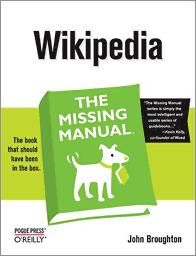
In an interesting Web-publishing innovation, The Missing Manuals series, published by O'Reilly Media, this week announced that its book about Wikipedia is now on Wikipedia, with the entire contents of John Broughton's Wikipedia: The Missing Manual available for free online for editing and updating just like any other Wikipedia entry.
 "What makes this project different than any of the other
zillion books online today is the format we've chosen - a wiki,"
explains Peter Meyers, Missing Manuals' managing editor. "Book viewers
will be able to do all the same things they do on any other wiki: view
the document, edit it, add to it - in short, whatever they want. The
book is going to reside in the site's Help
area, naturally, since the book is all about helping people edit
and navigate their way around Wikipedia."
"What makes this project different than any of the other
zillion books online today is the format we've chosen - a wiki,"
explains Peter Meyers, Missing Manuals' managing editor. "Book viewers
will be able to do all the same things they do on any other wiki: view
the document, edit it, add to it - in short, whatever they want. The
book is going to reside in the site's Help
area, naturally, since the book is all about helping people edit
and navigate their way around Wikipedia."
"Once it's live," continued Meyers, our hope is that the Wikipedia community will flock to the book and 'curate' it by adding tips, tricks, and by updating the material to reflect changes to Wikipedia since we've published the original edition. Down the road, when it comes time for us to consider publishing a second edition of the print book, we'll think about whether to incorporate some of the community's changes into the new edition."
Missing Manuals says the drive to post Wikipedia: The Missing Manual to Wikipedia was spearheaded by author John Broughton himself. Broughton, who has been a registered editor at Wikipedia since 2005 and has more than 20,000 edits under his belt, says he's looking forward to seeing what changes and improvements his fellow Wikipedians will make to his book.
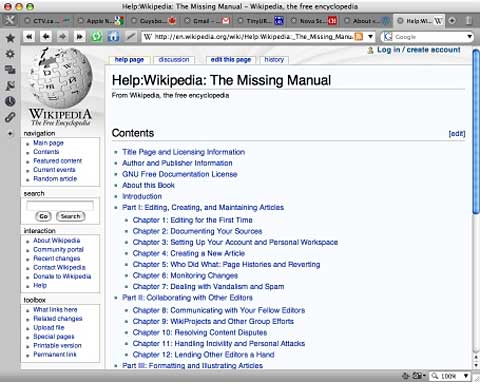
Wikipedia: The Missing Manual online.
I'm a fan of Wikipedia, the collaborative, free-content online encyclopedia project that has become one of the most popular information resources on the Internet, claiming more than 100 million article views per day. While some of my professional scholar friends turn up their noses at Wikipedia as a reliable and authoritative resource, I think, respectfully, that they are perhaps missing the point.
I would not, for example, cite Wikipedia (at least without a qualifying disclaimer) as a footnote resource in a nonfiction book or academic paper, but that not what it's for. Rather, I refer to Wikipedia as an extremely convenient source of quick background information that has the massive advantage of being continuously updated, in some instances in near real time, and I find that more often than not I can find out what I need to know there, for instance for second-source fact checking of other resources, and in that capacity it's also a wonderful time-saver.
And, of course, one of the cool things about Wikipedia is that most anyone acting in good faith can become a participant and contributor to the massive project. Wikipedia has thousands of articles in English and the mind-boggling 250-plus other language versions, does more than a quarter-million edits and more than 7,000 user accounts signing on every day. More than 1,000 articles are deleted daily. Wikipedia is a perpetual work in progress - and will remain so.
If this all appeals to you and you think you might like to pitch in with the Wikipedia project, you might still be feeling at a bit of a loss as to how to proceed, which is where Broughton's Wikipedia: The Missing Manual comes in. Broughton provides his readers with straightforward, fun-to-read, and clear to follow instructions and tips about how to join the mosaic of authors, citizen journalists, and scholars from around the planet who have helped make Wikipedia the success that it is.
The author notes that "Wikipedia his immensely popular as a source of information, but it needs many more active editors than it has now, because it is so incomplete. Wikipedia also needs many more editors who are experts in a particular subject matter." Perhaps that sounds like you. If so, you will find this book very helpful.
Wikipedia: The Missing Manual contains a great deal of practical advice for creating articles and collaborating with fellow editors, improving existing articles, and working with the Wikipedia community to review new articles, mediate disputes, and maintain the site. It offers structured guidance for people who want to learn the "core curriculum" of what you need to know to avoid running afoul of the rules.
The author notes that "tens of thousands of Wikipedians have gotten off to rough starts, yet persevered, going on to become solid contributors. This book helps you learn from those mistakes without having to personally go through them." The book is designed to accommodate editors at every level of experience.
Wikipedia: The Missing Manual's hard copy version is divided into six parts consisting of several chapters or appendixes each (a format that's retained with the online version).
- Part I, "Editing, Creating, and Maintaining Articles," covers the basics - editing for the first time, practicing in the Sandbox, markups, dealing with other editors, editing modes, guidelines for creating your articles, copyright issues, adding external links, footnotes, user names, registering, creating new articles, what doesn't belong on Wikipedia, page histories, making changes, watchlists, and and dealing with vandalism and spam.
- Part II is on Collaborating with Other Editors, and discusses the rules of engagement, how normal corrections occur, provisions for dealing with disagreement on content, and dealing with incivility and personal attacks. The section also covers what Wikipedia calls "Wiki Projects" - groups of editors working on articles of common interest, collaborations, and resolving and avoiding content disputes, general etiquette, giving other editors a hand, and coaching other editors.
- Part III is on the Formatting and Illustrating Articles, with a chapter on article sections and tables of contents, creating lists and tables, and adding images.
- Part IV is Building a Stronger Encyclopedia, covering topics like getting readers to be right article, "disambiguation,"categorizing articles, creating better articles, and deleting existing articles.
- Part V, is on Customizing Wikipedia, and discusses every option you can employ to tailor Wikipedia your needs and tastes using choices you will find when you click "My Preferences." There is also a section on how to implement a JavaScript user scripts.
- Part VI, Appendixes, contains more resources that can help you get more out of Wikipedia, including a tutorial on links and tabs found on Wikipedia pages, a Reader's Guide To Wikipedia and a guide for editors to help them find exactly the referral pages sought and where to get help. There is also a 20 - page Index.
Stylistically, Wikipedia: The Missing Manual (the hard copy book) uses the Missing Manuals green, black, and white cover theme, as well as the series' familiar page design with a comfortable amount of white space and lots of screen shot illustrations in grayscale, as well as sidebars under headings like "Word To The Wise," and "Power Users Clinic," all of which will make you feel right at home if you're familiar with other Missing Manuals titles.
"Wikipedia already has thousands of pages of documentation on how to be a good editor," says Broughton, but "This 'Missing Manual' book is different - it offers systematic guidance for people who want to learn the 'core curriculum,' the critical information needed to avoid running afoul of the rules. The book is organized as a structured process for learning to edit, with numerous tips and tools for easier editing. With this book, Wikipedia now has something that charts the path from novice toward expert, with step-by-step illustrations for every topic along the way."
"The Wikimedia Foundation is thrilled that John Broughton and O'Reilly have decided to release John's book under a free license," says Sue Gardner, executive director of the Wikimedia Foundation. "For years, John has done great work creating instructional materials that offer guidance for new Wikipedia editors. Now that the Missing Manual is being released under a free license, people will be able to reuse, update, translate and customize the material in it for different purposes and different audiences, which will make it even more useful for everyone."
Wikipedia: The Missing Manual traditional book version is priced at $29.99 for both the US and Canada, and includes 45 days free access to the Safari Books Online edition of Wikipedia: The Missing Manual. There is also a $20.99 PDF version. If you're even casually interested in becoming a Wikipedia contributor, and definitely if you're serious about it, this book is a must-have that should provide plenty of value for the money.
- Wikipedia: The Missing Manual
- By John Broughton
- First Edition January 2008
- Pages: 502
- ISBN 10: 0-596-51516-2 | ISBN 13:9780596515164
- Price $29.99
- PDF $20.99
- UK price £18.50
Join us on Facebook, follow us on Twitter or Google+, or subscribe to our RSS news feed
Charles Moore has been a freelance journalist since 1987 and began writing for Mac websites in May 1998. His The Road Warrior column was a regular feature on MacOpinion, he is news editor at Applelinks.com and a columnist at MacPrices.net. If you find his articles helpful, please consider making a donation to his tip jar.
Links for the Day
- Mac of the Day: PowerBook 2400c, (1997.05.08. This small-footprint PowerBook was created by IBM for the Japanese market.)
- Support Low End Mac
Recent Content
About LEM Support Usage Privacy Contact
Follow Low End Mac on Twitter
Join Low End Mac on Facebook
Favorite Sites
MacSurfer
Cult of Mac
Shrine of Apple
MacInTouch
MyAppleMenu
InfoMac
The Mac Observer
Accelerate Your Mac
RetroMacCast
The Vintage Mac Museum
Deal Brothers
DealMac
Mac2Sell
Mac Driver Museum
JAG's House
System 6 Heaven
System 7 Today
the pickle's Low-End Mac FAQ
Affiliates
Amazon.com
The iTunes Store
PC Connection Express
Macgo Blu-ray Player
Parallels Desktop for Mac
eBay

