
Miscellaneous Ramblings
3 WeatherBug Options for Apple Users
Charles Moore - 2008.11.19 - Tip Jar
Netscape Navigator 9 was and still is in many respects my all-time favorite iteration of the Mozilla/Gecko browser, and I continue to use Navigator 2.0.0.5 on my OS X 10.4 "Tiger" machines, as does my wife on her G3 iBook. It's fast, reliable, and rarely does one encounter a website it can't handle.
Unfortunately, one little feature I really loved about Navigator 9 - the WeatherBug weather monitor readout on the lower right of the browser window that gave you a constantly updated snapshot of temperature and weather conditions at the configured geographical location - is no longer supported. It was formally removed from the final, forever, finito, that's-all-folks version 9.0.0.6 of Navigator, support of which was discontinued by corporate parent AOL, and it no longer works with earlier builds either.
 Happily,
there are alternatives for WeatherBug addicts. You can add WeatherBug
support to the Firefox Browser via a
free plugin, to your iPod touch or iPhone with the WeatherBug Web Application,
or to your OS X Dashboard in a
free widget.
Happily,
there are alternatives for WeatherBug addicts. You can add WeatherBug
support to the Firefox Browser via a
free plugin, to your iPod touch or iPhone with the WeatherBug Web Application,
or to your OS X Dashboard in a
free widget.
WeatherBug, a provider of weather information services, manages and operates a proprietary network of over 8,000 WeatherBug Tracking Stations and more than 1,000 cameras strategically placed at schools, public safety facilities, and television stations throughout the US and Canada. These professional-grade weather stations generate live neighborhood level reports every second (unlike other weather providers, whose data is up to an hour or more old).
WeatherBug was developed with the purpose of delivering live local weather conditions, forecasts, and life saving severe weather alerts from its exclusive network of WeatherBug Tracking Stations. Today, the mission remains the same. WeatherBug data is used by:
- Consumers: 19 million unique at-home and at-work visitors.
- Government: accessible to Homeland Security personnel for plume modeling in the event of a biological or chemical attack and by over 100 government agencies at the state and local level.
- Schools and school districts: used in over 8,000 schools across the US for teaching math, science, and geography with real life data.
- Broadcasters: used by meteorologists at over 100 television broadcast stations like ABC, NBC, CBS, FOX, CW, and Univision, to bring "neighborhood" weather forecasts and conditions to communities every day.
 Since its release five years ago,
WeatherBug is one of the top 10 Internet properties in daily reach,
with millions looking to their WeatherBug desktop application for live
local weather conditions, forecasts, and severe weather alerts. The
WeatherBug service is available at WeatherBug.com as well as via
partners - NBC, CBS, ABC, FOX, CW, and Univision television stations,
Netscape, Logitech, HP/Compaq, and America Online, to name a few.
Since its release five years ago,
WeatherBug is one of the top 10 Internet properties in daily reach,
with millions looking to their WeatherBug desktop application for live
local weather conditions, forecasts, and severe weather alerts. The
WeatherBug service is available at WeatherBug.com as well as via
partners - NBC, CBS, ABC, FOX, CW, and Univision television stations,
Netscape, Logitech, HP/Compaq, and America Online, to name a few.
In 2000, the WeatherBug desktop application was launched to consumer and business users with the purpose of delivering live local weather conditions, forecasts, and life saving, severe weather alerts; all leveraging the existing WeatherBug Tracking Station network. Within eight months of the initial launch, 1.5 million users had downloaded WeatherBug to their computers. In addition, since 2002, WeatherBug's application has come preinstalled on HP and Compaq computers, and with Logitech peripherals. In 2004 WeatherBug and AOL brought millions of people the "Instant Message that could save their life," through the AIM cobranded WeatherBug partnership.
To date, WeatherBug has registered over 78 million users for the free product.
WeatherBug Plugin For Firefox
A WeatherBug plugin for the Firefox Web browser lets you get live, local weather conditions in your browser window, featuring detailed forecasts, radar, news, and severe weather alerts from WeatherBug's proprietary network.
Installation Instructions
- Download the latest Firefox browser
- Launch the Firefox browser and go to the WeatherBug Firefox Add-ons page.
- Click the "Add to Firefox" button on the WeatherBug Firefox Add-ons page
- Follow the installer's prompts and instructions.
WeatherBug Web Application for iPhone and iPod touch
WeatherBug also offers a unique web app optimized so iPhone and iPod touch users can access streaming neighborhood-level weather conditions and view video weathercasts which are updated daily. Listed as a staff pick on the Apple iPhone Web Apps Directory, the WeatherBug Web application is also available at <http://weather.weatherbug.com/labs/iphone.html>
Features:
- Live temperature
- Live wind speed and direction
- Forecast
- Radar
- Live weather camera views
- A national weather outlook video
"The launch of our Web app means we have given iPhone and iPod touch users a great new way to access WeatherBug information while on the go," commented Chris Brozenick, vice president of WeatherBug mobile. "With the ability to access live, local streaming weather and videos the WeatherBug Web app is a first-of-its-kind and a breakthrough service for consumer and professional users."
The WeatherBug Web app provides international weather information, detailed views of the 7 day forecast, radar, and camera images from WeatherBug's proprietary network of tracking stations. Additionally, the WeatherBug Web app allows users to set a variety of locations for multiple cities and scroll through current conditions, forecasts, radar and live camera images for each one. No matter where someone is in the world, they can access WeatherBug's unique live local weather content and check on live conditions in multiple locations.
WeatherBug Mac Widget for Mac OS X Dashboard
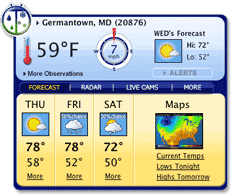
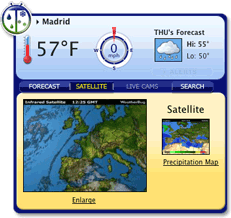
A WeatherBug Dashboard Widget is also available for Mac OS X "Tiger" and was a runner-up in the AppleDesign Awards 2006 for the Best Mac OS X Dashboard Widget.
The WeatherBug Widget for Macintosh lets you receive all the benefits of live weather streamed to your Dashboard, plus extra features. The WeatherBug Macintosh Widget is free.
Features
- Live, local weather conditions and forecasts
- Severe weather alerts
- NEW Live weather cameras
- NEW International weather data
- NEW Web search function
Installation Instructions
- Download the file from Apple's Dashboard Web site: WeatherBug Widget for OS X Dashboard.
- The widget icon should show up on your desktop. Double-click the icon to start.
- Click "Install" to place the widget into the Dashboard environment.
- Click "Keep" to give the widget permission to run.
- Note - You can also download the widget directly from WeatherBug servers: WeatherBug Widget for OS X Dashboard .
System Requirements
- Mac OS X 10.4 or newer
- Internet connection
Join us on Facebook, follow us on Twitter or Google+, or subscribe to our RSS news feed
Charles Moore has been a freelance journalist since 1987 and began writing for Mac websites in May 1998. His The Road Warrior column was a regular feature on MacOpinion, he is news editor at Applelinks.com and a columnist at MacPrices.net. If you find his articles helpful, please consider making a donation to his tip jar.
Links for the Day
- Mac of the Day: Performa 630, introduced 1994.07.01. The first desktop Mac with an IDE hard drive could accept a TV or radio tuner.
- Support Low End Mac
Recent Content
About LEM Support Usage Privacy Contact
Follow Low End Mac on Twitter
Join Low End Mac on Facebook
Favorite Sites
MacSurfer
Cult of Mac
Shrine of Apple
MacInTouch
MyAppleMenu
InfoMac
The Mac Observer
Accelerate Your Mac
RetroMacCast
The Vintage Mac Museum
Deal Brothers
DealMac
Mac2Sell
Mac Driver Museum
JAG's House
System 6 Heaven
System 7 Today
the pickle's Low-End Mac FAQ
Affiliates
Amazon.com
The iTunes Store
PC Connection Express
Macgo Blu-ray Player
Parallels Desktop for Mac
eBay

