
Miscellaneous Ramblings
Miscellaneous Ramblings Review
Targus USB 2.0 High-Speed File Transfer Cable Helps Offset Loss of FireWire
Charles Moore - 2008.11.10 - Tip Jar
Rating: 
Targus is best known as a purveyor of laptop cases, of which it offers a remarkably diverse and attractive lineup, but the company also markets a variety of computer accessories, one of its newer introductions being the Targus High-Speed File Transfer Cable, which is designed to facilitate transferring large amounts of data from computer to computer via USB, serving essentially has a USB substitute for Apple's built-in FireWire Target Disk Mode - a facility that should make it especially popular with buyers of the new, FireWire-bereft, Unibody MacBooks.
The High-Speed File Share Cable will work with either USB 2.0 or 1.1 ports, but the latter will be unacceptably slow for moving large files, although I found it worked just fine for moving a document or two from one computer to another on my old Pismo PowerBooks, which support only USB 1.1. It can thus replace other forms of media, such as CDs or DVDs, for data transfer. A maximum nominal transfer rate of 480 Mbps is claimed, although that speed will never be attained in real world applications, with something like 260 Mbps being more likely on most machines. However, some testers have reported that USB throughput on the Unibody MacBooks seems to be significantly faster than we've been accustomed to with older Macs.
 The genius of
the Targus High-Speed Data Transfer Cable is that it includes built-in
file transfer software called EasySuite that works with both Mac
OS X and Windows OS - it can be used to transfer files
cross-platform as well as from Mac-to-Mac or Windows-to-Windows. And
unlike FireWire Target Disk mode, one of the computers does not have to
be shut down and restarted in order to set up file transfers. The
EasySuite software requires no installation as it is stored on 2 MB of
flash memory inside the larger of the cable's USB connector plugs -
very slick and convenient!
The genius of
the Targus High-Speed Data Transfer Cable is that it includes built-in
file transfer software called EasySuite that works with both Mac
OS X and Windows OS - it can be used to transfer files
cross-platform as well as from Mac-to-Mac or Windows-to-Windows. And
unlike FireWire Target Disk mode, one of the computers does not have to
be shut down and restarted in order to set up file transfers. The
EasySuite software requires no installation as it is stored on 2 MB of
flash memory inside the larger of the cable's USB connector plugs -
very slick and convenient!
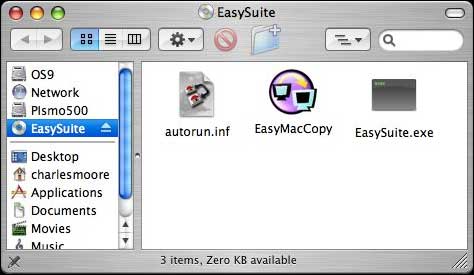
When you insert the cable, the EasySuite "CD-ROM drive" icon will appear on your desktop. Open the drive window and double-click the EasyMacCopy icon to start the file transfer application.
You will need to do the same on the remote computer.
Once the software is running on both machines, the application window will display file directories for both, one above the other.
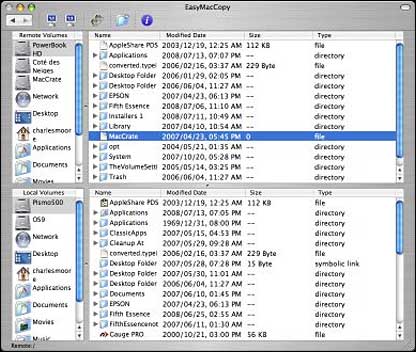
According to the somewhat sketchy mini-manual that comes with the product, which is unfortunately somewhat Windows-centric, in order to copy a file from the host computer to the remote computer you first need to click "system - setup" in the remote computer, but I found all I had to do was open the EasyMacCopy application on the remote Mac, and I was good to go. Your mileage may vary, or perhaps the "system-setup" is just a Windows thing.
The software also nominally supports email synchronization between computers. To configure that feature, you are instructed click "synchronize > mail > setup" in the remote computer to sync the mail from the remote computer into the host computer. With the setup configured, click "synchronize > mail > start" to initiate your mail synchronization. I did not test this feature, partly because I couldn't find it, so I can't say for sure whether it is Windows-only (the manual is vague on that point), but I didn't figure it would work with my Eudora mailboxes anyway and was disinclined to risk any data experimenting. My guess is that if it does work with the Mac in a way that I didn't discover, it would probably work only with Microsoft email software, or at most might support OS X's Mail app as well, but I don't use either.
 Another feature described in the manual that I did not
test is EasyMover, which, according to the documentation, can be used
to migrate settings and data from the remote computer to host computer,
for example moving your files and settings to configure a new machine
when you purchase it. The instructions say to click "synchronize >
EasyMover > setup" in the remote computer and then "synchronize >
EasyMover > start" to begin the process. I'm also uncertain whether
EasyMover supports the Mac or not, but the only function I could find
in the window that appeared when I clicked the Setup command in the
application menu seemed to pertain only to file transfer configuration,
so that may be the extent of it for Macs. Again the lack of much
documentation and sparse sketchiness of what's there is
frustrating.
Another feature described in the manual that I did not
test is EasyMover, which, according to the documentation, can be used
to migrate settings and data from the remote computer to host computer,
for example moving your files and settings to configure a new machine
when you purchase it. The instructions say to click "synchronize >
EasyMover > setup" in the remote computer and then "synchronize >
EasyMover > start" to begin the process. I'm also uncertain whether
EasyMover supports the Mac or not, but the only function I could find
in the window that appeared when I clicked the Setup command in the
application menu seemed to pertain only to file transfer configuration,
so that may be the extent of it for Macs. Again the lack of much
documentation and sparse sketchiness of what's there is
frustrating.
However, the file transfer functions, which are my main interest with this product, work just fine. As with any USB device, you need to quit any open applications (in this case the EasyMacCopy software on both computers) and drag the volume icon to the Eject icon in the Dock or use the Eject command before disconnecting the cable.
Even without support (presumably: I invite correction if I am mistaken about this) for the mail synchronization and settings transfer functions on the Mac, this Targus High-Speed File Transfer Cable for PC/Macs could be very useful at performing its main function of data transfer as an alternative to file sharing over ethernet or WiFi - or FireWire Target Disk Mode, with gradual abandonment of FireWire evidently now being Apple's game plan.
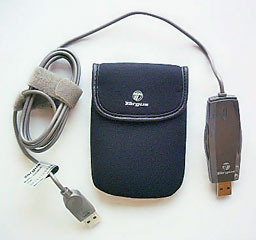
The Targus File Transfer Cable is 4.92' in length, weighs 1.76 oz, comes with a handy travel pouch, and has an estimated street price of $39.99.
Features
Quickly transfers data from PC to PC, Mac to Mac, Mac to PC, or PC to Mac at a high transfer rate; can replace other forms of media such as CDs or DVDs for data transfer
Plug and Play - No Software to install; Easy Suite software stored on 2 MB flash memory
System Requirements:
- Macintosh OS X or later
- Windows XP, Vista
- USB 1.1 or 2.0 port
Join us on Facebook, follow us on Twitter or Google+, or subscribe to our RSS news feed
Charles Moore has been a freelance journalist since 1987 and began writing for Mac websites in May 1998. His The Road Warrior column was a regular feature on MacOpinion, he is news editor at Applelinks.com and a columnist at MacPrices.net. If you find his articles helpful, please consider making a donation to his tip jar.
Links for the Day
- Mac of the Day: PowerBook 1400, introduced 1996.10.01. Considered by many the best pre-G3 PowerBook with a small footprint and great keyboard.
- Support Low End Mac
Recent Content
About LEM Support Usage Privacy Contact
Follow Low End Mac on Twitter
Join Low End Mac on Facebook
Favorite Sites
MacSurfer
Cult of Mac
Shrine of Apple
MacInTouch
MyAppleMenu
InfoMac
The Mac Observer
Accelerate Your Mac
RetroMacCast
The Vintage Mac Museum
Deal Brothers
DealMac
Mac2Sell
Mac Driver Museum
JAG's House
System 6 Heaven
System 7 Today
the pickle's Low-End Mac FAQ
Affiliates
Amazon.com
The iTunes Store
PC Connection Express
Macgo Blu-ray Player
Parallels Desktop for Mac
eBay

