
Miscellaneous Ramblings
Miscellaneous Ramblings Review
Pixelmator 1.2 Closing the Gap with Photoshop Elements 6
Charles Moore - 2008.05.27 - Tip Jar
Back in March, I posted a review of the new(ish) bitmap graphics and photo editing program Pixelmator, then at version 1.1.3, noting that Pixelmator is being positioned by its developers as a Photoshop challenger - at least to Photoshop Elements - but that the the bar was about to be raised with the imminent release of Photoshop Elements 6 for the Mac.
PSE 6 has been out for a couple of months now and has indeed raised the features and value ante, being offered at the same price as before (currently $79.99 at Amazon.com), but now Intel native (Universal Binary) - and with a raft of completely new features, including some very cool functions based on Adobe's proprietary Photomerge technology (like automated panorama stitching and correction and combining the best facial expressions and body language from a series of shots to create a single, perfect group shot, a new Quick Selection Tool reduces a once time-consuming select-and-adjust task to a single click, Adobe's Bridge photo organizer and browser application, a Color Curves control, which augments the color cast and skin tone correction tools, an improved conversion tool that converts color images into true nuanced black-and-whites, a Correct Camera Distortion tool, and more).
The bar has been raised indeed.
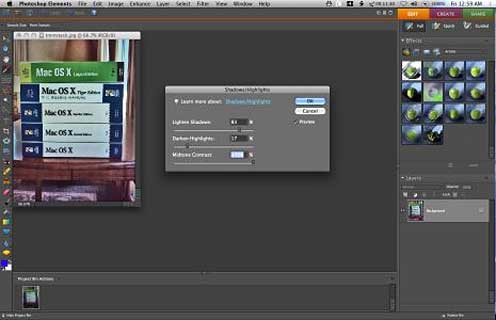
Photoshop 6 for Macintosh
This month, the Pixelmator folks responded with the release of Pixelmator 1.2 "Draftsman" (a free update for registered Pixelmator users) with new rulers, guides, curves, auto enhance, color balance, and polygonal lasso tools.
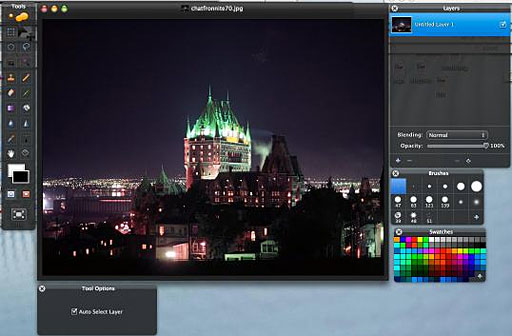
Pixelmator 1.2
Rather than re-ploughing recently turned ground, I'll refer you to the earlier review for discussion of Pixelmator's basic features and capabilities; we'll concentrate on what's new and improved in Pixelmator 1.2.
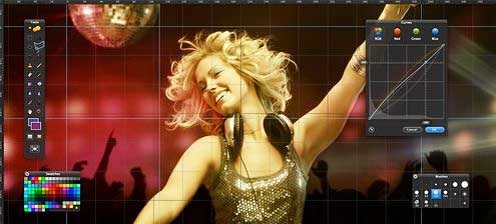
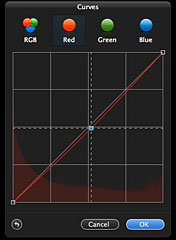 I
especially love Pixelmator's new Curves tool - the most intuitive and
and slickest I've ever used for adjusting tonal range or making precise
adjustments to individual color channels in an image.
I
especially love Pixelmator's new Curves tool - the most intuitive and
and slickest I've ever used for adjusting tonal range or making precise
adjustments to individual color channels in an image.
There is also a new Color Balance tool for controlling the overall color mixture in an image when you're doing color correction work.
Pixelmator 1.2 introduces an enhanced rulers tool, which is helpful for the exact positioning of images or elements. Users can also adjust the ruler's origin to measure from a specific point on an image and change the units of measurement to pixels, inches, centimeters, millimeters, points, picas, or percent. Guides appear as nonprinting lines that float over the image, which you can add, move, remove, and lock. You can also utilize the grid to lay out elements symmetrically and the snap feature to position selection edges precisely.
The new auto enhance tool is intended to optimize less-than-perfect images with a single click, convenient if you're in a hurry and sure to be popular with new or casual users. It works quite well, I would say pretty much on par with the similar tool in Photoshop Elements, but personally I prefer to tweak my shots with more precisely nuanced correction tools if I have the time.
The new polygonal lasso tool is useful for drawing straightedged segments of a selection border.
In addition to a free transform tool, Pixelmator 1.2 Draftsman features new and updated help documentation, enhanced Automator actions and transform tools, minor user interface and compatibility improvements, as well as bug fixes.
A concise observation would be that PSE has more tools, but Pixelmator's are nicer to use.
I do continue to miss Elements' Lighting and Shadows adjustment panel, especially the lighten shadows/ darken highlights controls, but Pixelmator's exposure adjustment control compensates somewhat, and is less complex to use.
 The PSE Spot
Healing tools are also conspicuous by their absence. Pixelmator's Clone
Stamp Tool partly compensates, but it's a lot clunkier solution than
the PSE pair, and the stamp shaped cursor is nowhere nearly precise
enough for close work.
The PSE Spot
Healing tools are also conspicuous by their absence. Pixelmator's Clone
Stamp Tool partly compensates, but it's a lot clunkier solution than
the PSE pair, and the stamp shaped cursor is nowhere nearly precise
enough for close work.
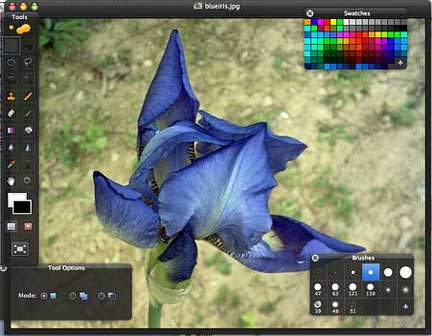
On the other hand, a really cool Pixelmator wrinkle is that the currently selected tool's icon gets magnified in the tool palette, and the icons are strikingly attractive. On the downside, I really dislike having to switch to a Move Tool from a Marquee Tool in order to move something around. I much prefer to be able to select and Option-drag.
Task progress - even simple things like image saves - continues to be sluggish on my 1.33 GHz G4 PowerBook. I wouldn't keep kvetching about this (those who say it's time to upgrade to an Intel Mac have a point, and I'm on the case), except that Low End Mac's readership is somewhat weighted toward users of older hardware. I anticipate that my speed complaints would be eliminated on an Intel Mac.
Your GPU Matters
The power and sophistication of your Mac's graphics support also will be a significant factor in Pixelmator's liveliness and responsiveness on your Mac. Claimed to be "The World's First GPU-Powered Image Editor", Pixelmator relies heavily on OS X's Core Image technology, which uses your Mac's video card for image processing. Core Image utilizes the graphics card for image processing operations, freeing the CPU for other tasks, so if you have a high-performance card with a lot of video RAM, you should find real-time responsiveness across a wide variety of Pixelmator operations enhanced substantially, so one can deduce that you're going to get substantially better performance with Pixelmator on a Mac Pro or MacBook Pro with a real graphics accelerator card and 128 MB or more of dedicated video RAM, than with a MacBook or Mac mini with Intel GMX 950 or 3100 integrated "vampire video" that shares RAM with the system.
In addition to Core Image, Pixelmator harnesses the power of Mac OS X's Open GL, Automator, ColorSync, Spotlight, and many other technologies. Pixelmator was built exclusively for Mac OS X, and it shows.
One more thing: Pixelmator supports over 100 different file formats. You can open and save in PSD, TIFF, JPEG, PNG, PDF, EPS, and scores of other image formats. Above all, Pixelmator can open and save Photoshop files with layers. You are never alone with Pixelmator.
Pixelmator's translucent black windows continue to be a visual feast, although IMHO it detracts from the program's functionality somewhat, and the new Photoshop Elements 6 for Mac, with its charcoal UI theme, appears to be a frank homage to Pixelmator's design influence. To reprise what I said in the earlier review, the Pixelmator UI is pretty but more than a bit distracting, and I find myself squinting to distinguish some of the tool selections, whose rendering is more than a bit murky in some instances - and also too-easily losing track of the cursor position. Also, with my favorite Leopard desktop picture, which happens to have a lot of black area, Pixelmator's toolbar just sort of blends in and disappears.
I don't want to disparage the look. It's interesting and distinctive, a treat to look at, and the developers have hinted that there is a cool new feature coming that will be related to window transparency. However, Elements' more subdued theme is more practical.
Pixelmator is getting better, and this 1.2 release addresses several of the complaints and concerns I expressed in the previous review. However, it's still not quite there yet for me.
I like using Pixelmator for its relatively quick startup and less complex and ponderous interface than Photoshop Elements - especially Elements 6. However, for production image editing when I'm in a hurry, I'm still inclined to go for either the power and versatility of PSE or on the other hand the incredible user-friendliness and lightning speed of Digimage Arts' venerable but still superb Color It! 4.5, a Carbon application with roots that dates back to the Mac System 7 era, but whose slickness, simplicity, and interface conventions the Pixelmator and PSE developers could both profitably study and emulate
System requirements: Pixelmator requires Mac OS X version 10.4.9 or later, but 10.5 is recommended. Core Image supported graphics card (recommended), some features require iLife.
More information, along with the 30-day Pixelmator trial, is available as a free download at the Pixelmator website.
Pixelmator 1.2 is available Smith Microfrom $60 via electronic download. Pixelmator 1.2 is a free update to current Pixelmator customers.
Join us on Facebook, follow us on Twitter or Google+, or subscribe to our RSS news feed
Charles Moore has been a freelance journalist since 1987 and began writing for Mac websites in May 1998. His The Road Warrior column was a regular feature on MacOpinion, he is news editor at Applelinks.com and a columnist at MacPrices.net. If you find his articles helpful, please consider making a donation to his tip jar.
Links for the Day
- Mac of the Day: PowerBook 1400, introduced 1996.10.01. Considered by many the best pre-G3 PowerBook with a small footprint and great keyboard.
- Support Low End Mac
Recent Content
About LEM Support Usage Privacy Contact
Follow Low End Mac on Twitter
Join Low End Mac on Facebook
Favorite Sites
MacSurfer
Cult of Mac
Shrine of Apple
MacInTouch
MyAppleMenu
InfoMac
The Mac Observer
Accelerate Your Mac
RetroMacCast
The Vintage Mac Museum
Deal Brothers
DealMac
Mac2Sell
Mac Driver Museum
JAG's House
System 6 Heaven
System 7 Today
the pickle's Low-End Mac FAQ
Affiliates
Amazon.com
The iTunes Store
PC Connection Express
Macgo Blu-ray Player
Parallels Desktop for Mac
eBay

