
Miscellaneous Ramblings
Miscellaneous Ramblings Review
Opera 9.5 Good Enough to 'Ruin You for Other Browsers'
Charles Moore - 2008.06.16 - Tip Jar
Rating: 
Getting the drop on Firefox's extravaganza "Download Day" for Firefox 3 slated for tomorrow. Opera got their new version 9.50 final out the door last Thursday with a new interface skin and a raft of under-the-hood features and refinements.
Opera 9.50, named "Kestrel", carries on the Opera hawk names tradition. Previous versions of Opera 9.x have been dubbed "Merlin." Perhaps someone at Opera is a vintage aircraft fan, since Kestrel and Merlin were names used for two very famous World War II Rolls-Royce aero engines. The next version of Opera, development of which has just commenced, is code-named "Peregrine", another falcon.
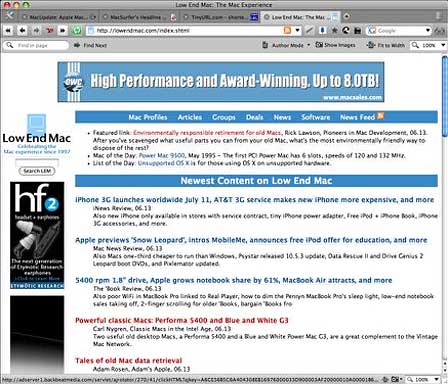
I've been using Opera 9.5 alpha and beta releases since last September, but Opera did save the major interface revamp for the final release. I'm still getting used to the new look and haven't decided whether I think it's an objective improvement or not in functional terms. It does give Opera a refreshed, up-to-date look and is broadly similar to the new Firefox 3 interface (which is a definite and substantial improvement for Firefox) more "Mac-like" in appearance with improved conformity to Apple Human Interface Guidelines.
I've been using Opera as my number-one browser for so long that I've gotten very used to and comfortable with the Opera 8/9 interface, so it's an adjustment for me. Functions haven't really changes much, but their look has, and I find myself doing some double-pumps when going for commands, but I think I will like the new red/green Stop and Reload page buttons when I get used to them.
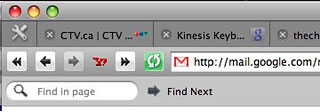 Reportedly,
Opera's boss has described the browser's new look a" inspired by
high-end audio equipment and Scandinavian design."
Reportedly,
Opera's boss has described the browser's new look a" inspired by
high-end audio equipment and Scandinavian design."
I'm dwelling on the new appearance up front because a fairly common objection to Opera is that some folks apparently found it off-putting because of its slightly unorthodox user interface. Personally, I've never found that a problem, and I love Opera's unique functionality - little things like the convenient access to the images toggle buttons, the fact that copied text from Opera retains spacing and paragraph breaks (unlike, say, Safari), and bigger ones like being able to set a dozen or 18 pages loading on my slow dialup connection - and Opera will bring them down sequentially without drama or giving up and crashing, which has happened in this sort of use with other browsers.
Indeed, one of the thinks that appeals to me about Opera is its generally solid stability and reliability. It's a great browser that deserves a larger market share than it has. [Editor's note: May 2008 site logs show Opera accounting for 1.7% of our traffic, a distant fourth place behind Firefox (37.1%), Safari 31.0%), and Internet Explorer (23.8%). dk]
Opera 9.50 has a new and faster version of Opera's proprietary Presto browser engine. This adds support for the newest cutting-edge Web standards and the upcoming Web developer. With its rewritten core code, Opera 9.5 contains more than a year's worth of speed, standards, and performance improvements. It's very fast, although so are Firefox 3 and the latest Safari 3.1 builds. I haven't done any formal bake-offs, but I have to say that Firefox 3 seems to have a distinct speed advantage on some sites, such as the Applelinks news posting CGI. However, for most pages there's not much difference, and these browsers are all very speedy.
Opera 9.5 is notably quicker to start up than previous versions, which is welcome, but Safari definitely has the edge in this department, possibly due to its tight integration with OS X 10.5 Leopard. Sluggish startup has been one of the relatively few complaints I've had about the Opera browsers, and it appears that it's been addressed with this version.
Opera claims that version 9.50 is more than two times faster than Opera 9.2 in rendering JavaScript and HTML, and also faster handling third party plugins.
Opera's already excellent Download Manager is a carry-over from version 9.2 but deserves mention - IMHO it's much better than any other browser's handling of downloads, with excellent progress monitoring and full control, including resumable downloads after a pause or shutdown, and no-hassle multiple downloads
Opera's Zoom controls are among the best - if not the best - with a handy pulldown menu and button in the lower right corner to resize pages. If the page is too wide for your screen, simply hit "Fit to Width", and Opera will resize the page so you avoid horizontal scrolling. I also like Opera's implementation of the sidebar, which stays out of your way until bidden to appear with a button-click - and hiding again efficiently.
Opera is unique among modern browsers (SeaMonkey is a good browser, but it's a holdover from Mozilla/Netscape Navigator of yore) in having a built-in email client, which has been tweaked for better speed and improved responsiveness in version 9.50, plus a a new mail backend and new IMAP support. Opera's email client now runs in a separate thread, so it won't slow down simultaneous web browsing.
Note that if you're already an Opera user, this release uses new storage and indexing formats for Opera Mail (including newsfeeds). If you copy your Mail directory from an existing user profile, you will be prompted to convert all accounts into the new format and reindex your messages. You will consequently not be able to downgrade to a previous version of Opera after starting the conversion process.
Opera's built-in newsreader stores newsfeeds on your computer so you can read them later, even when you're offline, a very nice feature if you don't have an always on Internet connection.
Other new features in version 9.50 include AppleScript support, improved font handling, improved image quality when zooming, respect for the Full Keyboard Access setting in Mac OS X System Preferences, full history search, improved site compatibility, access for everyone, improved platform integration, preview of bookmark and speed dial synchronization, a rewritten ECMAscript engine, some HTML 5 support, and improved IMAP reliability in the email client module.
The browser's Opera Link feature synchs your bookmarks and Opera's unique Speed Dial between your computers and mobile phone. Log in with your Opera username, and your data will always be accessible.
It's great to see Opera determined to stay ahead of the browser pack and pioneering more cool new Web browser features. Opera was first with tabs, first with session restore, first with integrated search, first with mouse gestures, first with mouseover tab thumbnail previews, and first (still unique) with Speed Dial and built-in BitTorrent support.
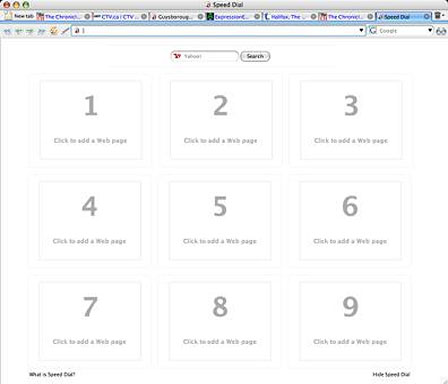
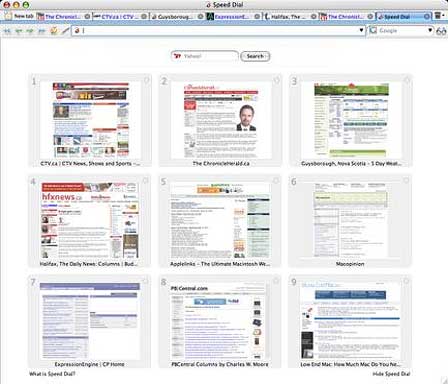
Speaking of Speed Dial, if you're not familiar, it's a set of visual thumbnail Web page bookmarks that appear when you open a new tab; it was introduced with Opera 9.2 - a feature that lets users transform their most frequently visited sites into nine visual bookmarks that are immediately available in any new tab. With each blank tab, Speed Dial presents a thumbnail preview of the top nine sites as selected by the user. In addition to fast access through the Speed Dial, users can also enter the number corresponding with each bookmarked Speed Dial page in Opera's address field to access the page.
Here's what a fresh tab window looks like before you configure any favorite sites.
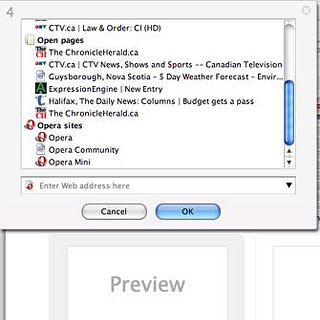
To configure it, just click on one of the nine Speed Dial panes, and a dialog window will appear with links to the last two-dozen or so sites you've visited. You can pick sites to add to Speed Dial from the ones shown or type or paste in a URL in the field provided, click "OK", and momentarily a thumbnail preview of the specified Web page will appear, which you can henceforth use as a shortcut button to load the site.
Every time you open a new tab, the Speed Dial buttons will be displayed. You can, of course, also use the conventional Bookmarks menu as well.
Security is enhanced as well. In Opera 9.5, the Fraud Protection feature is enabled by default, detecting and warning you about fraudulent websites automatically. Support for Extended Validation certificates (EV) provides added assurance and trust for secure websites.
While it's not as dramatic an evolutionary shift as, say, the distinction between Firefox 2 and 3, I'm really pleased with this latest effort from Opera, which has made my already favorite browser even better.
Mac OS X users are copiously blessed by a choice of excellent browsers - not a lemon in the bunch. However, as much as I like Firefox 3, Safari 3, and iCab 4, I keep coming back to Opera. Once you use it for a while, it kind of ruins you for other browsers.
For more information about additional Opera features, see the Opera tutorials or the help files.
Opera 9.5 includes a preview version of Opera Dragonfly, Opera's upcoming developer tools. Opera Dragonfly makes Web development using Opera easier than ever, both on your computer and mobile phone.
- System requirements: Mac OS X 10.3.9 or later.
- System support: PPC/Intel
- Opera is freeware
Join us on Facebook, follow us on Twitter or Google+, or subscribe to our RSS news feed
Charles Moore has been a freelance journalist since 1987 and began writing for Mac websites in May 1998. His The Road Warrior column was a regular feature on MacOpinion, he is news editor at Applelinks.com and a columnist at MacPrices.net. If you find his articles helpful, please consider making a donation to his tip jar.
Links for the Day
- Mac of the Day: PowerBook 1400, introduced 1996.10.01. Considered by many the best pre-G3 PowerBook with a small footprint and great keyboard.
- Support Low End Mac
Recent Content
About LEM Support Usage Privacy Contact
Follow Low End Mac on Twitter
Join Low End Mac on Facebook
Favorite Sites
MacSurfer
Cult of Mac
Shrine of Apple
MacInTouch
MyAppleMenu
InfoMac
The Mac Observer
Accelerate Your Mac
RetroMacCast
The Vintage Mac Museum
Deal Brothers
DealMac
Mac2Sell
Mac Driver Museum
JAG's House
System 6 Heaven
System 7 Today
the pickle's Low-End Mac FAQ
Affiliates
Amazon.com
The iTunes Store
PC Connection Express
Macgo Blu-ray Player
Parallels Desktop for Mac
eBay

