
Miscellaneous Ramblings
Miscellaneous Ramblings Review
Social Networking on the Mac: net4mac Shows Promise
Charles Moore - 2008.04.14 - Tip Jar
Rating: 
Social networking on the Internet is arguably the iPod's stiffest competition for laurels as the cultural phenomenon of the first decade of the 21st Century. Launched in mid-decade (2004), the marquee social networking service, Facebook, has exploded to an estimated 70 million users worldwide. A Canadian survey released last week found that with more than half of respondents younger than 25 reporting using Facebook, although only 10% of those age 50 and older had, so there is a sharp generation-gap in the social networking context.
However, Facebook isn't the only social networking service. The slightly older MySpace, which is even more lopsidedly populated with younger users, is also very successful, and there are other, more narrowly focused social networking services, one of which should be of particular interest to Low End Mac readers.
net4mac is a free social networking service built exclusively for Mac users. In order to participate in the community and use all of its features, you need to download a net4mac client application that requires Mac OS X 10.4 Tiger or Mac OS X 10.5 Leopard.
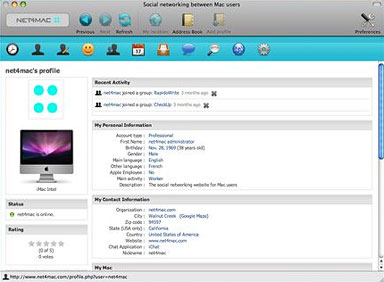
The net4mac application allows members to:
- Create an account and login to the service (Internet connexion required).
- Create your profile including your location, job, activities, skills, and the type of Macs, iPhone, iPod, etc. that you own.
- Add friends to your profile and manage them (remember, the service is only for Mac users).
- Contact members, send invitations to join the community, and manage your messages.
- Create your own groups of interest and invite friends to join them (people using the same application, in your same location, sharing the same passions, etc.).
- Browse and join groups you find interesting - share discussions, events, and more!
- Create events and invite Mac users (this is useful if you want to announce the presentation of a product/service, etc.).
- Create Classifieds Ads to sell items, find a job, offering services, etc.
- Search members using different criteria (for example, you can find people that use the same Mac or software).
- Discover people around you (other Mac users in your neighborhood).
- And many more functions!
Advantages of using a client application rather than a website include:
- Better integration between Mac OS X technologies and features.
- The community is easy to access from the Dock.
- Members can send invitations using their Address Book
- Members can add/remove people with public profiles to/from their Address Book.
- Members can add a picture to their profile or a group from their webcam!
- Members can see the number of messages in the dock (like Apple mail)
Recent enhancements and tweaks include:
- You can now see the location of an event on Google Maps and get directions to it
- You can now see upcoming events directly on the main page (only events related to the Mac, iPod, iPhone are accepted)
- There is a new blog for net4mac members at <http://net4macblog.blogspot.com> (not associated with net4mac)
- net4mac partner app4mac is offering 10% off on any app4mac product
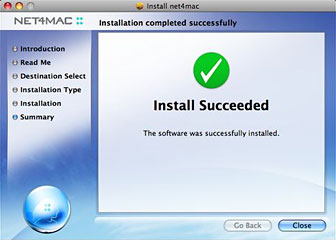
The net4mac client uses a standard OS X installer, and that went quickly and smoothly.
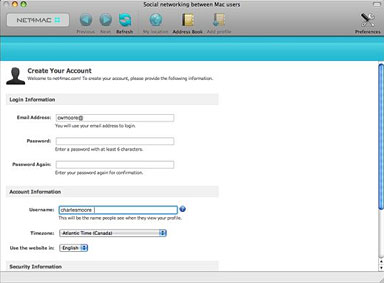
Once the program is installed and started up, first on the agenda is signing up for a net4mac account, which was pretty straightforward as well, involving specifying a username, password, preferred language, and so forth.
I was very curious to see how well the service would perform on my dialup Internet connection compared with Facebook, which is excruciatingly slow to the point of deterrence (unless one is really determined). I'm happy to report that net4mac is actually a half-decent performer on dialup - not lightning fast by any means, but certainly usable without excessive frustration, so it should be quite lively on broadband. I do wish there was a progress bar to track the process of switching panels, although this is no doubt missed more on dialup than it would be with a fast connection.
The net4mac user interface is clean and attractive, and it should prove intuitive. The main page shows the latest news and a list of other members who are currently online, plus a list of groups, such as user groups for specific Mac models, a Leopard group, and several other focused interest groups.
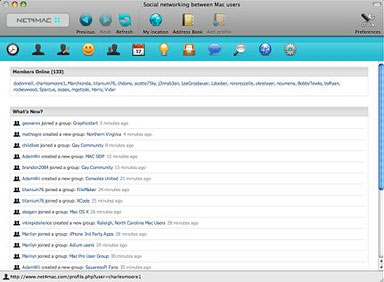
There are panes for viewing and editing your user profile, for friends and groups, events, classified ads, messages, search, chat, partners, and account settings, and a button linking the program to the OS X Address Book.
Like other social networking environments, net4mac can be pretty much what you want to make of it - and with more of a community atmosphere than the cosmopolitan vastness of Facebook or MySpace.
At this early stage in its development, it's both difficult and probably unfair to assign net4mac a LEM rating, but I'll give it a provisional 2.5 out of four expected to improve anticipation of growth and the fact that the client software seems to work well with no obvious bugs encountered.
System requirements:
- net4mac is optimized for Mac OS X 10.4 Tiger and Mac OS X 10.5 Leopard.
- net4mac is optimized for PowerPC and Intel processors (Universal binary).
net4mac runs in English and French.
net4mac is free. You can copy and distribute it.
You can use it for as long as you want.
Join us on Facebook, follow us on Twitter or Google+, or subscribe to our RSS news feed
Charles Moore has been a freelance journalist since 1987 and began writing for Mac websites in May 1998. His The Road Warrior column was a regular feature on MacOpinion, he is news editor at Applelinks.com and a columnist at MacPrices.net. If you find his articles helpful, please consider making a donation to his tip jar.
Links for the Day
- Mac of the Day: Power Mac G3, (1997.11.15. The first G3 Power Mac and the last Mac in a beige enclosure.)
- Support Low End Mac
Recent Content
About LEM Support Usage Privacy Contact
Follow Low End Mac on Twitter
Join Low End Mac on Facebook
Favorite Sites
MacSurfer
Cult of Mac
Shrine of Apple
MacInTouch
MyAppleMenu
InfoMac
The Mac Observer
Accelerate Your Mac
RetroMacCast
The Vintage Mac Museum
Deal Brothers
DealMac
Mac2Sell
Mac Driver Museum
JAG's House
System 6 Heaven
System 7 Today
the pickle's Low-End Mac FAQ
Affiliates
Amazon.com
The iTunes Store
PC Connection Express
Macgo Blu-ray Player
Parallels Desktop for Mac
eBay

