
Charles Moore's Mailbag
Tiger Great on Old G3 'Books, Maximum RAM for 867 MHz PowerBook G4, and More
Charles Moore - 2008.10.01 - Tip Jar
- Tiger Runs Great on Older, Slower G3 'Books
- PowerBook G4/867 MHz: 640 MB or 1152 MB Max?
- 4 GB of RAM 'Mostly Wasted' with Vista
- PC System Profiler
Tiger Runs Great on Older, Slower G3 'Books
From Simon Royal:
Hi,
I just read your article, What's the Best Mac OS for Your iBook, PowerBook, or MacBook?
Interesting. In your mentioning about Classic OSes, you didn't mention OS 8.6, which I think is just as good as 9.1 and runs super fast compared to OS 9 on older machines like pre-G3 PowerBooks.
I had a PowerBook 1400 117 MHz model a few months ago with only 32 MB of RAM, and performance under OS 8.6 was very good - but pretty dismal under 9.1.
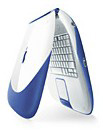 I also had a Clamshell iBook (366 MHz,
Indigo model, 576 MB of RAM) and a 'Lombard' PowerBook G3 (333 MHz,
256 MB RAM) (400 MHz, 512 MB RAM). All of these machines are
unsupported by Tiger. However, I modified the DVD/CDs to remove the
'badmachines' and installed Tiger. Tiger runs so much smoother than
Panther, even on the Lombard with only 256 MB of RAM.
I also had a Clamshell iBook (366 MHz,
Indigo model, 576 MB of RAM) and a 'Lombard' PowerBook G3 (333 MHz,
256 MB RAM) (400 MHz, 512 MB RAM). All of these machines are
unsupported by Tiger. However, I modified the DVD/CDs to remove the
'badmachines' and installed Tiger. Tiger runs so much smoother than
Panther, even on the Lombard with only 256 MB of RAM.
I had a WallStreet 233 MHz 12" a few months ago and agree, while it will officially support 10.2.8 unless you max the RAM to 512 MB of up the processor performance is not great, it is much better suited to OS 9.
A year ago I had a PowerBook G4 400 MHz with 1 GB of RAM and 60 GB hard drive, which I installed Leopard on. Performance was usable, but not under any heavy use - but then it is way below Apples minimum spec.
My current portable Mac is a Pismo 400 MHz with 1 GB of RAM and 40 GB 5400 RPM hard drive, and it runs Tiger. The machine smokes along, even I was surprised just how well it runs on this (but then it is officially supported by Apple). I actually think it handles better than the G4 400 MHz Titanium, and comparing GeekBench and Xbench scores of my two machines, the Pismo was slightly ahead. This might be due to the faster hard drive.
I love older Macs, so much so I have my own column on Low End Mac, which is where I spotted your articles.
Simon
Hi Simon,
I agree with you about OS 8.6 vs. OS 9.x on pre-G3 Macs up to say 200 MHz. I have 8.6 installed on my PowerBook 1400 117 MHz, although OS 8.1 (also installed on another partition) is speedier. OS 9 is essentially unusable on that machine. I do prefer OS 9 on my 200 MHz 604e SuperMac S900 tower.
I didn't notice a big performance boost upgrading my 500 MHz Pismos from Panther to Tiger, but Tiger is a smooth kitty, and I find it hard to live without Spotlight.
I have two Pismos, both now upgraded to 550 MHz G4. One has a 4200 RPM hard drive, and the other a 5400 RPM drive, and the latter is significantly livelier even though it has less RAM installed. Both are running Tiger 10.4.11 very nicely.
I was never successful in getting Jaguar to install in my WallStreet (I expect the RAM wasn't up to OS X standards, but it was an excellent performer in OS 9.2.2. My daughter has it now and is planning to have another go (with different RAM) at getting Panther or Tiger installed. She has Tiger on her S900, which has a 350 MHz G3 upgrade processor.
Charles
PowerBook G4/867 MHz: 640 MB or 1152 MB Max?
From Greg:
I am awaiting the arrival (with fear and trepidation) of a 12" PowerBook G4 (867 MHz) purchased off of eBay. I researched this particular machine on your site and found information that let me to believe that this machine maxed out at 640 MB of RAM, which would be a single 512 MB SO-DIMM, plus 128 MB built into the motherboard.
Because the auction stated that the SO-DIMM slot was empty, I visited both the Crucial and OWC websites to get some RAM; they offered to sell me a 1 GB SO-DIMM, which was more capacity than I was expecting.
Returning to your site, a closer inspection seems to reveal two slightly different 12" 867 MHz G4 machines; Before, I thought there was only one!
Both seemed to have a simultaneous release, January 2003.
Are there two different 12" G4 867 MHz machines, one of which recognizes 1 GB chips, and one that only recognizes 512 MB chips? Why? Seems confusing.
Do I have to have the machine in hand, boot the system profiler, and see what flavor of CPU it has to figure out how much RAM to order?
Thanks,
Greg Koelpien
PS - below is the relevant information I found from your site.
Machine #1: Original PowerBook G4
- CPU: 867 MHz PowerPC 7455
- RAM: 256 MB (128 MB soldered), expandable to 640 MB using one PC2100 module
- Hard drive: 40 GB
- Optical: Combo drive (optional 1x DVD-R/CD-RW SuperDrive)
- Nvidia GeForce 4 420 Go graphics card with 32 MB of VRAM
- Optional AirPort Extreme Card
- Integrated Bluetooth 1.1
- 2 USB 1.1 ports
Machine #2: 12" 867 MHz PowerBook G4 (January 2003) (Only specifications different from the previous model are listed.)
- PowerPC 7410 (G4) 867 MHz with 1 MB Level 2 cache
- 133 MHz system bus
- 256 MB DDR, officially expandable to 640 MB (unofficially to 1152 MB)
- Active-matrix 12.1" color display (1024 x 768)
- Nvidia GeForce 4 420 Go graphics card with 32 MB of VRAM
- VGA video output supports dual display mode and video mirroring (S-video out requires adapter)
- tappable trackpad
- 3 built-in speakers and microphone
- 10/100/1000 Base-T Ethernet
- Built-in 56k Fax/Modem
- 16-bit stereo sound input/output
- slot-loading Combo drive (DVD-ROM/CD-RW); 1x SuperDrive optional
- 40 GB 4200 rpm hard drive standard
- one FireWire Port
- two USB 1.1 ports
- audio line-in and audio line-out ports
- 16-bit CD-quality stereo input/output sound
- AirPort ready with integrated antennas and card slot
- size: 8.6" x 10.9" x 1.18" (219 x 277 x 30 mm)
- weight: 4.6 pounds
- Lithium Ion battery (up to 5 hours use)
Hi Greg,
I think the same dynamic applies as with the PowerBook Pismo, which is only officially supported by Apple up to 512 MB of RAM, but which can happily support 1 GB.
As I somewhat hazily recall it from 2003, when the 12-incher was released, Apple conservatively rated it at 640 MB max, partly because of the unavailability of 1 GB upgrade modules at the time. Later that year, 1 GB PC2700 DDR333 modules did become available, and it was discovered that they worked fine in the 12" 867 MB PowerBook .
TransIntl, which sells RAM upgrades, lists the PowerBook G4 867 MHz [12-inch Screen] January 2003 as being upgradable to 1,280 MB
Charles
4 GB of RAM 'Mostly Wasted' with Vista
From Tom:
Hi,
You realize, of course, that Vista is a 32-bit OS and thus cannot use more than 2.3 GB of RAM. Anything more is just a rip-off by Dell. I think Ars Technica had an article about this last week.
Cheers,
Tom
Hi Tom,
My ignorance of Vista's technical particulars is fairly encyclopedic, but I can't imagine that Dell would build or sell machines that can support 16 GB or RAM if there was no OS available to support it. There is: both Genuine Windows Vista Ultimate 64-Bit and Genuine Windows Vista Business 64-Bit are on the Dell Precision M6400 options list.
According to DevTopics:
Windows Vista RAM
- 2 GB is minimum
- 3 GB if you can afford it
- 4 GB is mostly wasted
If a PC has 4 gigabytes (GB) of random-access memory (RAM) installed, Windows Vista will show significantly less than 4 GB memory available. For example, the Vista "System Information" dialog box may report 3,120 megabytes (MB) of memory available on a PC that has 4,096 MB (4 GB) of memory installed. Note this only applies to the 32-bit versions of Vista; the 64-bit versions of Vista can access between 8 and 128 GB of RAM.... because of driver compatibility issues, the 32-bit versions of Vista limit available memory to 3.12 GB.
Microsoft's page on various Vista editions
Charles
PC System Profiler
From Randall
Greetings Mr. Moore,
I was reading through your exchange on this subject, and I noticed that you mentioned you could not find any equivalent to the Apple System Profiler. I've looked for a while, and finally a coworker recommended Belarc Advisor.
The advisor polls the computer's hardware and reports several elements of the system (model, software version, processor, RAM, etc.). It is available for Windows Vista, 2003, XP, 2000, NT 4, Me, 98, and 95. It displays everything in a webpage.
I've started dabbling in various Linux distributions as of late (so far Ubuntu is my favorite). It's easier to pick up a cheap old PC to run Linux (and more compatible). The advisor has been very useful for me when dealing with these older PC's.
Hope that helps you in the future.
Randall
Hi Randall,
Thanks for the tip and link. I'll keep them filed for future reference.
Unfortunately my daughter's ThinkPad has suffered what appears to be a charge board failure - i.e.: it will run off its battery (or at least it would before the charge expired, but won't run or charge off AC).
Charles
Join us on Facebook, follow us on Twitter or Google+, or subscribe to our RSS news feed
Charles Moore has been a freelance journalist since 1987 and began writing for Mac websites in May 1998. His The Road Warrior column was a regular feature on MacOpinion, he is news editor at Applelinks.com and a columnist at MacPrices.net. If you find his articles helpful, please consider making a donation to his tip jar.
Links for the Day
- Mac of the Day: PowerBook 500 Series, introduced 1994.05.16. 'Blackbird' includes a 25 to 33 MHz 68040 along with smart batteries and grayscale or color displays.
- Support Low End Mac
Recent Content
About LEM Support Usage Privacy Contact
Follow Low End Mac on Twitter
Join Low End Mac on Facebook
Favorite Sites
MacSurfer
Cult of Mac
Shrine of Apple
MacInTouch
MyAppleMenu
InfoMac
The Mac Observer
Accelerate Your Mac
RetroMacCast
The Vintage Mac Museum
Deal Brothers
DealMac
Mac2Sell
Mac Driver Museum
JAG's House
System 6 Heaven
System 7 Today
the pickle's Low-End Mac FAQ
Affiliates
Amazon.com
The iTunes Store
PC Connection Express
Macgo Blu-ray Player
Parallels Desktop for Mac
eBay

