
Charles Moore's Mailbag
A Use for Bad RAM, WiFi Security for OS 9, Steve Jobs' Health, and More
Charles Moore - 2008.07.30 - Tip Jar
- A Use for Bad Memory
- Tricking Out Your Notebook
- WiFi Security for Mac OS 9?
- Belkin Also Makes a Portable Power Outlet with USB
- Steve Jobs' Health
- Upgrading to Mac OS X 10.2
A Use for Bad Memory
From Dan:
Hi Charles,
I guess this qualifies as a Miscellaneous Rambling dealing with low-end Macs, so I thought I'd send it your way. Here's the background:
A few years ago, I bought a 512 MB stick of memory for my TiBook 800 DVI off of Craigslist. I knew that the memory was sold as-is, so I brought my machine along with me.
So, with the seller watching, I inserted it into the memory slot, booted it up, and I had a machine with more memory. I did a few test program starts, etc. and everything seemed to check out. So I paid the seller $75, a good price for a 512 PC133 SO-DIMM at the time.
Upon my arrival at home, though, I put it through a more thorough stress test just to confirm, and that's when I discovered a problem.
Somewhere in the upper registers of the memory was an error - and it only showed up when the real memory was almost filled up, say the 500th MB or so. Every time my real memory was filled up to that point, my machine froze with a kernel panic, and just like that, I was out $75 - but I rolled the dice, and I paid the price.
I tested it out in an IBM laptop, which wouldn't even boot with the stick in.
Other Apple machines similarly confirmed this issue. I was rather bummed, so it went into antistatic bag and my storage.
Fast forward to last night. I recently came into possession a Lombard PowerBook that had only 192 MB (128/64) of RAM. Just playing around with some memory configs, I came across my bad memory (both literally and figuratively!). For the fun of it, I inserted the bad 512 stick and booted up. Not surprisingly, it booted up fine, but when I checked the system profiler, it showed only 384 MB of RAM: 256 available from the 512 stick, and 128 from the 128. At first, I was disappointed that the entire 512 MB couldn't be addressed by the Lombard's memory controller.
But then I had a realization: Because the Lombard can't even address anything beyond 256 MB on one memory stick, my bad memory's registers will never hit the faulty section of memory! Has this memory finally been redeemed? I ran the machine, started a bunch of apps, etc., and so far so good! Over the next few days I'll burn it in to confirm my findings....
Obviously, I wouldn't recommend doing this on a mission-critical machine, but since this is just a backup machine - probably for my kids to use - then I'm quite content that I've now spent $75 for a good 256 MB stick of RAM. It's better than a heart full of regret and nothing to show for it!
It would probably be a good time to just remind people of the "buyer beware" adage, as well as to fully test out memory before one goes home! Thanks again for your great resource (actually, everybody's on LEM). I hope this might come in handy for others who happen to read this.
Blessings,
Dan
Hi Dan,
Thanks for the cautionary tale and tip. I agree that this wouldn't be advisable for a mission-critical machine, although in all probability it will continue to work just fine.
Charles
Tricking Out Your Notebook
From Elaine:
Hi Charles,
Re your piece, Tricking Out Your Notebook for Superior Desktop Duty, here is what I'm including in the next SMOG|alert:
"Tricking Out Your Notebook for Superior Desktop Duty"
See <http://lowendmac.com/ed/moore/08cwm/desktop-duty.html>. 07.29.08
/e/note: Normally I agree with Charles Moore (we have even owned the same Macs over the years and replaced them about the same times) but I don't agree with him about using external keyboards and mice with a 'Book. Whether on my lap or set at the right height and attached to a dumb external monitor or HDTV, my 'Book keyboard and trackpad are perfect for me so I have no use for another keyboard or input device, although I've tried several. Maybe he has bigger hands...
Best regards,
Elaine Stannard aka /e/
SMOG* <http://www.ocmug.org/>
VP, Program Chair, and SMOG|alert editor
*Why we are SMOG:
S outhern California
M acintosh
O wners/users
G roup
(The name SMUG was already taken and our group has anything but that
attitude.)
Hi Elaine,
I do both. I'm afflicted with fibromyalgia and deal with a fair bit of chronic pain, so computing in a reclined position appeals, and I don't know what I would have done over the past seven years or so without my Laptop Laidback, which facilitates pretty much ideal posture when using a laptop - elbows bent 90 degrees and resting on a support surface (bed or sofa), display at eye-level thanks to the Laidback tray's incline, and I do several hours in that mode each day for the past few years, mainly on one or the other of my Pismos, which have an excellent and comfortable keyboard.
I find the trackpad tolerable and use it when I'm laptopping hands-on rather than hooking up a mouse, but I do prefer a mouse for pointing and dragging.
I wouldn't necessarily say my "laptop desktop" workstation is any more comfortable than that, and definitely less relaxing, but I find using an external keyboard with a full complement of dedicated keys that don't require the fn modifier with a mouse on a super-slick and low-friction SteelPad mouse pad (designed for gaming but superb for general computing as well) more efficient, and I get more done faster that way. The Kensington SlimType keyboard is a pleasure, perhaps not quite up to the Pismo 'board's standard for comfort and feel, but it's close, and I definitely like it better than the 'boards in my aluminum PowerBook and iBook.
My hands are not exceptionally big, but I do have long fingers and prefer relatively large mice.
Different strokes.... ;-)
Charles
WiFi Security for Mac OS 9?
From Seth:
Dear Charles Moore,
Recently my mom wanted a laptop. She was looking at a Sony Vaio, and I steered her away from it because one Windows computer is enough to handle. let alone two with a user that isn't exactly experienced. So I mentioned a G3 iBook (500 MHz) and up would be a great choice, because they are reliable and easy to use, I used to use a G3 iMac years ago, but some things changed and I needed to go Windows.
But I've heard Mac OS 9's WiFi can be a little tricky with security. I use WEP security on a B/G router - can OS 9 handle it ? All she needs is light Web browsing, iTunes, and email, and that's it. Also I've read the Compleat Guide to Mac OS 9, the 2008 edition, and I was wondering: Would you recommend Internet Explorer or iCab or a mix of both ?
-Seth
Hi Seth,
My experience with OS 9 and WiFi is zero. I was well into the OS X era when I got my first AirPort-equipped Mac. Perhaps someone in Mailbag readerland will be able to advise.
As for your browser quandary, my browser of choice for using with OS 9 is neither IE nor iCab, but Netscape 7.02, which you can still get here <http://sillydog.org/narchive/> or here <http://browser.netscape.com/releases>.
Some folks also like the WaMCom Mozilla 1.3 hack, which would be my second-choice. (Download WaMCom here.) I love iCab 4 for OS X but am not smitten with iCab 3.
Charles
Belkin Also Makes a Portable Power Outlet with USB
From Albert:
 Hello Charles,
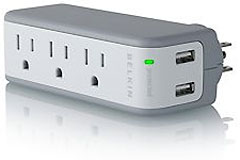
I come across with this product similar to the Kensington one: Belkin Mini Surge 3OUT Wall Mount $75K 918J with USB Charger.
The only thing I don't like about it is the plug can't be hidden.
Albert
Hi Albert,
That's a slick and very compact unit. Belkin stuff is usually pretty good, and that Amazon.com price is friendly.
Thanks for the info and link.
Charles
Editor's note: We covered the Belkin Mini Surge Protector with USB Charger in our March 14 'Book Review. dk
Steve Jobs' Health
From Ryan:
Hi Charles,
I am sure you have noticed and read over the Web . . . Steve's weight as seen at the last WWDC was horrifically low. Not only does he look very frail, but he sounds very weak too. He even looked and sounded weak at the D4 with Gates 1 year ago, but his frailness has gotten much worse since then. I just can't seem to accept that it is simply a consequence of his cancer operation: from what I understand one can maintain their weight with a special diet.
So either Steve is not on a special diet and simply losing weight because of his operation in 2004, or maybe he has cancer again and it has spread throughout his body....
Other explanations could be advanced, but he really does look sick.
Ryan
Hi Ryan,
I expect you have probably seen this column by the New York Times' Joe Nocera by now. The closest thing I've seen to a "horses' mouth" explanation.
Charles
Upgrading to Mac OS X 10.2
From Alan, following up on Web Browser and USB Adapter for WallStreet:
Actually, we're running OS 9.x for software, but OS X for web browsing. I have OS X 10.2 on my WallStreet and Becky has OS X 10.1 on hers - and we are looking for an installer to upgrade it to 10.2. (I can't remember where I got the 10.2 on my WallStreet).
We are using an older Firefox on hers and can probably get a later version once we have her system upgraded.
Thanks.
Alan
Hi Alan,
Amazon.com has OS X 10.2 install CDs from $59.99.
Charles
Editor's note: Also see our Best Mac OS X 10.0 - 10.3 Prices. OS X 10.2 upgrade CDs start at $9.99. dk
Join us on Facebook, follow us on Twitter or Google+, or subscribe to our RSS news feed
Charles Moore has been a freelance journalist since 1987 and began writing for Mac websites in May 1998. His The Road Warrior column was a regular feature on MacOpinion, he is news editor at Applelinks.com and a columnist at MacPrices.net. If you find his articles helpful, please consider making a donation to his tip jar.
Links for the Day
- Mac of the Day: PowerBook 500 Series, introduced 1994.05.16. 'Blackbird' includes a 25 to 33 MHz 68040 along with smart batteries and grayscale or color displays.
- Support Low End Mac
Recent Content
About LEM Support Usage Privacy Contact
Follow Low End Mac on Twitter
Join Low End Mac on Facebook
Favorite Sites
MacSurfer
Cult of Mac
Shrine of Apple
MacInTouch
MyAppleMenu
InfoMac
The Mac Observer
Accelerate Your Mac
RetroMacCast
The Vintage Mac Museum
Deal Brothers
DealMac
Mac2Sell
Mac Driver Museum
JAG's House
System 6 Heaven
System 7 Today
the pickle's Low-End Mac FAQ
Affiliates
Amazon.com
The iTunes Store
PC Connection Express
Macgo Blu-ray Player
Parallels Desktop for Mac
eBay

