
Charles Moore's Mailbag
No New Macs for Me, Irreplacable Classic Mac Apps, Unexpected Navigator 9 Slowdown, and More
Charles Moore - 2007.06.27
- No More New Macs for Me
- Irreplacable MacDraw Pro
- Classic Mac Apps without Parallel and Netscape 7
- Navigator 9 Slowdown with Dialup
- MacBook's Magnets Causing Problems for G3 iMac's Screen
- MagSafe May Be Causing Problems with CRT iMac
No More New Macs for Me
From Ian
Hello again Charles,
I got ahold of a supervisor (if I recall correctly) at Apple, and he also told me replacing my iBook's power board would cost me around $250 just for the part! He didn't tell me what the cost of labor would be. Needless to say, I did the same as before and hung up. Only this time I went on eBay and purchased a used/warranted one for $26.35 shipped. The ifixit.com guide depicts it as an easy fix, so I have no problem doing it myself.
Also, and I should probably put this in a different email, this iBook and all of its problems have halted my want for a new MacBook. It appears the most-annoying (not necessarily worst) problems surface after 2-3 years. I'm going to wait at least until 2008-09 to think about buying one, or any current Mac for that matter, when problems are well known and there's a good supply of parts in the channel.
Apple just lost a new-computer customer.
Ian A.
Hi Ian,
$26.35 sounds very reasonable for the replacement part. I'll be interested to hear how you make out with the DIY repair. iBooks don't have a reputation for being easy to open up and work on.
I like to hang back a bit to see how new computer models fare for reliability before buying one, although 2-3 years sounds a bit over-cautious, but if that works for you, cool.
I think the current MacBooks and MacBook Pros are probably a pretty good bet in the context of new machines, since both have been in production for over a year with no major engineering changes.
Charles
Irreplacable MacDraw Pro
From Stephen M Lubliner regarding Classic Mac Applications that OS X Can't Match:
Charles,
Please add MacDraw Pro to the list of Classic applications without OS X equivalents. The drawing program in ClarisWorks is okay but not as friendly (it seems) as MacDraw. MacDraw also seemed to import (as PICT files) better than ClarisWorks into Word or PowerPoint. I tried another program called Eazy Draw for OS X (that supposedly opens MacDraw files). It was mediocre at best. The hardest thing is that there are virtually no programs out there other MacDraw Pro that can open MacDraw Pro files.
Steve Lubliner
Hi Steve,
I've never used MacDraw, but I used to love the paint module in HyperCard and understand your observation about ClarisWorks being less user-friendly.
Charles
Classic Mac Apps without Parallel and Netscape 7
From Andrew Main:
As for "key applications I've never found completely satisfactory OS X substitutes for", my two favorite apps in the classic days were AppleWorks and Aldus PageMaker. Yes, there is an OS X version of AppleWorks, but it isn't a real OS X app (no Unicode support, for one thing, which means I must remember to switch keyboards any time I switch to AppleWorks or it'll crash when I try to enter text), and there's no real OS X app that matches the simplicity and elegance of AppleWorks in the classic Mac OS. And PageMaker is the one reason I periodically return to OS 9; I've found nothing like it in OS X - though it too lacks Unicode, which is one of the big pluses for me in OS X.
iWork's Pages has been touted as a replacement for both, but it has serious lacks in (to mention only what I've run into) capabilities (no paint module like AW), text handling (no way to set exact leading), and layout (no way to fine-tune text wrap around objects). Besides that, I just find it non-intuitive and awkward to use.
Recently I had occasion (first time in quite a while) to set up an OS 9 Mac and took another look at Netscape 7.0.2, which I'd ignored heretofore because I don't like to install a big, complex app many of whose parts I don't need. I discovered that a Custom Install allowed installing only the browser (Navigator), and it isn't half bad. For one (big) thing, it has tabs, which I consider sine qua non for web browsing. And it seems to work fine, no crashes - unlike the previous time I'd tried it, several years ago.
And Netscape 9 looks pretty nice, too; kind of nostalgic seeing it in the Dock - though I don't guess I'll get into it much, as Safari and Camino already take care of all my needs. OS X is kind of lopsided: too many browsers, not enough (not any) basic productivity apps like AppleWorks.
Andrew
Hi Andrew,
Good points all.
IMHO, Netscape 7.0x is the best of the browsers that support Mac OS 9.2.2. I simply can't abide trying to browse without tabs, and Netscape serves my non-tech oriented wife very satisfactorily on her WallStreet PowerBook.
I also agree that there is a big hole vacated by the old "real" AppleWorks. However, my main productivity application since Classic days has been Tex Edit Plus tweaked and customized with AppleScripts that tune it to my needs, and it is even better in OS X than it was in OS 9, while retaining fully transparent backwards file compatibility. :-)
Charles
Navigator 9 Slowdown with Dialup
From Christoph Trusch in response to Netscape 7 and 9:
Hello Charles,
I have used Navigator 9.0b1 for some hours and found it quite usable. I haven't encountered your dialup slowdown problem, but then, I have DSL 4000, so whatever Netscape is doing in the background (there must be something), using up a few kb/s may just be irrelevant to my connection.
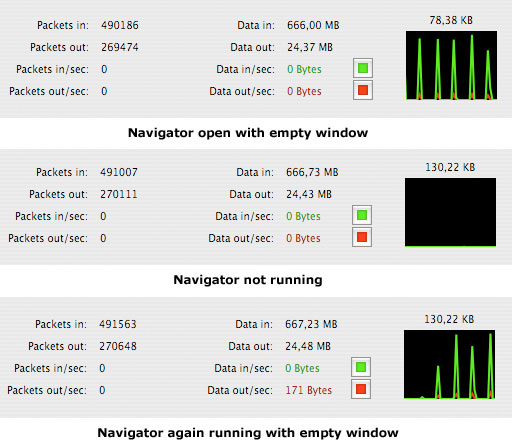
There are, however, considerable and regular "spikes" of network activity visible in Activity Monitor, starting as soon as Navigator is launched (even when no website is being displayed) and ending when it's quit. I disabled automatic update checking and "forgery site" checking, but it's still doing it. Given the commercial orientation of Netscape, I get an unpleasant "phone home" feeling here which I - lacking sufficient tools - can't prove, but would like to see further investigated.
Best regards,
Christoph Trusch
Hi Christoph,
Thanks for the feedback.
Having DSL no doubt makes a big difference.
The strange thing is that Navigator 9 seemed to work fine for a week or so, then this slowdown thing cut in. Because it affected all online performance - other browsers, email clients, etc. - it was difficult to determine what was happening.
I finally nailed it down by restarting and then opening programs one by one. Navigator 9 proved the culprit repeatably on two different computers. The problem hasn't re-manifested since I stopped using Navigator 9.
Charles
MacBook's Magnets Causing Problems for G3 iMac's Screen
From Lee Farrell:
Charles,
This is kind of random, so I figured it'd be right up your alley. While finishing up a paper on my MacBook, I set it down next to my iMac G3 for a second and was quite surprised at the results. I looked over at my iMac, and all of a sudden there was a rainbow type pattern showing where the outside corner of my MacBook screen was in very close proximity to the CRT screen. I pulled my MacBook away, and now there's a rather noticeable grey spot where my MacBook touched the iMac.
Maybe I missed this lesson in common sense 101, but is this something known to happen or is my MacBook a freak? I'm really hoping the grey spot diminishes as I love this iMac. At the very least I hope this is a warning to all iMac G3 owners (or all CRT owners?) to not place your Books anywhere near the screens. Thanks!
The problem here is that the MacBook has two very strong magnets in the lid, one on each corner. These are what hold the screen down (remember the wowie-zowie latchless design?). When he gets his MacBook close to the CRT of the iMac, the magnetic field interferes with the CRT causing the pretty colours. It's a good idea to keep anything that can be adversely affected by magnets far away from the MacBook screen. I discovered this the hard way when I set my nice set of System 7.0.1 floppies on top of my MacBook....
Cheers,
Lee Farrell
Hi Lee,
Ouch!
So sorry to hear about the floppies. :-(
This certainly sounds like you've nailed the screen anomalies culprit.
Charles
MagSafe May Be Causing Problems with CRT iMac
From Mat Schulte
" ... a rainbow type pattern showing where the outside corner of my MacBook screen was in very close proximity to the CRT screen."
I suppose dozens of people have already suggested this, but mightn't it have been the magnet in the MacBook's MagSafe port causing the rainbow effect?
- Mat
Hi Mat,
Yes, that would explain it.
Thanks,
Charles
Join us on Facebook, follow us on Twitter or Google+, or subscribe to our RSS news feed
Charles Moore has been a freelance journalist since 1987 and began writing for Mac websites in May 1998. His The Road Warrior column was a regular feature on MacOpinion, he is news editor at Applelinks.com and a columnist at MacPrices.net. If you find his articles helpful, please consider making a donation to his tip jar.
Links for the Day
- Mac of the Day: PowerBook 500 Series, introduced 1994.05.16. 'Blackbird' includes a 25 to 33 MHz 68040 along with smart batteries and grayscale or color displays.
- Support Low End Mac
Recent Content
About LEM Support Usage Privacy Contact
Follow Low End Mac on Twitter
Join Low End Mac on Facebook
Favorite Sites
MacSurfer
Cult of Mac
Shrine of Apple
MacInTouch
MyAppleMenu
InfoMac
The Mac Observer
Accelerate Your Mac
RetroMacCast
The Vintage Mac Museum
Deal Brothers
DealMac
Mac2Sell
Mac Driver Museum
JAG's House
System 6 Heaven
System 7 Today
the pickle's Low-End Mac FAQ
Affiliates
Amazon.com
The iTunes Store
PC Connection Express
Macgo Blu-ray Player
Parallels Desktop for Mac
eBay

