
Miscellaneous Ramblings
The PowerBook 5300 Turns 11: A Reminiscence
Charles Moore - 2006.08.28 - Tip Jar
Last Friday marked the 11th anniversary of the PowerBook 5300's original launch. And in a couple of months, my own PowerBook 5300 will be ten years old - still functional, but long since retired from active duty.
The 5300 had a tough act to follow when it debuted on August 25, 1995, superseding the enormously popular and solid-performing 68LC040 PowerBook 500 series.
As Apple's first PowerPC laptop, there were high expectations for the 5300, and a general consensus soon developed that it fell somewhat short of the mark.
Flaming Batteries
Even before the 5300 began shipping in quantity, it suffered a major engineering setback and PR disaster that is ironically seems ripped from the headlines in August 2006. The 5300 was originally designed to use lithium-ion (LiIon) batteries, but Apple did a recall and switched to Nickel-Metal-Hydride (NiMH) cells after two of the Sony-made LiIon batteries caught fire.
No consumer machines were damaged, but the switchover caused shipping delays and was a major embarrassment.
Last week, a day short of the PowerBook 5300's anniversary, Apple announced a massive recall of 1.8 million LiIon batteries made by Sony and sold worldwide from October 2003 through August 2006 for use with the following notebook computers: 12" iBook G4 (all speeds), 12" PowerBook G4 (all speeds), and 15" PowerBook G4 (aluminum model, all speeds), citing a safety risk that may result in overheating under rare circumstances. Apple has received nine reports of batteries overheating, including two reports of minor burns from handling overheated computers and other reports of minor property damage. No serious injuries were reported.
The Top End 5300ce
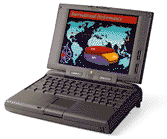 In addition to
being the first PowerPC PowerBook, the 5300 also has the
distinction of being the most expensive laptop Apple ever sold,
with the top-end 5300ce model originally selling for a whopping
$6,500!
In addition to
being the first PowerPC PowerBook, the 5300 also has the
distinction of being the most expensive laptop Apple ever sold,
with the top-end 5300ce model originally selling for a whopping
$6,500!
That $6,500 PowerBook 5300ce had only four differences from the entry-level $2,200 PowerBook 5300:
- A 16-bit 800 x 600 10.4" active matrix display vs. the 5300's 4-bit 640 x 480 9.5" grayscale passive matrix screen
- 32 MB of RAM vs. 8 MB
- a 1.1 gigabyte hard drive as opposed to a 500 MB unit
- a 117 MHz 603e processor instead of a 100 MHz unit
However, the 5300ce sold for $4,300 more than the base 5300; even considering the much superior display and the higher price of RAM in 1995, that seems like a disproportionate difference in tariff.
The Low End 5300
Or perhaps the plain Jane 5300 was just an exceptional bargain. I thought so, and in the fall of 1996, I bought an end-of-life PowerBook 5300 with a 9.5" passive matrix grayscale display and a 100 MHz Power PC 603e processor. Thanks to the low CPU demand of the 4-bit/16-shade grayscale screen, the entry level 5300 was faster than the top-of-the-line 5300ce with its larger screen and 16-bit video (still nothing to get up in the night and write home about, alas), despite the slower processor.
Available with either a 100 MHz or a 117 MHz PowerPC 603e processor, the 5300's 33 MHz internal bus and slow IDE hard drive gave it about the same speed as the Performa 5200/75 desktop PowerMac.
Better than Blackbird
The 5300 was nearly one pound lighter and an inch less deep than its 500 series predecessor, and it has almost the same footprint as the 12" dual USB iBook, the trim dimensions accomplished partly by leaving out the 500's optional internal modem, built-in ethernet, and stereo speakers, and its ability to carry two batteries. Instead, the 5300 had two PC card slots and an IR port.
The 5300's floppy drive lives in an expansion bay and can be removed and replaced with a magneto-optical drive, a second hard drive, a Zip drive, or even a PC Card storage bin, which lightens the machine for carrying.
Regrettably, the expansion bay would not accommodate a CD-ROM drive, although Apple had tentatively floated the idea of a new 3.5" CD-ROM format. That idea went nowhere (thankfully).
Most expansion bay devices for the later 3400 and original G3 (Kanga) PowerBooks will work in the 5300's expansion bay, except for the CD-ROM. The 5300's lack of CD-ROM support was a major mistake for Apple, not rectified until the PowerBook 1400 debuted more than a year later.
Hands On
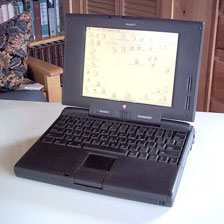 I loved the
5300 from the moment I lifted it from its box. The clean,
squared-off styling and small footprint (very close to that of the
recently discontinued 12" iBook) appealed to me aesthetically.
I loved the
5300 from the moment I lifted it from its box. The clean,
squared-off styling and small footprint (very close to that of the
recently discontinued 12" iBook) appealed to me aesthetically.
On the downside, while the 5300 represented a significant, albeit not spectacular, performance upgrade from the desktop 68030 Mac LC 520 that was my previous workhorse, it was not nearly as fast as I had hoped it would be, and the operating system that shipped with it, version 7.5.2, was a dog.
Boosting the RAM to 24 MB and upgrading to System 7.5.5 improved performance and stability a lot, and I found that running from a RAM disk also speeded things up significantly, as well as facilitating blissfully quiet computing with the hard drive spun down.
The 5300 served as my main workhorse for nearly three years, and I was as fond of it at the end as I was at the beginning, but as the Internet became a more central focus of my work, the cramped 640 x 480 grayscale display and the lazy online performance proved seriously inadequate.
Pros and Cons
Still, in a few aspects the old 5300 shone in comparison with today's Mac notebooks. It had no noisy internal cooling fan (it didn't need one). My 100 MHz model would barely get warm to touch after hours of use. The 5300 also introduced the removable device expansion bay to Apple laptops, a super innovation that lasted an all-too-brief six years before it was discontinued with the introduction of the Titanium PowerBook. With two PC card slots and the expansion bay, one could partly forgive the 5300's built-in connectivity shortcomings.
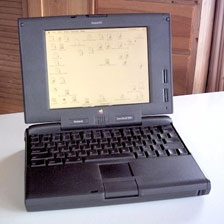 There were also
other shortcomings - faulty motherboards, for instance. Once the
first 5300s were in the hands of consumers, several design and
manufacturing flaws began showing up, including power and circuitry
problems. The 5300's power supply did not produce enough juice to
run certain combinations of expansion bay and PC Cards at the same
time, and the control circuitry for reducing power consumption when
the 5300 was in Sleep mode would sometimes go to sleep before
completing its job. As a result, the fully charged 5300 would sleep
for only four days instead of the usual eight to ten days.
There were also
other shortcomings - faulty motherboards, for instance. Once the
first 5300s were in the hands of consumers, several design and
manufacturing flaws began showing up, including power and circuitry
problems. The 5300's power supply did not produce enough juice to
run certain combinations of expansion bay and PC Cards at the same
time, and the control circuitry for reducing power consumption when
the 5300 was in Sleep mode would sometimes go to sleep before
completing its job. As a result, the fully charged 5300 would sleep
for only four days instead of the usual eight to ten days.
Some 5300s would lock up when the reset button and the power-on keys were pressed. The workaround was to press reset and power-on again. Not all early 5300s were affected, and Apple quickly supplied replacement motherboards for those that were. A production line fix was also implemented, which cured the problem, and later machines were not affected, but the PR damage was done.
There were also problems with flimsy monitor screen hinges and power adapter plugs that broke on the early 5300s. These faults were also attended to by Apple with free repairs and an extended seven year warranty on these items.
OS Problems
My personal suspicion is that at least some of the apprehended "motherboard problems" were actually software-related, as the System 7.5.2 that shipped with the 5300s was very buggy. I had some frustrating stability problems with my late-in-the-production-run 5300 when it was new. this diminished drastically when I installed System 7.5.3, and even more with System 7.5.5 - both free upgrades from Apple.
With Mac OS 8.1, my 5300 became almost rock-stable, and I could go for several days without a restart.
Appearance
Some people were disappointed with the 5300's clean, squared-off shape after the swoopy and flamboyant 500 PowerBooks. Personally, I think that the 5300 one of the most attractive PowerBooks ever, and that its looks have stood the test of time well, being recycled for the long-running dual USB iBook.
However, the original 5300 proportions didn't gracefully survive being "stretched" for the 3400 and original G3 PowerBook series, which look as ungainly as did the beautiful E-type Jaguar back in the 1960s when it had 9" grafted in to its original near-perfect proportions accommodate 2+2 seating.
The PowerBook 5300 was available in four models:
- 5300: 4-bit 640 x 480 9.5" dual-scan passive matrix grayscale screen, 100 MHz processor, 8 MB soldered RAM, 500 MB hard drive.
- 5300cs: 8-bit 640 x 480 10.4" dual scan passive matrix color screen, 100 MHz processor, 8 or 16 MB soldered RAM, 500 or 750 MB hard drive.
- 5300c: 8-bit 640 x 480 10.4" active matrix color screen, 100 MHz processor, 8 or 16 MB soldered RAM, 500 or 750 MB hard drive.
- 5300ce: 16-bit 800 x 600 10.4" active matrix color screen, 117 MHz processor, 32 MB soldered RAM, 1 MB or 1.1 MB hard drive.
As noted, my PowerBook 5300, which was passed on to my daughter who used it for several years as her high school computer and as a backup (to a PowerBook 1400) during her freshman year at university, still runs, and its original battery still takes a charge, although runtime is limited. The only issues it's had in ten years are a broken trackpad button (addressed by an entire case plastics replacement under Apple's Extended Service Program), a wobbly AC power adapter jack socket which never actually let go, and the hard drive is now making some loud and alarming noises at startup (but it still works).
That tiny, murky, 9.5" grayscale display looks quaint compared with the widescreen display in my 17" PowerBook, but I still have affection for that old 5300, which got me started and on portable computing quickly hooked me.
Happy anniversary!
- PowerBook 5300, Low End Mac
- PowerBook 5300, Road Apples, Low End Mac
- PowerBook 5300, Wikipedia
- PowerBook 5300 Series, Mac Consulting. Includes list of compatible expansion bay devices.
- PowerBook 5300 FAQ, Alksoft
- PowerBook 5300 Exposed, Charles W Moore, Road Warrior, MacOpinion, 2000.09.05
- PowerBook 5300 Revisited, Charles W Moore, Road Warrior, MacOpinion, 2002.01.15
- How to Disassemble the PowerBook 5300, PowerBook 190, PowerBook 5300 Page
- PowerBook 5300 Prototype, Applefritter
Join us on Facebook, follow us on Twitter or Google+, or subscribe to our RSS news feed
Charles Moore has been a freelance journalist since 1987 and began writing for Mac websites in May 1998. His The Road Warrior column was a regular feature on MacOpinion, he is news editor at Applelinks.com and a columnist at MacPrices.net. If you find his articles helpful, please consider making a donation to his tip jar.
Links for the Day
- Mac of the Day: 17" 1 GHz PowerBook G4, introduced 2001.01.07. The first PowerBook with a 17" display - and FireWire 800.
- Support Low End Mac
Recent Content
About LEM Support Usage Privacy Contact
Follow Low End Mac on Twitter
Join Low End Mac on Facebook
Favorite Sites
MacSurfer
Cult of Mac
Shrine of Apple
MacInTouch
MyAppleMenu
InfoMac
The Mac Observer
Accelerate Your Mac
RetroMacCast
The Vintage Mac Museum
Deal Brothers
DealMac
Mac2Sell
Mac Driver Museum
JAG's House
System 6 Heaven
System 7 Today
the pickle's Low-End Mac FAQ
Affiliates
Amazon.com
The iTunes Store
PC Connection Express
Macgo Blu-ray Player
Parallels Desktop for Mac
eBay

