
Charles Moore's Mailbag
Best OS for Older Macs, Why OS 9 Remains a Player, Camino Browser Fast, DVD-RAM Support for Macs, and More
Charles Moore - 2006.05.22 - Tip Jar
- The Best Mac OS for Older Macs
- Mac OS 9 for Productivity and Performance
- OS 9 Crucial for Some Legacy Peripherals
- Camino 1.0.1 a Real Speedster
- Could MaxiMice Replace Scrollability?
- DVD-RAM Support on the Mac
- If You Like WannaBe, Try Links
- Upgrading a 233 MHz WallStreet to 300 MHz
- Making Word 2004 Work Like Word 5.1
- Pismo Modem Works with Many Tiger Installations
The Best Mac OS for Older Macs
From William Doty
HI
I always enjoy your articles. Here are my favorite OS for older Macs:
- Mac OS 7.6 from LC II up to PPC
- OS 8.1 601 machines
- OS 8.6 any 603 or 604 Mac up to G3 ( I like 8.6 for non-Internet Macs)
- G3 OS 9.1
My current Mac is a 733 G4 Quicksilver running 10.3.9 and 9.2.2
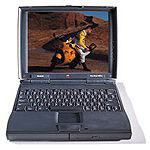 I recently bought a
very nice PowerBook 1400. I
don't run Internet on it, and I have several old style printers
that seem to like it.
I recently bought a
very nice PowerBook 1400. I
don't run Internet on it, and I have several old style printers
that seem to like it.
Mac OS 8.6 seems very good. It is a bit slow to start, but it runs very good. MS Office 98 PowerPoint presentations work very well. (As does AppleWorks 6.) The 1400 has 64 MB of RAM and a 750 MB hard drive. (I can't seem to win a bid on eBay for a bigger drive.)
Bye,
Bill Doty
Hi Bill,
Thanks for the comment. Here are my current OS picks for my fleet:
- Mac Plus - System 7.0 for Internet support; System 6.0.8 for speed (dual boot from separate partitions)
- LC 520 - System, 7.5.5 with Open Transport from System 7.6.1 grafted in (7.6 has some issues on that machine, but I've forgotten the details)
- PowerBook 1400 - OS 8.6
- Umax SuperMac S900 - OS 9.1
- WallStreet PowerBook 233 MHz - OS 9.2.2
- Pismo PowerBook G4 550 MHz - OS X 10.3.9
- G3 iBook 700 MHz - OS X 10.4.4
- 17" PowerBook G4/1.33 GHz - OS X 10.4.4
Charles
Mac OS 9 for Productivity and Performance
From Leo LeBron
Hello Mr. Moore.
I am happy to report that I am running Mac OS 9.2.2 on both my B&W G3 and my WallStreet (it's doing fine since I last talked to you) as my primary OS. Note that both these machines can run OS X, versions 10.4.6 and 10.2.8 respectively.
I just want to say that I choose to run OS 9 on both my systems. Not because it is faster, but because it is simply cozier. No terminal, no fancy animations, no weird files that I may mess up. That plus the fact that it boots in 30 seconds on both machines. How many OS X systems can boot that fast, even on the fastest hardware? Not even Macintels (I know, I test booted one in a store).
Granted, I have replaced the Platinum theme with Aqua, which is the only thing I like about OS X. I attached a screen shot to show you. However, I have added more stuff to the Dock since then.
You have to admit that is pretty impressive for a 5-year-old OS to transform into something from today. Even the Apple Geniuses can't tell it's 9, but I can.
So, as you can see, OS 9 is still alive and kicking on my machines, and it will continue to do so for years. OS 9 is still the productive workhorse it was all those years ago.
-Leo V
Cool!
Thanks for the report, Leo.
Charles
OS 9 Crucial for Some Legacy Peripherals
From Robert MacLeay
I can't believe that you skipped over one of the most important reasons for keeping a Mac OS 9 Mac up and running in your article: hardware compatibility. I have and still use (albeit only occasionally) several legacy peripherals for which OS X drivers were never written. These include a couple of scanners and some oddball removable drives.
Keep up the good work!
Robert MacLeay
Hi Robert,
Good point, if you really need/like those old SCSI and serial peripherals.
I still have an Apple ImageWriter II printer that I like and still use occasionally, thanks to still owning several old Macs that support the Classic OS and ImageWriter drivers.
I also have a SCSI Zip drive, which gets used from time to time as well, albeit only for the older Macs themselves, and a monochrome Microtek scanner, which almost never gets used anymore.
The thing is, though, that I guess I don't personally consider this an issue impacting production work, as USB and FireWire peripherals are so much better and relatively inexpensive these days.
Charles
Camino 1.0.1 a Real Speedster
From Peter Tyler
Hello, Charles:
A few months back I wrote you about how much faster SeaMonkey renders pages. While I still use SeaMonkey more frequently than other browsers, it almost seems the Camino developers want to make me eat my words. :)
I set my default browser for opening links on the desktop to Camino some time back, and after upgrading to 1.0.1, it really does seem much faster. The only place it seems to be slowing down is in Gmail. Who knows - maybe Camino will catch up in the race before too much longer.
Regards,
Pete Tyler
Hi Pete,
I thought the latest version of Camino was pretty speedy, too, although it seemed less consistent than SeaMonkey, and the bookmarks menu scrolls really slowly. It also crashed on me. I used it for a week or so to give it a good thorough test but have now gone back to SeaMonkey.
Charles
Editor's note: Camino has been my default browser since shortly after version 1.0 shipped. It's fast, more Mac-like than SeaMonkey and FireFox, and seems every bit as compatible with websites as FireFox 1.5.x, which has my previous default. dk
Could MaxiMice Replace Scrollability?
From Sebastian Soyka
Hello there,
I just read your article about OS 9 on Low End Mac and found it very well-written.
quote
"I'm not very optimistic about Scrollability ever being offered in an OS X version, but perhaps someone will develop a utility with similar characteristics for OS X (hint to software developers). Other users will have different reasons to need Classic mode."
end quote
Here's one - http://www.catchysoftware.com/products/maximice/ - which even gets recommendations from Scrollability's developer 8^)
(Note: I'm not in any way affiliated with Catchy Software).
Best,
Sebastian Soyka
Hi Sebastian,
I tried that one a while back and didn't find it nearly as slick as Scrollability, but perhaps a more recent version merits another look.
Charles
DVD-RAM Support on the Mac
From Andrew Main
Re Using DVD-RAM on the Mac: I couldn't find the complete article either, but I thought I'd mention that I replaced the stock Apple-label UJ-825-C SuperDrive in my 17" PowerBook 1.5 GHz with an OEM UJ-825-B that I found on eBay. It does DVD-RAM discs just fine. It doesn't even require PatchBurn; just put in a DVD-RAM disc (I have only one so far, a Panasonic disc that came with the drive), format it, and I can add and subtract files at will.
Previously I had put the same drive in an expansion bay case for use with my PowerBook 2000/FireWire (Pismo); there it required PatchBurn and worked fine. I don't know why Apple doesn't want us to use DVD-RAM; all the drives it uses (the Panasonic ones, anyway) can do DVD-RAM, but for some reason they have the capability disabled in the drives they get from Panasonic to Apple specs (with the Apple label).
Andrew Main
Thanks for the report Andrew. The FastMac 8x drive in my Pismo is supposed to support DVD-RAM, too (with PatchBurn), although I haven't tried it.
Charles
If You Like WannaBe, Try Links
Responding to Is Mac OS 9 Still a Player?, Ruffin Bailey writes:
"I also still use OS 9 every day in OS X Classic mode, mostly to run the fast little WannaBe text browser, for which I've found no satisfactory substitute in OS X native software."
Enjoyed the recent Musings. Personally, I like using OSes older than 9.2, mostly on 68k machines, precisely because they can't do much more than email, word processing, and a bit o' usenet. Keeps me productive when I absolutely need to be by removing the distractions of the Net.
Liked your suggested cutoff on hardware running OS 9 - I have a 500 MHz G3 iBook w/384 megs of RAM, and it just misses being fast enough to be comfortable, IMO. But at this point, OS X does so many things so well and Safari is fast enough even with the 500 G3 that that iBook boots OS X first. It's a shame, as when I boot into OS 9 on that G3, I feel like I've purchased a new, up-to-date computer.
In any event, I'm sure you've already been spammed to death, but if you like WannaBe (and I do on my 68k hardware, certainly), try Links on OS X. This text-only browser really is head and shoulders above Lynx, if you've tried that more popular text-only browser for *nix. Links has great SSL and HTML forms support, and it even does a pretty good job with table display and the like. After you've used it a few times from the Terminal, I don't think you'll continue carrying around Classic for WannaBe.
As I emailed Dan [Knight] a while back, vMac or the like runs most of what I miss by not having Classic on my OS X boxen, and it takes up a ton less space. World of Warcraft appreciates the room.
Thanks again for the article, and my apologies for being the thousandth person to email the links recommendation.
Ruffin Bailey
Hi Ruffin,
Thanks for the suggestion, and so far you're the only one who has mentioned Links. I will check it out.
And yes, booting even my 550 MHz G4 upgraded Pismo or my 700 MHz iBook into OS 9 after running OS X makes it feel like the afterburners just cut in.
Charles
Upgrading a 233 MHz WallStreet to 300 MHz
From: Marcel
I have recently purchased a WallStreet G3/233. Can I upgrade it, by purchasing a G3/300 CPU from another WallStreet? Can it be installed in the current machine?
Marcel
Hi Marcel,
It might work. Swapping the daughtercards is a pretty easy operation. I can't say for sure that it will work, however. The 233 MHz and 300 MHz machines both had a 66 MHz system bus, so that should be compatible.
The 233 MHz WallStreets have only 2 MB of video RAM, while the 300 MHz machine had more, I think at least 4 MB. I don't know if this could cause incompatibility problems or not.
You're not talking big bucks here, so it might be an interesting experiment.
Charles
Making Word 2004 Work Like Word 5.1
From Ronald Evry
Do consider using Office 2004. The program still has a nifty item in the VIEW > TOOLBARS > CUSTOMIZE TOOLBARS menu to use Word 5.1 menus. It's like being in Classic Mode running Word 5.1, only faster.
Ron
Hi Ron,
I have checked our Office 2004, but I make it a point to avoid using Microsoft software unless there is absolutely no practical alternative (very rare). [Editor's note: read the classic Why I Live Microsoft Free from March 2002 for more on the subject.]
Word 5.1 itself is an exception. I haven't used it for production for years, but it's one Microsoft program that doesn't annoy me.
This one isn't a biggie for me, as there are other OS X apps that will open Word 5.1 files, albeit not necessarily with formatting intact.
Charles
Pismo Modem Works with Many Tiger Installations
Chris writes:
FYI, I have a Pismo 500 that I have been running the latest version of Tiger on for some time (all updates, now at whatever the newest version is). I don't usually use a modem; I usually use ethernet or AirPort, but I found a reason to the other day. I was somewhat apprehensive after reading your article.
However, it set up and worked fine for me; a little slower than the broadband I'm used to, but actually faster than I've ever connected before on any other computer (between 49k and 50k).
Sorry that yours does not work; I did not try this with all the versions of Tiger, so I have no way of knowing it the most recent update fixed it or if it never "broke" in the first place. Thanks for your help and supporting such a great site!
Thanks!
Hi,
Actually it worked fine for me for about eight months before the problem manifested, and I don't doubt that most Pismo users are experiencing no issues.
I've been running OS X 10.3.9 for the past several months, and everything has been rock-stable. I may roll the dice and upgrade to Tiger again, but aside from the modem and Spotlight issues that cropped up with my previous Tiger installation, Panther is definitely more responsive on this machine, especially Finder snappiness.
Charles
Join us on Facebook, follow us on Twitter or Google+, or subscribe to our RSS news feed
Charles Moore has been a freelance journalist since 1987 and began writing for Mac websites in May 1998. His The Road Warrior column was a regular feature on MacOpinion, he is news editor at Applelinks.com and a columnist at MacPrices.net. If you find his articles helpful, please consider making a donation to his tip jar.
Links for the Day
- Mac of the Day: Power Mac G5 (Early 2005), (2005.04.27. At 2.7 GHz, the fastest G5 CPU Apple ever used, also 16x SuperDrive and it shipped with OS X 10.4 Tiger.)
- Support Low End Mac
Recent Content
About LEM Support Usage Privacy Contact
Follow Low End Mac on Twitter
Join Low End Mac on Facebook
Favorite Sites
MacSurfer
Cult of Mac
Shrine of Apple
MacInTouch
MyAppleMenu
InfoMac
The Mac Observer
Accelerate Your Mac
RetroMacCast
The Vintage Mac Museum
Deal Brothers
DealMac
Mac2Sell
Mac Driver Museum
JAG's House
System 6 Heaven
System 7 Today
the pickle's Low-End Mac FAQ
Affiliates
Amazon.com
The iTunes Store
PC Connection Express
Macgo Blu-ray Player
Parallels Desktop for Mac
eBay

