
Miscellaneous Ramblings
FastMac's $190 8x Dual-layer SuperDrive for PowerBooks and Dual USB iBooks
Charles Moore - 2006.01.30 - Tip Jar
My first Mac, a Mac Plus, supported 800 KB floppy disks and had an external SCSI hard drive with a whopping 20 MB capacity. I never did manage to fill it up.
My second Mac, an LC 520, had a cavernous 160 MB hard drive and supported 1.4 MB high-density floppies. It also had a caddy-loading Sony 2x CD-ROM drive.
My 1996 PowerBook 5300 came with a 500 MB hard drive and a floppy drive, but it had no CD-ROM drive, and my 1998 PowerBook G3 Series (a.k.a. WallStreet) had a 2 gigabyte hard drive and a 20x CD-ROM drive.
I recall when 100 MB capacity Zip disks seemed a very big deal, and they were compared with 800 KB and 1.4 MB floppies.
How things have changed! A 60 GB hard drive is now considered small, and 700 MB burnable CDs are at the low end of the recordable media scale. For serious data backup, you really want a "SuperDrive" DVD-burning drive that will allow you to store 4.7 gigabytes of your stuff on one single-layer disk - or twice that much on a dual-layer disk.
One of the more frequent questions I receive from readers is what to do about malfunctioning DVD-ROM drives in Pismo PowerBooks. The Pismo is a great old laptop, and there are tons of them still in service, but one of their few weak points is the tray-loading DVD-ROM drive, which is - how shall we say it - not very robust.
My advice is usually to get a combo drive or SuperDrive module to replace the original DVD-ROM drive.
One of the the cooler features of the Pismo is that its optical drive is in a removable expansion bay module, which makes swapping drives a 20-second operation. Just pull the release lever, pop out whatever module is in the expansion bay, slide in the new drive module, and you're done.
My Pismo's original DVD-ROM drive still works fine, but I've replaced it with an 8x SuperDrive module from FastMac, and it's an upgrade I heartily recommend whether or not your stock DVD drive has packed it in. The FastMac drive does a fine job of burning both CDs and DVDs, and it also reads both categories of discs, is bootable, and is a slick slot-loader to boot.
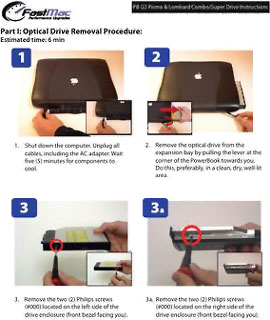 The
FastMac 8x SuperDrive module for Pismo (it also supports the
earlier "Lombard" PowerBook G3 Bronze
Keyboard) has the same drive innards offered in upgrades for
the titanium PowerBook, dual USB iBook, slot-loading G3 iMacs, and
G4 Cubes, but installation is, much
more challenging with those units - and in most instances likely
not a do-it-yourself operation.
The
FastMac 8x SuperDrive module for Pismo (it also supports the
earlier "Lombard" PowerBook G3 Bronze
Keyboard) has the same drive innards offered in upgrades for
the titanium PowerBook, dual USB iBook, slot-loading G3 iMacs, and
G4 Cubes, but installation is, much
more challenging with those units - and in most instances likely
not a do-it-yourself operation.
However, FastMac includes easy to understand, fully illustrated instruction manuals with purchase of each drive if you want to give it a shot.
This SuperDrive upgrade burns DVDs at 8x speed (8 times faster than Apple's original SuperDrive) and writes to rewritable DVDs at 4x. It also writes to DVD-RAM discs at 3x, CD-Rs at 24x, and CD-RWs at 10x - essentially equivalent to the SuperDrives offered in PowerBooks and iBooks (and faster than the 4 SuperDrive Apple has specified for the MacBook Pro). I understand it is the same Matsushita (Panasonic) UJ-825 mechanism that Apple uses. (The October 2005 revisions of the 15" and 17" PowerBook have an 8x SuperDrive with dual-layer support.)
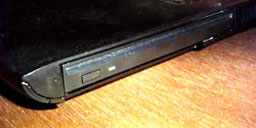 The FastMac 8x SuperDrive changes the appearance of the
right front corner of the Pismo slightly, and it doesn't quite have
the tailored look of the OEM drive, but it looks fine to me.
The FastMac 8x SuperDrive changes the appearance of the
right front corner of the Pismo slightly, and it doesn't quite have
the tailored look of the OEM drive, but it looks fine to me.
The unit has performed flawlessly for me, and is much faster than the Pismo's original DVD-ROM drive (which is playback only). "Our new 8x multi-format burner, with included iLife software, offers the ultimate DVD and CD recording experience," says Michael Lowdermilk, Business Development Manager for FastMac. "With it, you can burn a complete 4.7 GB DVD in under 10 minutes."
Indeed, I've found nothing to complain about with the FastMac 8x SuperDrive unit. It "just works".
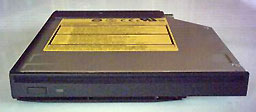 OS X Disk
Utility Disk Burner as well as Burnz BurnX Free and BurnAgain disk
authoring software perform perfectly with it, and while I didn't
test them, Apple's iDVD and iTunes, as well as Roxio's Toast
Titanium and Popcorn applications, are supported as well.
OS X Disk
Utility Disk Burner as well as Burnz BurnX Free and BurnAgain disk
authoring software perform perfectly with it, and while I didn't
test them, Apple's iDVD and iTunes, as well as Roxio's Toast
Titanium and Popcorn applications, are supported as well.
Super Drive 8x Pismo System requirements:
- Compatible with Mac OS 9.x, Mac OS X 10.2 up
The FastMac SuperDrives require installation of a little software driver called PatchBurn, a tool to patch existing CD/DVD drivers (under Mac OS X 10.2.x) or to generate and install new device profiles (under Mac OS 10.3.x and later). PatchBurn was developed by Christian Möller using the MBS-plug-ins written by Christian Schmitz. PatchBurn is included on a CD bundled with the drive.
Running OS 10.3 and 10.4, I used the PatchBurn driver included with the unit, but you can download the latest version from the PatchBurn Website. PatchBurn is donationware.
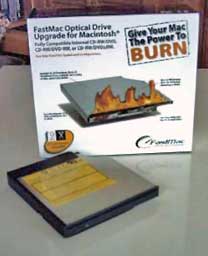 The FastMac SuperDrive for PowerBook
G3 Pismo or Lombard features:
The FastMac SuperDrive for PowerBook
G3 Pismo or Lombard features:
- 8x speed DVD-R writing
- 4x speed DVD-RW writing
- 3x speed DVD-RAM writing
- 24x speed CD-R writing
- 10x speed CD-RW writing
- 8x speed +R writing
- 4x speed +RW writing
- 24x speed CD-ROM reading
- 8x speed DVD-ROM reading
- Buffer under run protection
Designed to replace Apple's original optical drive, FastMac's 8x DVD±RW drive is compatible with all Apple PowerBook G4, iBook G4, PowerMac G4 Cube, iMac G3 Slot-Load, and iMac G5 models.
FastMac SuperDrive 8x prices:
- SuperDrive 8x Dual-Layer for PowerBook G4 400, 500, 550 & 667 MHz, $249.95
- SuperDrive 8x Dual-Layer for PowerBook G4 667 MHz or Higher, $189.95
- SuperDrive 8x Dual-Layer for PowerBook G3 Pismo, $189.95
- SuperDrive 8x Dual-Layer for PowerMac G4 Cube, $249.95
- SuperDrive 8x Dual-Layer for iMac Slot Loading, $249.95
- SuperDrive 8x Dual-Layer for iBook G4, $189.95
Also available from FastMac:
- Combo Drive 24x for PowerBook G3 Pismo, $159.95
- SuperDrive 1x for PowerBook G3 Pismo, $169.95
- Link: FastMac 8x SuperDrive module for Pismo
- Link: PatchBurn
Join us on Facebook, follow us on Twitter or Google+, or subscribe to our RSS news feed
Charles Moore has been a freelance journalist since 1987 and began writing for Mac websites in May 1998. His The Road Warrior column was a regular feature on MacOpinion, he is news editor at Applelinks.com and a columnist at MacPrices.net. If you find his articles helpful, please consider making a donation to his tip jar.
Links for the Day
- Mac of the Day: PowerBook 1400, introduced 1996.10.01. Considered by many the best pre-G3 PowerBook with a small footprint and great keyboard.
- Support Low End Mac
Recent Content
About LEM Support Usage Privacy Contact
Follow Low End Mac on Twitter
Join Low End Mac on Facebook
Favorite Sites
MacSurfer
Cult of Mac
Shrine of Apple
MacInTouch
MyAppleMenu
InfoMac
The Mac Observer
Accelerate Your Mac
RetroMacCast
The Vintage Mac Museum
Deal Brothers
DealMac
Mac2Sell
Mac Driver Museum
JAG's House
System 6 Heaven
System 7 Today
the pickle's Low-End Mac FAQ
Affiliates
Amazon.com
The iTunes Store
PC Connection Express
Macgo Blu-ray Player
Parallels Desktop for Mac
eBay

