
Miscellaneous Ramblings
Matias OS X and USB 2.0 Keyboards Reviewed
Charles Moore - 2006.01.03 - Tip Jar
I'm particular about keyboards. Even though I'm a dyed-in-the-wool laptop computer aficionado, most of the time I interact with my 'Books via an external keyboard, which facilitates keeping the laptop elevated on a laptop stand rather than working day-in and day-out with the literally crippling body English that use of the built-in keyboard imposes.
I also have nerve pain issues that are aggravated by stiff, rough, and/or hard landing key action, and I tend to get along best with scissors-action or membrane-type keyboards that use molded soft plastic dome keyswitch "springs" rather than the metal components in mechanical keyswitches - although even some membrane 'boards have a stiff enough action to cause me problems.
Matias Corp. has developed a couple of very nice, relatively inexpensive membrane keyboards targeted mainly at Mac users. The Matias OS X Keyboard (which sells for a very reasonable US$29.95) has light-touch, soft landing key action that people who struggle with typing pain should find comfortable, and a deluxe version of essentially the same keyboard called the Matias USB 2.0 Keyboard (which includes a built-in USB 2.0 dock on top for use with iPods, USB flash drives, digital cameras, and so forth) that sells for $39.95 alone or $49.95 in a combo pack with a USB optical mouse.
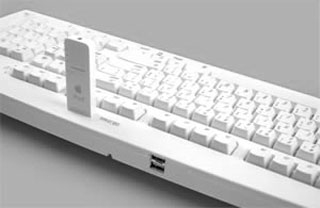 USB 2.0 is fast becoming the interface of
choice for high speed data transfer, even on FireWire equipped
Macs. Apple no longer ships a FireWire cable with iPods, nor do any
of the current iPods support FireWire.
USB 2.0 is fast becoming the interface of
choice for high speed data transfer, even on FireWire equipped
Macs. Apple no longer ships a FireWire cable with iPods, nor do any
of the current iPods support FireWire.
Note that you need a Mac that supports USB 2.0 in order for the dock feature to work at full speed, and you need to have two available ports to use the keyboard. The USB 2.0 Keyboard has two plugs - one for USB 1.1, the other for USB 2.0. Both must be plugged in to use this keyboard's full capabilities.
You can plug ordinary USB 1.1 devices into the USB keyboard dock, but throughput will be limited to USB 1.1 speeds (which are about 1/40 as fast). If you have a computer with both USB 2.0 and USB 1.1 ports, make sure that the keyboard's USB 2.0 cable is plugged into a USB 2.0 port or a USB 2.0 hub connected to a USB 2.0 port.
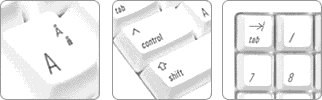
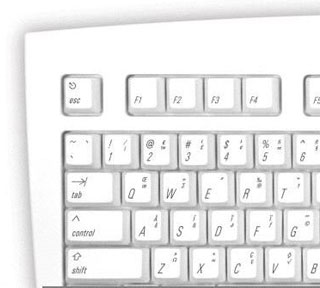 Both keyboards have alternate characters
printed on the respective key caps for quick and convenient
reference - no need to launch another application to find ™
€ £ © and other symbols. Just press Option for
the bottom right characters and Shift Option for the top right
characters. It's nice touch that I've never encountered on other
keyboards.
Both keyboards have alternate characters
printed on the respective key caps for quick and convenient
reference - no need to launch another application to find ™
€ £ © and other symbols. Just press Option for
the bottom right characters and Shift Option for the top right
characters. It's nice touch that I've never encountered on other
keyboards.
There is an extra Control key positioned to let you Control-Click contextual menus faster (just like the second button on a 2-button mouse). A Tab key on the number pad allows one-handed number entry into forms and spreadsheets, leaving your other hand free to flip through information being entered.
The keyboard has the standard Mac OS X Volume keys, an Eject key (F12), and two USB 1.1 ports, as well as the USB 2.0 dock on the top of the USB 2.0 'board.
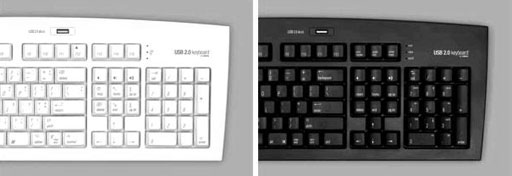
Either of these keyboards is a good choice to use with a Mac mini - or a PowerBook or iBook mounted on a laptop stand.
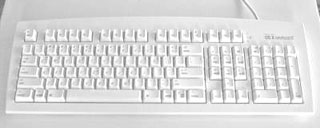 The first impression one registers of these
keyboards is how amazingly light they are (1.6 pounds). However,
they don't feel flimsy. Quite the contrary, in fact, they have a
good, solid, substantial feel.
The first impression one registers of these
keyboards is how amazingly light they are (1.6 pounds). However,
they don't feel flimsy. Quite the contrary, in fact, they have a
good, solid, substantial feel.
The Matias OS X and USB 2.0 Keyboards come in opaque white plastic with a matte finish similar to the palm pad area of the white iBooks.
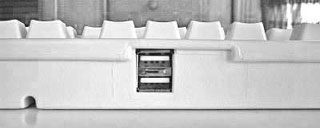
Connecting the keyboard is a simple USB plug and play. There are no proprietary drivers to be concerned with. The keyboard comes with a generous five feet of USB cable. It also has the customary two USB ports for plugging in pointing devices and other peripherals, but they are positioned one above the other at the left center of the back of the unit rather than at the more typical outer ends of the 'board. The center position could prove problematic if you have a really short-tailed mouse, and it is somewhat less convenient to access.
Keystroke action on the Matias OS X and USB 2.0 Keyboards is pleasantly soft and light. It's not perfect from my perspective, with the travel being longer than I prefer, and a bit more over-center feedback when pressing the keys than would be ideal, but it's pretty good. My daughter, who first tried the OS X Keyboard out over the Christmas holiday, pronounced it "awesome".
The 108 keys are arrayed in a mostly standard extended keyboard layout with the exception of the aforementioned third Control key where the Caps Lock key usually resides, and the Caps Lock key moved to between the right-hand Option and Control keys on the bottom row.
Vesna Vojnic, Marketing Manager for Matias, explains: "Most Macs have one-button mice. Many users don't realize that Control-Click does the same thing as having a second mouse button. With OS X based on Unix, a lot of new Mac users are accustomed to having Control where Caps Lock normally is, so they can press it faster. Repositioning Caps Lock also makes it harder to hit by accident. [true!] We think a lot of users will appreciate these improvements."
 The OS X Keyboard can be used with Key Maestro
automation software to let you set up your own custom keyboard
commands that can be triggered using the OS X Keyboard's extra
Control key. You can configure new menu shortcuts, automate
frequently used commands, control iTunes or other applications
running in the background, etc.
The OS X Keyboard can be used with Key Maestro
automation software to let you set up your own custom keyboard
commands that can be triggered using the OS X Keyboard's extra
Control key. You can configure new menu shortcuts, automate
frequently used commands, control iTunes or other applications
running in the background, etc.
There is no Power key. The usual three indicator LEDs are stacked vertically on the right to the right of the F15 key, and there are three volume control keys at the top of the navigation keypad, as well as Help and forward Delete keys.
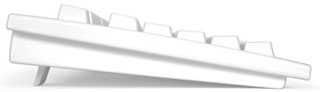 The Matias OS X
and USB 2.0 Keyboards have a nice (in my estimation) near-flat
orientation, but there are also a couple of flip down feet at the
back which will raise the board by about 5/8" if you prefer more
rake.
The Matias OS X
and USB 2.0 Keyboards have a nice (in my estimation) near-flat
orientation, but there are also a couple of flip down feet at the
back which will raise the board by about 5/8" if you prefer more
rake.
With Apple's wired USB keyboard now reduced in price to $29.95, the Matias 'boards have a lot stiffer competition than was probably anticipated when the Apple 'board sold for twice as much. However, I like the key action of the Matias OS X Keyboard better than my Apple 'board.
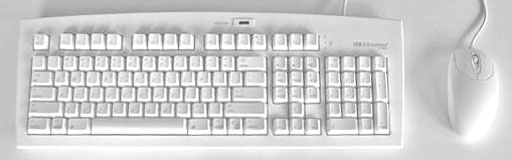
In a marketing/packaging strategy aimed especially at buyers of the Mac mini, which comes with no mouse or keyboard, the Matias USB 2.0 Keyboard is available bundled with a USB optical mouse. At $49.95, the combo product will run you about 40% less than buying an Apple mouse and keyboard. The mouse is a two-button unit with a scroll wheel and is about the same size as an Apple mouse, but with a more angular form factor.
These keyboards appear and feel well put together with quality materials, and the nature of membrane type keyboards in general is for long, trouble-free service. They are also compatible with Mac OS 9 and Windows machines, although the volume keys on the navigation keypad require OS X 10.3 or later.
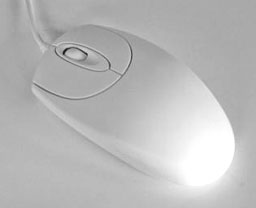 But while I like
these keyboards a lot, I have to say that the mouse bundled with
the USB 2.0 Keyboard Combo Pack is not the greatest. I don't find
it as comfortable as the rounded Apple mouse (or the similar
form-factor MacMice Mouse), and while the buttons have a pleasantly
light action, the scroll wheel is not especially smooth in
operation.
But while I like
these keyboards a lot, I have to say that the mouse bundled with
the USB 2.0 Keyboard Combo Pack is not the greatest. I don't find
it as comfortable as the rounded Apple mouse (or the similar
form-factor MacMice Mouse), and while the buttons have a pleasantly
light action, the scroll wheel is not especially smooth in
operation.
However, my most serious criticism is that tracking is not nearly as precise as with any of the five other USB mice I checked for comparison, and for some reason cursor movement seems jerky or jumpy, something also not noted with any of the other mice.
The Matias mouse, in fact, wouldn't track at all on the glossy side of my reversible black SteelPad mousepad, although it worked on the matte finish side, as well as on a regular mousepad with printed text. Interestingly, it seemed happiest on the bare plywood surface of my computer table. It will do the job, but it's not a pointing device I would use by preference.
The keyboard is available without the mouse for $39.95, so you can get a spare mouse for ten bucks more - not a bad deal.
The Matias OS X Keyboard has a MSRP of $29.95.
The Matias USB 2.0 Keyboard is available for both PC and Mac, in US, French, UK, and German layouts. It retails for US$39.95 (or US$49.95 with the 2-button optical wheel mouse).
Join us on Facebook, follow us on Twitter or Google+, or subscribe to our RSS news feed
Charles Moore has been a freelance journalist since 1987 and began writing for Mac websites in May 1998. His The Road Warrior column was a regular feature on MacOpinion, he is news editor at Applelinks.com and a columnist at MacPrices.net. If you find his articles helpful, please consider making a donation to his tip jar.
Links for the Day
- Mac of the Day: Power Mac G5 (Early 2005), (2005.04.27. At 2.7 GHz, the fastest G5 CPU Apple ever used, also 16x SuperDrive and it shipped with OS X 10.4 Tiger.)
- Support Low End Mac
Recent Content
About LEM Support Usage Privacy Contact
Follow Low End Mac on Twitter
Join Low End Mac on Facebook
Favorite Sites
MacSurfer
Cult of Mac
Shrine of Apple
MacInTouch
MyAppleMenu
InfoMac
The Mac Observer
Accelerate Your Mac
RetroMacCast
The Vintage Mac Museum
Deal Brothers
DealMac
Mac2Sell
Mac Driver Museum
JAG's House
System 6 Heaven
System 7 Today
the pickle's Low-End Mac FAQ
Affiliates
Amazon.com
The iTunes Store
PC Connection Express
Macgo Blu-ray Player
Parallels Desktop for Mac
eBay

