
Charles Moore's Mailbag
2 Trash Shortcuts, Screen Orientation, iPod Update Breaks CD Burner, Mac 512K System Disks, and More
Charles Moore - 2005.10.11 - Tip Jar
- Two Ways to Avoid the Trash Ducking Out of the Way
- Screen Orientation
- iPod Updater Renders CD Burner Unusable
- Joining the Mac Side with a 12" PowerBook
- Making Mac 512k System Disks
- Looking for Mac OS 9 Compatible Printers
- Prediction for Apple's October 12 'One More Thing'
Two Ways to Avoid the Trash Ducking Out of the Way
From Ian Orchard
G'day Charles,
Agreed, the Dock Trash basket is a pain, but I never use it anyway. I select the item(s) for trashing and hit Cmd-Delete.
Keep in touch....
Ian Orchard
Hi Ian,
Actually, while I have long used Select-Cmd-Delete as my standard Trashing mode since OS 9 days, more recently with OS X I've just been hitting the right mouse button and using the contextual menu.
Charles
Re: Trash Ducking Out of the Way?
From Ian Orchard
Charles W. Moore wrote:
"Actually, while I have long used Select-Cmd-Delete as my standard Trashing mode since OS 9 days, more recently with OS X I've just been hitting the right mouse button and using the contextual menu."
Aha!! Veeeery Dangerous. Any mouse that is configured so the right button calls the context menu is a time bomb waiting to blow your right arm off!
Bare your right arm, rest your hand on the mouse, and waggle your index finger. You will see concurrent muscle activity right up to your shoulder. If you hold your index finger over the left button for the majority of your mouse clicks, you need to keep it under very slight tension to avoid inadvertent mouse clicks. This persistent tension is (IMHO & experience) a major cause of RSI/OOS and is one of Microsoft's worst crimes against humanity.
My mouse (an A4Tech wireless 2 button + scrollwheel) is configured with USB Overdrive to have Right button = normal click, Left button = Cmd-click (for open link in new Tab) and Scroll click = Control-click (context menus). The normal position for my index finger is on the table* beside the mouse, only flicking up slightly or up & over when required. No resting tension. Combined with exploiting keyboard commands whenever possible, I have stifled a growing problem with crippling arm pain.
Yes I do have a few hiccups when using someone else's mouse, but that's their problem. I don't lie awake at night with my arm in agony.
Ian Orchard
*strictly speaking it's resting on my middle finger. It's only on the table when using the very small mouse that accompanies my iBook.
Hi Ian,
Thank for the warning. Actually, I am highly cognizant of RSI issues. I am afflicted with fibromyalgia, neuralgia, and myofacial pain syndrome. I use a foot mouse for most clicking. The hand mice that I use most, a Quill Mouse (honking big), a Contour Perfit optical (also very big), and a Mac Mice mouse, all have a very comfortable action to the right button, falling under the big finger or the ring finger.
Charles
Screen Orientation
From M.D.
I can agree that it depends on one's needs - there are definitely times when I'm working with a long HTML/PHP document and wish I could just get a better overview of the thing. Portrait orientation would be good, and I suspect Russell had similar situations. On the other hand, if Apple's priority is defining itself as the "digital hub" company, it makes sense they would choose an orientation that lends itself easily to widescreen movie formatting.
Mac OS X's not perfect, but I wish people would really consider the validity of their complaints in the context of average work habits. It's taking the Mac out of context that's given it the most bad press, anyway, I think.
Hi M.D.
Well taken points all.
Thanks.
Charles
iPod Updater Renders CD Burner Unusable
From David L. Duff
Hi Charles,
Has anyone else had a problem after downloading the 9-23-2005 iPod updater? Specifically where their CD burner is rendered unusable in OS X and iTunes 5.0.1? And how do I undo it?
I had accepted iTunes offer to update the driver for my iPod Shuffle (to 1.1.2 I believe) and after the agonizing 30-some megabytes download over dialup Internet I'm rewarded with "cannot find burner or burner software" when I try to burn a disk in either iTunes or Roxio Toast 6. And even worse, CDs no longer mount to desktop and are not readable either. Amazingly both burners show up in Apple System Profiler, but show no disks within them. My affected unit is a Beige G3 "All in One" with the formerly bootable Sony CRX1611 CD-RW as the only modification. Running OS X 10.2.8 and 9.2.2 in separate partitions.
I know for a fact that both my internal and external burners (both previously iTunes compatible) are still functioning, because when I boot to OS 9 (thank Apple for dual booting low-end Macs!) they work flawlessly in iTunes 2 and Roxio Toast 5.
Help me, Mr. Wizard, or perhaps one of your readers might have a fix.
Thanks in advance.
Regards,
David
Hi David,
Yes, there have been issues. MacFixIt has a thread on this problem that you would promptly find worthwhile to check out.
The workarounds suggested include:
- Reset
- Reverting firmware
Charles
Joining the Mac Side with a 12" PowerBook
From SwOoShY BaLLeR
Thanks Charles.
Thanks to your help. I've decided to join the Mac side and buy a PowerBook 12" myself! Thanks for taking the time to answer all my questions.
I really appreciate it!
Making Mac 512k System Disks
From Michele Matteo
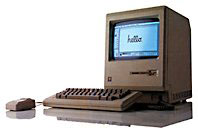 Hello!
:-) I get from a friend a Mac 512k, in very good conditions,
with original mouse and keyboard! The machine works good, the b/w
monitor is like a new one, but I haven't the System Disk or any
type of diskette. Also, I can't make a boot disk coz all my friends
haven't an old Mac with 400 - 1,44 floppy drive to build one. Pls,
can you suggest me where I can find an usable System Disk or how I
can make one?
Hello!
:-) I get from a friend a Mac 512k, in very good conditions,
with original mouse and keyboard! The machine works good, the b/w
monitor is like a new one, but I haven't the System Disk or any
type of diskette. Also, I can't make a boot disk coz all my friends
haven't an old Mac with 400 - 1,44 floppy drive to build one. Pls,
can you suggest me where I can find an usable System Disk or how I
can make one?
Thank you in advance,
Michele Matteo, Milan - Italy
Hi Michele,
You can find information and lots of links on this issue here:
- http://www.mandrake.demon.co.uk/Apple/ltalk/apple_software.html
- http://www.eiu.edu/~philos/retro/mac/system.htm
- http://forums.macrumors.com/archive/index.php/t-121388.html
You're going to have to find someone with a Mac that has a floppy drive that supports 400K/800K floppies, however. Perhaps you could find a somewhat newer old Mac for sale cheaply?
Charles
Editor's note: The only Macs that included 800K floppies were the Mac Plus, 512Ke, pre-FDHD SE, and the Mac II. To the best of my recollection, you can't make a 400K floppy using a 1.4 MB drive. dk Update: You can.
Looking for Mac OS 9 Compatible Printers
From Lynn Gray
Greetings:
I read with interest your article on Mac OS 9 compatibility. I'm looking for a printer replacement for my mother's iMac 233 MHz setup. Any ideas on whether there are any new printers that support Mac OS 9? If not, perhaps some suggestions on the best refurbs to buy.
Thanks,
Lynn Gray
Hi Lynn,
I don't have a very broad frame of reference on this topic, but as a general comment, I think most of the major printer manufacturers, such as Canon, Epson, HP, and Lexmark, are are still providing OS 9 drivers for at least some of their printers. If a printer supports OS 9, it should say so on the box - or the sales person should be able to tell you.
Charles
Prediction for Apple's October 12 'One More Thing'
From Alvin
Hi, how're you? I'd like to share my prediction for the Apple October 12 event. Enjoy the read.
Title: Apple October 12, One More Thing...
God bless,
Alvin
Thanks Alvin
Charles
Join us on Facebook, follow us on Twitter or Google+, or subscribe to our RSS news feed
Charles Moore has been a freelance journalist since 1987 and began writing for Mac websites in May 1998. His The Road Warrior column was a regular feature on MacOpinion, he is news editor at Applelinks.com and a columnist at MacPrices.net. If you find his articles helpful, please consider making a donation to his tip jar.
Links for the Day
- Mac of the Day: PowerBook 500 Series, introduced 1994.05.16. 'Blackbird' includes a 25 to 33 MHz 68040 along with smart batteries and grayscale or color displays.
- Support Low End Mac


