
Miscellaneous Ramblings
Is 'The Mouse' from DVForge the Multi-button Mouse Apple Should Have Built?
Charles Moore - 2005.01.31 - Tip Jar
DVForge calls The Mouse, their optical USB pointing device, "The Mouse Apple Should Have Built."
Apple's second USB mouse, the "buttonless" optical unit, is a major improvement over their original "hockey puck" USB mouse. It looks great, is ergonomically better, and its optical technology is superior. But its action is still too stiff, and it only has one button - and no scroll wheel.
I quit using the Apple USB optical mouse that came with my G4 Cube after few days and switched to a third-party mouse with a lighter action and multiple buttons.
There is indeed room for "a better mouse."
The Mouse from MacMice Workplace Products Co. of Hendersonville, TN, is one interpretation of what a better mouse should be. I've been using a The Mouse for the past several months as my main pointing device, I liked it from the get-go, and I like it better the longer I use it.
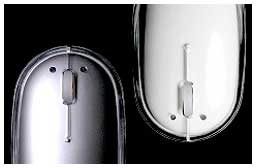 Appearance-wise, it pays more than a little
homage to Apple's USB optical mouse, but in my estimation it's a
nicer mouse to use. Like the Apple unit, The Mouse is a nearly
symmetrical rectangular ovoid in shape and of about average size
for computer mice, and the entire clear mouse housing cover (an
aluminum-colored model is also available) serves as the button - or
more accurately in this case two of the three buttons. The front
half of the case is split and serves as left and right buttons.
Appearance-wise, it pays more than a little
homage to Apple's USB optical mouse, but in my estimation it's a
nicer mouse to use. Like the Apple unit, The Mouse is a nearly
symmetrical rectangular ovoid in shape and of about average size
for computer mice, and the entire clear mouse housing cover (an
aluminum-colored model is also available) serves as the button - or
more accurately in this case two of the three buttons. The front
half of the case is split and serves as left and right buttons.
This configuration does not provide the same sort of satisfyingly precise tactile feedback that a regular mouse button mounted on a mechanical switch mechanism does, but it's not bad at all once you get used to it. The mouse also incorporates a scroll wheel with a delightfully light and silky-smooth action and also a third button click function.
The left/right button click action is slightly lighter than with the Apple mouse, but still stiffer than I prefer. I find the scroll wheel button click uncomfortably stiff, but I hardly ever use it.
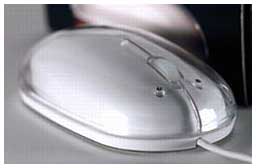 The Mouse itself is nicely balanced and
weighted. It glides smoothly and almost effortlessly on my
mousepad. It has 800 dpi tracking resolution, with a fast,
responsive optical tracking mechanism for accurate pixel-level
editing.
The Mouse itself is nicely balanced and
weighted. It glides smoothly and almost effortlessly on my
mousepad. It has 800 dpi tracking resolution, with a fast,
responsive optical tracking mechanism for accurate pixel-level
editing.
When you move the mouse, the red optical sensor lights up causing the entire skirt of the housing to glow - a very cool effect.
If you are using Mac OS X 10.1 or higher, no driver installation is necessary for basic support of mouse clicking and the scroll wheel. If you're still using Mac OS 8.5.1 through 9.2.2 - or you want more mouse functionality than the built-in OS X drivers provide - proprietary drivers are downloadable at the MacMice support page. MacMice's MouseCommand drivers are full featured to satisfy demanding multi-button mouse users, with assignable scroll button, left-handed operation, adjustable clicking and motion, built-in adjustable cursor acceleration, reversible horizontal scrolling.
MouseCommand v9 driver works with Mac OS 8.5.1 through 9.2.2, and the v10 version works with Mac OS 10.1 through 10.2.8. MouseCommand v11 has been specifically tweaked for Panther.
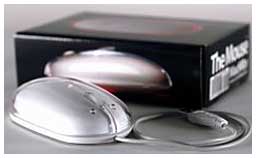 Aside from the button stiffness, my
only real complaint about The Mouse pertains to its cord, which as
with Apple mice is a tad on the short side at 31.5" (I'm a fan of
six foot mouse cables). It is also very small diameter wire that
MacMice says is purposely the most soft, supple materials they
could find, which makes it nice to handle, but I'm wondering about
long-term durability, especially with rough treatment.
Aside from the button stiffness, my
only real complaint about The Mouse pertains to its cord, which as
with Apple mice is a tad on the short side at 31.5" (I'm a fan of
six foot mouse cables). It is also very small diameter wire that
MacMice says is purposely the most soft, supple materials they
could find, which makes it nice to handle, but I'm wondering about
long-term durability, especially with rough treatment.
Other than that, the quality of materials and standard of finish are first-rate.
The Mouse is available in both clear-over-white and an "aluminum" version to harmonize with aluminum PowerBooks and the G5 towers. The USB cable is silver-gray as well. The Mouse dimensions are 2.2" wide, 4.4" long, 1.2" high.
The Mouse sells for $39.99.
Join us on Facebook, follow us on Twitter or Google+, or subscribe to our RSS news feed
Charles Moore has been a freelance journalist since 1987 and began writing for Mac websites in May 1998. His The Road Warrior column was a regular feature on MacOpinion, he is news editor at Applelinks.com and a columnist at MacPrices.net. If you find his articles helpful, please consider making a donation to his tip jar.
Links for the Day
- Mac of the Day: PowerBook 1400, introduced 1996.10.01. Considered by many the best pre-G3 PowerBook with a small footprint and great keyboard.
- Support Low End Mac
Recent Content
About LEM Support Usage Privacy Contact
Follow Low End Mac on Twitter
Join Low End Mac on Facebook
Favorite Sites
MacSurfer
Cult of Mac
Shrine of Apple
MacInTouch
MyAppleMenu
InfoMac
The Mac Observer
Accelerate Your Mac
RetroMacCast
The Vintage Mac Museum
Deal Brothers
DealMac
Mac2Sell
Mac Driver Museum
JAG's House
System 6 Heaven
System 7 Today
the pickle's Low-End Mac FAQ
Affiliates
Amazon.com
The iTunes Store
PC Connection Express
Macgo Blu-ray Player
Parallels Desktop for Mac
eBay

