
Charles Moore's Mailbag
Charles Moore - 2004.11.22 - Tip Jar
DigiTools is a difficult program to categorize. It's a jack of many trades, and there's nothing else quite like it, even among other software suites.
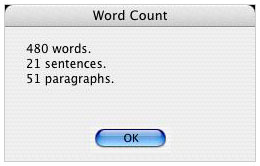
DigiTools is a Mac OS X application suite that combines eight useful tools into one small program including a "typewriter" (i.e.: word processor), calculator, movie player, image viewer, font viewer, dictionary, and converter.
My first impression of DigiTools upon opening the Typewriter window was how pretty and polished the user interface looks. No ugly brushed metal here. Just a nice, clean, attractive, and functional Aqua theme.
Checking out DigiTools multiple feature set was also impressive. I kept remarking to myself: "Oh, and it does that too."
 And
did I mention that DigiTools is freeware?
And
did I mention that DigiTools is freeware?
With DigiTools you can:
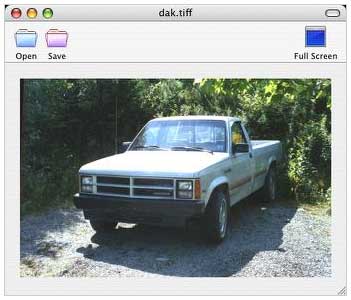
- View high quality images in many resolutions and forms.
- Do word processing with word count, dictionary, and a font viewer all built in.
- Play movies with the addition of a full screen feature
- Convert units and calculate sums in real-time.
- View fonts faster than with Apple's Font Book.
- Create graphical and text based notepads.
- Open dozens of file formats including DivX, WMA, WMP, AIFF, MP3, TIFF, PICT, PDF, WAV, PSD, TXT, RTF, HTML, XML, and more.
 DigiTools
lets you do more than just play a movie or view an image - you can
save images and play movies in different speeds with full-screen
playback without buying additional software such as QuickTime Pro.
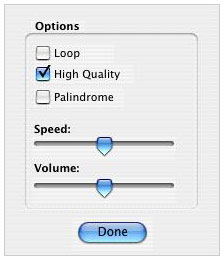
New in DigiTools 1.2 is an options dialog for the Movie Player. From
this dialog you can set movie settings and properties such as speed,
volume, loop, palindrome, and "high quality".
DigiTools
lets you do more than just play a movie or view an image - you can
save images and play movies in different speeds with full-screen
playback without buying additional software such as QuickTime Pro.
New in DigiTools 1.2 is an options dialog for the Movie Player. From
this dialog you can set movie settings and properties such as speed,
volume, loop, palindrome, and "high quality".
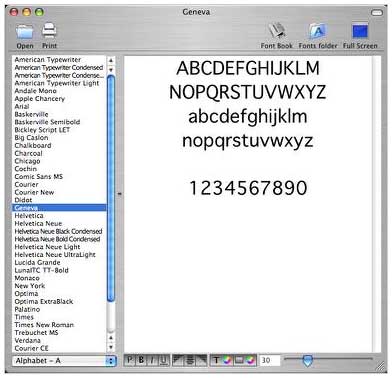 DigiTools'
Font Browser tool is notably faster in performance than Apple Font
Book and has more features, such as letting you open existing text
files, print font styles, change text color and background color and
also has a smart full-screen view. Apple's Font Book has none of
these features, although if you want to call Font Book up, the
DigiTools Font Viewer window has a handy Font Book launch button.
DigiTools'
Font Browser tool is notably faster in performance than Apple Font
Book and has more features, such as letting you open existing text
files, print font styles, change text color and background color and
also has a smart full-screen view. Apple's Font Book has none of
these features, although if you want to call Font Book up, the
DigiTools Font Viewer window has a handy Font Book launch button.
The full-screen feature is also included in the font viewer, word processor, and image viewer for either home and family use or business presentation use. The font viewer can act as a character palette at the same time as being a fast and simple font viewer tool. View math symbols, Greek, currency symbols and even special Unicode graphic characters in different styles and sizes.
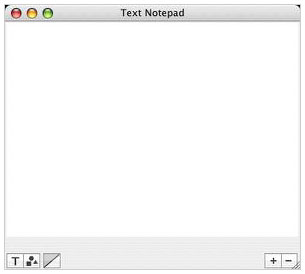 DigiTools
notepad lets you make notes either in text or graphic form. The
graphic notepad feature is especially useful for those with a
graphics tablet. Also included is the text notepad feature that
includes formatting and a transparency option.
DigiTools
notepad lets you make notes either in text or graphic form. The
graphic notepad feature is especially useful for those with a
graphics tablet. Also included is the text notepad feature that
includes formatting and a transparency option.
Unfortunately, the word processor still needs some work. Theoretically, with DigiTools' Instant Text Search, as soon as you start typing a keyword to search for in a word processing document, it is supposed to be found almost instantly with the word found highlighted with a color ring. I couldn't get this to work at all. When I started typing in the Search field, after one letter the cursor would switch to the main text field and begin replacing what was there.
There is no spell checker - or even the ability to tap into the OS X spellchecker, which is curious, since this is a Cocoa application that supports OS X Services.
 DigiTools
is programmed by Joshua Coventry and Nathan Wheatley at MegaWorks is
Sheffield, United Kingdom, plus a team of beta testers who make sure
every DigiTools version is ready for release.
DigiTools
is programmed by Joshua Coventry and Nathan Wheatley at MegaWorks is
Sheffield, United Kingdom, plus a team of beta testers who make sure
every DigiTools version is ready for release.
Joshua is currently looking for volunteer programmers to bring more software to MegaWorks.
Joshua believes that OS X users should have basic computer programs free of charge, because they are standard and tools you have to use every day. He pledges that DigiTools will always be free and will never morph into a shareware or commercial product.
This application is off to a nice start and has lots of potential, but the word processor, which is the hub of any suite like this, is just too features-challenged and buggy for serious use as yet.
 New
in DigiTools 1.2:
New
in DigiTools 1.2:
- Improved overall program interface and performance
- Added new separate 'DigiTools Updater' application
- Added movie menu
- Added help menu
- Added Open, Print, Full-screen to Font Viewer
- Added RPN Scientific Calculator
- Added Options dialog to movie player
- Added Full-Screen option to Word processor
- Added Separator control to Font Viewer
- Added .WAV support to Movie Player
- New and larger tool icons
- New tools window design with Scrolling feature
- New notepad with drawing, text and transparency options
- Word processor toolbar is now within each document window
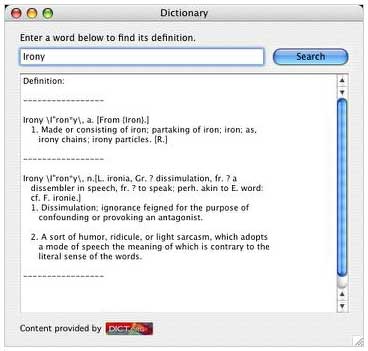
- Improved Dictionary interface
- More compact Converter interface
- Font Viewer can now view Currency and Math Symbols amongst others
- Calculator Log is now a separate floating palette.
- Calculator Log can be shown using a menu command.
- Converter units are now displayed in their long-term names
- Notepad text can now be formatted (align, font, size, etc.)
- Format menu and Select All now work with font viewer and notepad.
Bug fixes:
- Solved word processor performance issues
- Toolbar graphics now have mask images
- Pressing cancel on movie open dialog no longer crashes DigiTools
- Image Viewer Open menu item bug
- Major bug involving opening text files
- Word Processor searching bug
- Close menu item now works for notepad
- Calculation bugs in calculator
- Save Changes dialog icon is no longer stretched.
System requirements:
- Mac OS X 10.2.5 or higher
- Additional QuickTime codec needed to play DivX files
DigiTools is freeware.
Join us on Facebook, follow us on Twitter or Google+, or subscribe to our RSS news feed
Charles Moore has been a freelance journalist since 1987 and began writing for Mac websites in May 1998. His The Road Warrior column was a regular feature on MacOpinion, he is news editor at Applelinks.com and a columnist at MacPrices.net. If you find his articles helpful, please consider making a donation to his tip jar.
Links for the Day
- Mac of the Day: PowerBook 500 Series, introduced 1994.05.16. 'Blackbird' includes a 25 to 33 MHz 68040 along with smart batteries and grayscale or color displays.
- Support Low End Mac
Recent Content
About LEM Support Usage Privacy Contact
Follow Low End Mac on Twitter
Join Low End Mac on Facebook
Favorite Sites
MacSurfer
Cult of Mac
Shrine of Apple
MacInTouch
MyAppleMenu
InfoMac
The Mac Observer
Accelerate Your Mac
RetroMacCast
The Vintage Mac Museum
Deal Brothers
DealMac
Mac2Sell
Mac Driver Museum
JAG's House
System 6 Heaven
System 7 Today
the pickle's Low-End Mac FAQ
Affiliates
Amazon.com
The iTunes Store
PC Connection Express
Macgo Blu-ray Player
Parallels Desktop for Mac
eBay

