
Miscellaneous Ramblings
Quest for a Replacement PowerBook Battery
Charles Moore - 2003.10.06 - Tip Jar
The battery in my heretofore trusty PowerBook G3 Pismo croaked last week. At least I think that's the problem.
I unplugged the computer the night Hurricane Juan blew through in case we experienced electric power issues. The next day I noticed that the sleep light was not flashing, which was unexpected, as the computer was booted into OS 9.1, which usually will last for weeks asleep on battery power.
I plugged the AC adapter back in, and the Pismo booted up normally, although the PRAM settings had reverted to defaults. The little lightning bolt battery charge indicator came on, but after an hour very little charge progress had been achieved. I put the 'Book to sleep, and when I returned the next day, the battery was completely dead, with zero charge indicated, and when I pulled the AC adapter, the computer shut down.
Upon reboot, the PRAM settings had again reverted to defaults, indicating that the zero charge readout was not kidding. None of the little charge state lights on the battery are illuminated either. Resetting the Power Manager Unit didn't change anything. Neither did rebooting onto OS X.
Come to think of it, I had noticed that the palm rest area over the battery compartment had seemed unusually warm when the PowerBook was sleeping over the past couple of weeks or so, which may have been a warning that the battery was in failure mode.
Lithium Ion battery behavior is a mystery to me.
The Pismo is just a few days short of its three year manufacture date anniversary, and the battery has not had a lot of discharge/recharge cycles, so if the problem is the battery (rather than, say, PMU circuitry), that seems like a disappointingly short life span. The original NiMH battery in my (now my daughter's) old 1996 PowerBook 5300 is still going strong, but I guess that LiIon units are not as hardy.
Anyhow, in the absence of another Pismo/Lombard battery available to try in this neck of the woods, the first logical step seems to be procuring a replacement battery to try. As it turns out, there are a number of replacement Pismo batteries offered by a variety of resellers, with prices ranging from about $129 to $195.
One possibility that intrigued me is the new line of high-capacity batteries designed for PowerBook G4 and G3 models introduced by Newer Technology, Inc. (NewerTech) and Other World Computing (OWC) a couple of weeks ago.
The NuPower line of Lithium Ion batteries offers up to 30 percent more capacity than Apple's stock PowerBook batteries, and the companies claim that they deliver the longest run times of any replacement batteries available today.
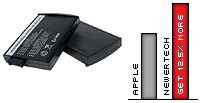 NuPower
LiIon G3 Batteries for G3 Lombard
(1999/Bronze Keyboard) and G3 FireWire (2000/Pismo) series
PowerBooks sell for $149.99, which is about middle-of-the-road for
Lombard/Pismo replacement batteries, and they are rated at 10.8 volts
and 5400 mAh, providing an advertised 12.5% more capacity versus
stock Lombard and FireWire batteries.
NuPower
LiIon G3 Batteries for G3 Lombard
(1999/Bronze Keyboard) and G3 FireWire (2000/Pismo) series
PowerBooks sell for $149.99, which is about middle-of-the-road for
Lombard/Pismo replacement batteries, and they are rated at 10.8 volts
and 5400 mAh, providing an advertised 12.5% more capacity versus
stock Lombard and FireWire batteries.
While 12.5% extra run time is nothing to sniff at, it's significantly less than the boost NuPower batteries for the PowerBook WallStreet (25 percent) and PowerBook G4 Titanium (30 percent) offer - and the Lombard/Pismo unit sells for $10 more than the others. This must have something to do with its smaller physical size.
NewerTech NuPower batteries are available through OWC and at other resellers in the US and around the globe. Visit NewerTech for additional information.
Good places to comparison shop for laptop batteries are ComparesPrices.com and NexTag.com.
Incidentally, Apple recommends that you calibrate PowerBook and iBook batteries for best performance
The Lithium Ion battery of an iBook or PowerBook computer has an internal microprocessor that provides an estimate of the amount of energy in the battery during charging and discharging. The battery needs to be recalibrated from time to time to keep the onscreen battery time and percent display accurate. You should perform this procedure when you first use your computer and then every few months thereafter.
Follow these steps:
- Plug the power adapter in and fully charge your computer's battery until the battery indicator lights turn off and the adapter plug ring goes from amber to green, which indicates that the battery is fully charged.
- Disconnect the power adapter and use your iBook or PowerBook. When your battery gets low, you will see the low battery warning dialog on the screen. Continue to use your computer until it goes to sleep. At that point the battery has been sufficiently drained for calibration.
- Connect the power adapter and leave it connected until the battery is fully charged again.
Note: You have to fully charge and then discharge your battery only once to calibrate it. After that, you can connect and disconnect the power adapter when the battery is at any charge level.
When the battery reaches empty, the computer is forced into sleep mode. The battery actually keeps back a reserve beyond empty to maintain the computer in sleep for a period of time. Once the battery is truly exhausted, the computer is forced into shutdown. At this point, any open files could be lost. Therefore, it is important that you find an electrical outlet and connect the adapter before the forced shutdown occurs.
While that NuPower extra capacity battery look like a pretty good deal, in my searches I found that Wegener Media offers pulled and tested OEM Pismo batteries for $119.99, and I've decided to go with one of those.
Now, here's keeping my fingers crossed that the only problem is with the battery itself, and not something in the Power Management Unit.
Join us on Facebook, follow us on Twitter or Google+, or subscribe to our RSS news feed
Charles Moore has been a freelance journalist since 1987 and began writing for Mac websites in May 1998. His The Road Warrior column was a regular feature on MacOpinion, he is news editor at Applelinks.com and a columnist at MacPrices.net. If you find his articles helpful, please consider making a donation to his tip jar.
Links for the Day
- Mac of the Day: PowerBook 500 Series, introduced 1994.05.16. 'Blackbird' includes a 25 to 33 MHz 68040 along with smart batteries and grayscale or color displays.
- Support Low End Mac
Recent Content
About LEM Support Usage Privacy Contact
Follow Low End Mac on Twitter
Join Low End Mac on Facebook
Favorite Sites
MacSurfer
Cult of Mac
Shrine of Apple
MacInTouch
MyAppleMenu
InfoMac
The Mac Observer
Accelerate Your Mac
RetroMacCast
The Vintage Mac Museum
Deal Brothers
DealMac
Mac2Sell
Mac Driver Museum
JAG's House
System 6 Heaven
System 7 Today
the pickle's Low-End Mac FAQ
Affiliates
Amazon.com
The iTunes Store
PC Connection Express
Macgo Blu-ray Player
Parallels Desktop for Mac
eBay

