
Miscellaneous Ramblings
A Miscellaneous Ramblings Review
Laptop Laidback Computer Stand
Charles Moore - 2003.07.28 - Tip Jar
There are a lot of laptop stands on the market these days, testimony to the fact that more and more people are opting to use portable computers as dual-purpose machines - both for traditional notebook tasks and as desktop substitutes at home and/or at work.
Most laptop stands are designed to get the computer screen elevated to a more comfortable viewing angle when working at a desk or table with an external keyboard and mouse for input. Getting the computer off the support surface also allow it to cool more efficiently.
However, another category of stand is designed for use in more relaxed postures, such as lying on a bed, sofa, the floor, or whatever. The Laptop Laidback, which is made not far from where I live in eastern Nova Scotia, is great for this purpose and does what it was designed to do perfectly. It's also a fine piece of furniture, made of good, honest, Nova Scotia maple attractively varnished, with a smooth, white, Melamine surface on the laptop support tray. The plastic adjustment knobs are robust, user friendly, strong, and attractive.
In addition to satisfying comfort-seeking computer users, Laptop Laidback can enable individuals with certain long term disabilities as well as those recuperating from surgery or undergoing rehabilitation. Indeed, I haven't encountered a better device for computing in bed. I don't know what I would do without mine.

One major advantage of the Laptop Laidback for portable computer
use away from a desk or table is that it keeps the hot computer
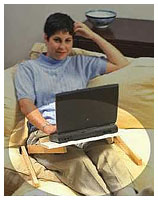 away
from you or the blankets, which allows it to run cooler. This will be
a lot more comfortable for the user. This is particularly important
for newer laptops with their hotter processors. A fairly consistent
complaint - about the G4 PowerBooks especially - is that they run
very hot.
away
from you or the blankets, which allows it to run cooler. This will be
a lot more comfortable for the user. This is particularly important
for newer laptops with their hotter processors. A fairly consistent
complaint - about the G4 PowerBooks especially - is that they run
very hot.
The Laptop Laidback's white tray surface and bright finished natural maple legs will coordinate nicely with the iceBook's white livery.
The Laptop Laidback has five main components; two two-piece articulated, varnished maple legs joined respectively by knurled bushings that allow "knee-style" angle adjustments in five degree increments. The adjustment angle is secured by sturdy and generously sized thumbscrews for each joint.
As noted above, the tray section is a laminate surfaced with smooth Melamine. There are two angled slots at the back containing captive sliding anchors for the thumb screws that fasten the legs to the tray. This allows the user infinite adjustment of the Laptop Laidback tray height within the range of the slots.
Once assembled an adjusted to the user's preference, Laptop Laidback is a solid and stable platform. It easily accommodates my PowerBook 1400, which is a relatively heavy portable computer by today's standards. Included with the Laptop Laidback kit are self-adhesive Velcro strips that can be affixed to the bottom of the computer to secure it to corresponding Velcro strips on the tray's facing surface, however, I have found these unnecessary.
When disassembled, the Laptop Laidback's legs store neatly and securely, fastened with Velcro patches to the Velcro strips on the unit's tray module. This creates a compact, unified bundle that will easily stored in many standard-sized computer cases or carry bags. Breakdown and reassembly takes just a couple of minutes.
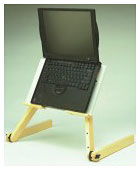 Laptop
Laidback features include:
Laptop
Laidback features include:
- Fits all laptop computers.
- Allows the laptop to run cooler
- Ideal for computing in bed, sofa, and recliners.
- Highly adjustable.
- Very stable.
The Laptop Laidback can also be used as a book rest for reading in bed or on a sofa, or as a portable writing desk. It could accommodate a keyboard for a desktop computer or PDA as well for persons confined to bed, with the computer monitor positioned nearby. A wireless keyboard with an integral pointing device would be ideal for this sort of use.
My only complaint about the Laptop Laidback is that with the heavy old PowerBook 1400 aboard, it is just a wee bit tippy on a bed. I found this out the hard way a couple of weeks ago when I sat down on the bed, where the computer was parked on the Laptop Laidback, to change my shoes. As I stood up, I heard a sickening crash behind me. The mattress decompression (and it's an extra-firm bed, too) had caused the Laidback to upset, dumping the poor old 1400 on the hardwood floor.
Happily, I was unable to find any damage on the computer - not even a new scratch. Those old 1400s are tough critters. However, I shall be more careful in the future.
Laptop Laidback specs and dimensions:
- 16 inches (41 cm) wide
- 10 inches (25 cm) high
- 1.75 inches (4.5 cm) thick
- weight: 4.75 lbs (2.2 kg)
- maximum clearance: 11" (28 cm)
- left to right leg separation: 22" (56 cm)
- legs lock every 5 degrees
- legs: maple
- table: 1/2" (1.27 cm) melamine
Laptop Laidback sells for US$89.
Join us on Facebook, follow us on Twitter or Google+, or subscribe to our RSS news feed
Charles Moore has been a freelance journalist since 1987 and began writing for Mac websites in May 1998. His The Road Warrior column was a regular feature on MacOpinion, he is news editor at Applelinks.com and a columnist at MacPrices.net. If you find his articles helpful, please consider making a donation to his tip jar.
Links for the Day
- Mac of the Day: Macintosh LC, (1990.10.15. Only 3" tall, the LC was the least expensive color Mac in 1990.)
- Support Low End Mac
Recent Content
About LEM Support Usage Privacy Contact
Follow Low End Mac on Twitter
Join Low End Mac on Facebook
Favorite Sites
MacSurfer
Cult of Mac
Shrine of Apple
MacInTouch
MyAppleMenu
InfoMac
The Mac Observer
Accelerate Your Mac
RetroMacCast
The Vintage Mac Museum
Deal Brothers
DealMac
Mac2Sell
Mac Driver Museum
JAG's House
System 6 Heaven
System 7 Today
the pickle's Low-End Mac FAQ
Affiliates
Amazon.com
The iTunes Store
PC Connection Express
Macgo Blu-ray Player
Parallels Desktop for Mac
eBay

