
Miscellaneous Ramblings
FireWire: Hot Swapping Isn't Always a Good Idea
Charles Moore - 2003.02.24 - Tip Jar
One of the highly touted advantages of FireWire is hot pluggability. Unlike cranky old SCSI, you are supposed to be able to plug in or unplug FireWire devices to your heart's content with your Mac powered up - or not?
While I have occasionally taken chances (or been obliged to when something locked up) and hot-plugged/unplugged SCSI cables over the past decade, I've never experienced any notable problems from doing so. Consequently, I find it highly ironic that I think I have just experienced my first-ever hot-plugging induced hardware failure - and it's with a FireWire drive.
While my daughter was home from university (for what used to be called "March break") last week, she asked me to burn a CD for her. My usual computer of choice for CD-burning is the good old Umax S900, so I started it up, and, while it was still booting, I (being in a hurry as usual) plugged in the FireWire cable for the Que Fire! CD burner into the Macally PCI FireWire adapter in the S900 - and OS 9.1 immediately crashed to the MacsBug debugger, which reported a bus error. Rats!
I tried rebooting, and the same thing happened again, although I discovered that the Umax would resume booting if I typed "es" in the MacsBug command line field and then hit Return. But while my Desktop icons appeared, the rest of the Finder didn't - no menu bar and no Desktop picture. Very peculiar. However, I could open my hard drive window and get at the System Folder.
I tried rebooting from an OS 8.1 Disk Tools floppy, and the Finder appeared normally. I ran Disk First Aid, which affirmed that all was well on the hard drive. You can't do much when booted from an OS 8.1 floppy disk, so I opened Startup Disk and selected the hard drive partition with OS 9.0 on it. When I rebooted, it again crashed to the debugger when the extensions started to load. I then tried booting from an OS 9.0 install CD, and that worked fine.
Okay, I also have OS 8.1 installed on the hard drive's third partition, so I tried it, and the machine booted up normally. I ran Disk Warrior on all three partitions to make sure that there were no directory corruption issues, although at this point I thought that was a very long shot. While Disk Warrior did find a few minor problems that Disk First Aid had missed, there was nothing that would explain the anomalous behavior.
However, OS 8.1, which was working happily, does not support FireWire, while OS 9.0 and OS 9.1 do, and that observation, combined with the fact that the problem first manifested at the moment when I was plugging in a FireWire drive, seemed to narrow the scope of probability.
I opened the OS 9.1 Extensions folder, moved the FireWire extensions to the disabled folder, and rebooted. The S900 started up nicely, with the Finder and the menu bar showing up as they should.
Just to eliminate another remote possibility, I installed a fresh set of FireWire extensions and rebooted again. It once more crashed to the debugger as soon as the extensions started to load.
In summary, my best guess at this point is that plugging in the CD burner (which was powered up at the time with its external power supply) somehow damaged the FireWire port and/or PCI card circuitry, something that I had thought was not supposed to be an issue with FireWire.
If the PCI card really is fried, it's not a major financial
catastrophe - you can pick up 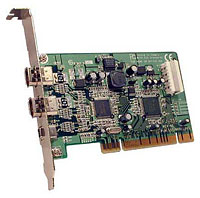 Macally PCI FireWire adapters for about twenty dollars these
days, but it is a pain, although not nearly as much of one as being
experienced by a sizable cohort of titanium PowerBook owners who are
reporting FireWire port failures that seem to be related to plugging in
the iPod, of all things.
Macally PCI FireWire adapters for about twenty dollars these
days, but it is a pain, although not nearly as much of one as being
experienced by a sizable cohort of titanium PowerBook owners who are
reporting FireWire port failures that seem to be related to plugging in
the iPod, of all things.
The provisional moral of this tale: Be cautious about FireWire connections, and it's probably prudent to at least wait until the machine is fully booted before connecting or disconnecting a FireWire device.
TiBook owners might be well advised to be extra wary and put the machine to sleep, although I don't know if that would really prevent the problem from occurring
USB 2 anyone?
Join us on Facebook, follow us on Twitter or Google+, or subscribe to our RSS news feed
Charles Moore has been a freelance journalist since 1987 and began writing for Mac websites in May 1998. His The Road Warrior column was a regular feature on MacOpinion, he is news editor at Applelinks.com and a columnist at MacPrices.net. If you find his articles helpful, please consider making a donation to his tip jar.
Links for the Day
- Mac of the Day: 466 MHz iBook G3 (FireWire), introduced 2000.09.13. The first Mac to use the PowerPC 750cx includes FireWire and DVD-ROM.
- Support Low End Mac
Recent Content
About LEM Support Usage Privacy Contact
Follow Low End Mac on Twitter
Join Low End Mac on Facebook
Favorite Sites
MacSurfer
Cult of Mac
Shrine of Apple
MacInTouch
MyAppleMenu
InfoMac
The Mac Observer
Accelerate Your Mac
RetroMacCast
The Vintage Mac Museum
Deal Brothers
DealMac
Mac2Sell
Mac Driver Museum
JAG's House
System 6 Heaven
System 7 Today
the pickle's Low-End Mac FAQ
Affiliates
Amazon.com
The iTunes Store
PC Connection Express
Macgo Blu-ray Player
Parallels Desktop for Mac
eBay

