
Miscellaneous Ramblings
Miscellaneous Ramblings Review
Wacom Graphire2 Graphics Tablet
Charles Moore - 2003.02.10 - Tip Jar
I don't do a lot of graphics work and have had little experience with graphics tablets, but when the good folks at Wacom offered to send me one of their Graphire2 graphics tablets to test, I gladly accepted.
The Graphire2 package consists of the tablet itself, a squarish plastic panel about half the size of the standard clipboard; the Graphire2 pen, a pen-shaped stylus with a click button on the side; the Graphire2 Cordless Mouse, a three-button mouse with a scroll wheel that uses the tablet's surface as a mousepad; and two CDs containing driver software and a package of bundled graphics applications.
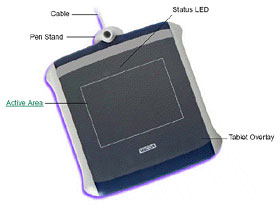
Installation of the Graphire2 was easy - just plug the unit's USB cable into a USB port. If all is well, a small LED will light on the tablet showing that it is properly connected. The tablet must be plugged in during driver installation and the first restart after the installation to create the tablet preference file. Once that preference file has been created you can plug the tablet in anytime and it should work.
The Graphire2 Tablet CD contains software installers for both the Classic Mac OS (minimum OS 8.6), and OS X (minimum 10.1), as well as various versions of Windows. The installer automatically detects what system software is running and proceeds accordingly. The Classic OS install was especially slick, taking only a minute or two, and not requiring a restart. The installer menu automatically displayed, and the instructions were easy to follow.
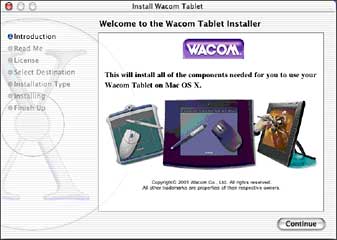
The OS X install required a double-click of the install icon in the CD window, which, interestingly, called up Classic mode. However, a different install menu ultimately appeared from the one I had used for the OS 9.2.2 install, and the OS X installer seemed to be a standard native one, requiring entry of an administrator password and displaying Aqua buttons and progress bars. Unlike the Classic install, the OS X software requires a restart in order to be fully operational.
The installer CD includes a quick start tutorial that walks you through the basic features and functions of the Graphire2 tablet and its input devices. A user's manual in PDF format is also provided containing detailed information on using and customizing the Graphire2 tablet.
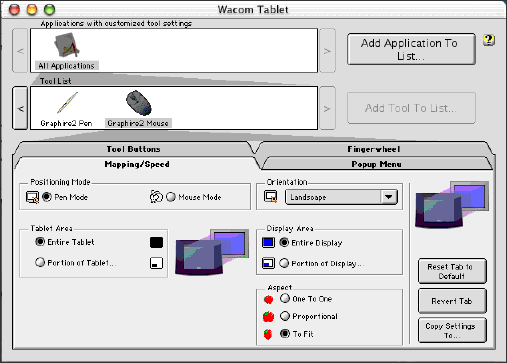
To open the control panel and configure your preferences, in the Classic OS open the Wacom Tablet control panel from the Apple Menu Control Panels submenu. In OS X, select Applications from the Go menu, open the Wacom folder, and double click on the tablet icon.
A graphics tablet like the Graphire2 facilitates sketching and drawing by hand, and allows you to sign your name in digital documents. The pressure-sensitive Graphire2 Pen makes easy to edit photos, sketch, add a note to an email, or simply sign your name. Of course, if you are into graphics or just want to have more fun with your digital photos, having a graphics tablet is a no-brainer.
With the Graphire2 you can move people around in photos, colorize old black-and-white images, or just clean up scratches and imperfections. Graphire2's pen supports 512 levels of pressure, so you can easily edit your digital photos or make a quick sketch. With the bundled Painter Classic application you can sketch and paint with simulated natural media tools like oils, colored pencils and chalks. Also bundled with the Graphire 2 is Adobe Photoshop Elements - a "lite" version of Adobe Photoshop (but still a 65 MB install!). These bundled applications add a ton of value to the Graphire2 product and facilitate some pretty cool stuff with the tablet right out of the box - plenty of functionality and features to keep nonprofessional graphics dabblers satisfied for a long time.
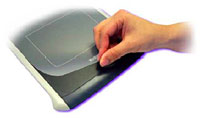
You can also place a graphic or photo under the lift-up clear plastic tablet contact surface and trace over it with the pen transferring it to a graphics application document.
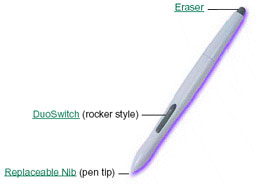
The Graphire2 pen responds to the nuance and inflection of your hand movements, enabling you to create natural looking pen and brush strokes. Many graphics applications have drawing tools that respond the pressure you place on the pan. For example, in some drawing programs sliders are used to vary brush characteristics (width, color, and opacity.) These characteristics can be controlled much better by the Graphire2 pen's pressure sensitivity. You can very line width, blend colors, and change opacity the pressure you exert upon the pen.
The Wacom cordless Graphire2 Mouse also dispenses with cords and
cleaning, and is claimed to be twice  as accurate as a standard optical mouse.
Three programmable buttons give you key commands at your
fingertips, and the scrolling finger wheel lets you scroll Web
pages and text documents with ease.
as accurate as a standard optical mouse.
Three programmable buttons give you key commands at your
fingertips, and the scrolling finger wheel lets you scroll Web
pages and text documents with ease.
The Graphire2 mouse is cordless, batteryless, and works by moving across the tablet's active area. You can position the screen cursor just as you do with a regular mouse. The buttons are programmable, and the integrated finger wheel is both programmable with programmable middle button and a rolling wheel for scrolling. The mouse is light, and tracking is indeed very accurate. The action of the buttons and scroll wheel are a bit heavier than I prefer, but that is largely a matter of personal taste.
The Wacom Graphire2 graphics tablet is a slick package, and represents excellent value at $99.
The Graphire2 bundle includes:
- The Graphire2 Pen, complete with programmable DuoSwitch, built-in eraser, and 512 levels of pressure sensitivity.
- The three-button cordless, ball-free Graphire2 Mouse complete with finger wheel.
- The Graphire2 tablet with removable pen stand and transparent overlay for easier tracing.
- Adobe Photoshop LE & Corel Painter Classic so you can edit your favorite photos or simply draw and paint on your computer.
Graphire2 Specifications
- Tablet Dimensions: 8.2" x 8.4" x 0.4"
- Active Area: 3.65" x 5"
- Pressure Levels: 512
- Resolution: 1015 lpi
System requirements: Mac with Mac OS 8.5, 9, or 10.1; powered USB port, CD-ROM drive, color monitor.
You may need to download the Apple USB Card updates available at the Apple web site.
- Mac OS 8.6.1 and greater require the 1.3.5 update.
- Mac OS 8.5.1 requires the 1.2 update
- PC running Windows 98, 2000, Millennium, or XP; Powered USB port, CD-ROM drive, color monitor.
The Wacom Graphire2 sells for $99.95
You can download the latest OS X drivers for the Wacom tablets at < http://www.wacom.com/productsupport/mysupport.cfm?platform=macosx>
Join us on Facebook, follow us on Twitter or Google+, or subscribe to our RSS news feed
Charles Moore has been a freelance journalist since 1987 and began writing for Mac websites in May 1998. His The Road Warrior column was a regular feature on MacOpinion, he is news editor at Applelinks.com and a columnist at MacPrices.net. If you find his articles helpful, please consider making a donation to his tip jar.
Links for the Day
- Mac of the Day: Centris 660av, introduced 1993.07.29. This breakthrough model included digital signal processor for video.
- Support Low End Mac
Recent Content
About LEM Support Usage Privacy Contact
Follow Low End Mac on Twitter
Join Low End Mac on Facebook
Favorite Sites
MacSurfer
Cult of Mac
Shrine of Apple
MacInTouch
MyAppleMenu
InfoMac
The Mac Observer
Accelerate Your Mac
RetroMacCast
The Vintage Mac Museum
Deal Brothers
DealMac
Mac2Sell
Mac Driver Museum
JAG's House
System 6 Heaven
System 7 Today
the pickle's Low-End Mac FAQ
Affiliates
Amazon.com
The iTunes Store
PC Connection Express
Macgo Blu-ray Player
Parallels Desktop for Mac
eBay

