
Miscellaneous Ramblings
The LC 520: Still Useful after All These Years
Charles Moore - 2002.12.16 - Tip Jar
I wonder how many PC users are still getting useful service out of nine-year-old machines? I mean, the cusp of 1993-94 was still the early days of the 486 chip, and Windows 3 was state of the art (so to speak) in Microsoft system software.
The point of this musing is the upcoming ninth birthday of my old
Mac LC 520 all-in-one, which is
still in daily 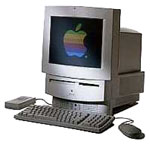 use by my wife as her word
processing and email machine - tasks which it performs for her purposes
almost as satisfactorily as newer hardware would. In fact, she uses the
LC in preference to several faster and newer Macs in the house.
use by my wife as her word
processing and email machine - tasks which it performs for her purposes
almost as satisfactorily as newer hardware would. In fact, she uses the
LC in preference to several faster and newer Macs in the house.
The old LC has a 25 MHz 68030 chip and 20 MB of RAM. The original 160 MB Quantum hard drive is still going strong; it works quietly and dependably. So does the dead-silent to 2x Sony CD-ROM drive, whose only functional shortcoming is that it loads with a CD caddy, something outside the experience of a lot of Mac users these days.
Everything still works on the old machine, although the floppy drive is a bit cranky, having for the past couple of years refused to eject discs without some help from a straightened paper clip inserted in the handy emergency eject hole. It still reads and writes floppies fine, however.
The 640 x 480 Sony Trinitron display is still sharp, bright, and clear, and within its resolution limitations, is one of the nicest CRT monitors I've ever used.
My wife uses Word 5.1 - the best piece of software Microsoft ever made - Eudora Light 3.1.3 for email, and Netscape 4.04, which isn't great, but she switches to one of our faster Macs for most Web surfing anyway. On the other hand, the old LC has great serial port throughput and gives nothing away to the later models in email performance through a 28,800 bps US Robotics Sportster modem, which is still faster that our crummy rural phone lines will support.
We're running System 7.5.5, but with the Open Transport software from System 7.6.1 installed for dialup support. We had 7.6.1, the last Mac OS version that supported the '030, installed for a short time, but it seemed to offer no performance advantages and had compatibility problems with our old Microtek scanner, so we downgraded to 7.5.5.
The LC is also the computer that stays hooked up to our ancient ImageWriter II printer most of the time, and what little hard copy printing I do is mostly handled through it and Word 5.1.
The old all-in-one also handles light-duty graphics work reasonably well in Color It! 4.1, still my all-time favorite graphics program, and indeed the one I still use in Classic Mode running OS X on my PowerBook. It is, of course, lightning fast on the G3, but it's no slouch on the LC - quite an amazing testimony to backward and forward compatibility. I understand that an OS X native port is in the works.
The LC 520 has been an amazingly forgiving and robust robust computer. One of my favorite anecdotes about it is the time my son had it dialled up to the Internet while he was working on an old Power Mac 9500 we had. He needed a hard drive to test something he had repaired on the 9500, so without bothering to shut down the LC or even a log off the Net, he popped the Quantum hard drive out of its easily accessible bay in the back of the 520, did what he needed to do with it, and then reinserted it in the LC, which had remained running and dialled up to the Internet throughout.
Not only is the LC's hard drive easily accessible, but the motherboard slides out of a hatch in the back like pulling a drawer out in a cabinet, making things like RAM upgrades or PRAM battery replacement a breeze. One of Apple's better ideas.
The LC was a good and faithful workhorse computer for me for three years. It would not even be remotely adequate as a production machine now - the computer world has progressed too far in the subsequent six years. However, it is still a tribute to be the essential goodness of the Mac OS concept, not to mention the robustness of Apple hardware, that this old computer at nine years of age is still not only useful, but that the user interface paradigms it employs are not all that radically different from the ones in Apple's new generation OS.
I wish I had more confidence that my current Pismo PowerBook will still be running, let alone useful, in seven years time. On the other hand, the PowerBook 5300 that superseded LC 520 as my number one computer is still going strong well into its seventh year, now in the hands of my daughter, and I would guess that it has twice the hours on at that has the LC does.
The LC 520 was built for seven months - June 1993 to February 1994 - and then replaced by the short-lived (production wise) LC 550, which was pretty much identical save for a slightly faster 33 MHz '030 chip. There were also Performa versions of these machines that shipped with keyboards, mice, and bundled software, including the Performa 560, the "Money magazine edition" that came bundled with personal finance software.
Another variant was the Macintosh
TV in this form factor, but with a very cool black case and
matching 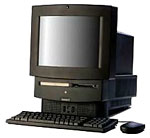 keyboard, mouse, and remote-control - and
an internal TV tuner. Unfortunately, this configuration was limited to
a maximum 8 MB of RAM. The Mac TV had a 33 MHz '030 chip.
keyboard, mouse, and remote-control - and
an internal TV tuner. Unfortunately, this configuration was limited to
a maximum 8 MB of RAM. The Mac TV had a 33 MHz '030 chip.
In November 1994, the LC 550 was superseded by the LC 575 (Performa 575, 577, 578) which replaced the old 33 MHz '030 with a 68LC040 chip running at 33 MHz, had a 250 MB hard drive, and added a "Communications Slot" that could except an ethernet card or an internal fax/modem. The LC 550 and later also dispensed with the 520's rock-solid and silent running Sony 2x caddy-loading CD-ROM drive, and replaced it with a more convenient - but unfortunately much less reliable - Matsushita tray-loading 2x drive.
The final edition of the all-in-one 5xx series was the LC 580 (Performa 580, 588), which was sort of to the modular LC/Quadra/Performa 630 what the LC 520 had been to the LC III, and the LC 575 had been to the LC 475/Quadra 605. It was also the last 68k desktop Mac marketed (at least in Canada). The 58x model retained the 57x's 33 MHz '040 chip, but Apple replaced the lovely Trinitron with a cheaper, grainier, less flat monitor, and the SCSI hard drive gave way toh a cheaper, higher capacity 500 or 800 MB IDE drive.
The 58x also had two RAM upgrade slots. Some of the Macintosh TV's functionality was incorporated in an optional TV tuner, and standard RAM was upgraded to 8 MB, with a maximum RAM of 52 MB.
Want a piece of Mac history? At this writing, Shreve Systems, which is winding down operations, is still advertising some new LC 580s at fire sale prices: LC 580 new in box, incl. ClarisWorks. With CD-ROM, $75. No CD-ROM, $50.
Join us on Facebook, follow us on Twitter or Google+, or subscribe to our RSS news feed
Charles Moore has been a freelance journalist since 1987 and began writing for Mac websites in May 1998. His The Road Warrior column was a regular feature on MacOpinion, he is news editor at Applelinks.com and a columnist at MacPrices.net. If you find his articles helpful, please consider making a donation to his tip jar.
Links for the Day
- Mac of the Day: PowerBook 1400, introduced 1996.10.01. Considered by many the best pre-G3 PowerBook with a small footprint and great keyboard.
- Support Low End Mac
Recent Content
About LEM Support Usage Privacy Contact
Follow Low End Mac on Twitter
Join Low End Mac on Facebook
Favorite Sites
MacSurfer
Cult of Mac
Shrine of Apple
MacInTouch
MyAppleMenu
InfoMac
The Mac Observer
Accelerate Your Mac
RetroMacCast
The Vintage Mac Museum
Deal Brothers
DealMac
Mac2Sell
Mac Driver Museum
JAG's House
System 6 Heaven
System 7 Today
the pickle's Low-End Mac FAQ
Affiliates
Amazon.com
The iTunes Store
PC Connection Express
Macgo Blu-ray Player
Parallels Desktop for Mac
eBay

