
Miscellaneous Ramblings
Do Sub-Laptop Computers Make Sense?
Charles Moore - 2001.08.06 - Tip Jar
Tired of carrying a heavy, fragile, expensive laptop computer with you on the road when all you really want to do a bit of word processing and spreadsheet work and check your email? QuickPAD Technology thinks it has a better idea.
They claim that their QuickPAD Pro
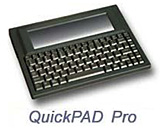 will perform many light duty portable computing
tasks, but at a fraction of the cost and weight of a full-fledged
laptop.
will perform many light duty portable computing
tasks, but at a fraction of the cost and weight of a full-fledged
laptop.
"For many professionals the standard laptop computer is more of a burden than a help," says Michael Spencer, VP of Sales/Marketing for QuickPAD Technologies. "QuickPAD Pro fulfills the needs of many users who want an inexpensive yet powerful, mobile, fully computing, and Internet ready solution."
Weighing an easy-on-the-arms 1.5 pounds, and with an equally light suggested retail price of $299, the QuickPAD Pro features a built-in word processor, spell check, spreadsheet, scientific graphing calculator, database, personal organizer and daytime scheduler. The screen displays 16 lines with 80 characters per line. Memory can be expanded to fit the user's specific needs. As sold, the unit holds up to 300 pages of content and has a port for external flash cards up to 128 MB. With the optional Infrared receiver, files can be transferred wirelessly to a Mac or PC.
QuickPAD can also send and receive email through its built in modem. Its four AA batteries can give you over 200 hours of use and store all information from its multiple applications into a combination of SRAM or flash memory, then be easily connected to a computer using the USB port, infrared port, or comm port.
QuickPAD Pro is also an ideal tool for the classroom. Password-protectable folders allow 10 students to share one QuickPAD Pro. "With the QuickPAD Pro, an entire elementary class is finally able to work on a computer at the same time, without spending a fortune," says Spencer.
You can check out QuickPAD Pro's specs at the end of this article.
Also available is the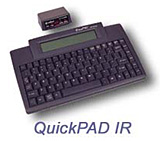 QuickPAD IR word
processor.
QuickPAD IR word
processor.
The QuickPAD IR also operates on four AA batteries, giving up to up to 400 hours use, and can hold up to 250 individually named files in ten separate folders. All text is automatically saved in the QuickPAD and files are easily transferred wirelessly into any writing application in either a Mac or PC with just one keystroke.
These are clever little machines selling at an affordable price, but do they make sense as an alternative to a full-fledged laptop computer on the one hand or a PDA on the other?
You can buy a used older PowerBook for about the same price, and it will do an awful lot more for you, while a PDA will handle really light duty computing chores and email while being pocket-portable.
On the other hand, if a QuickPAD Pro will do everything you need it to, 1.5 pounds is a lot nicer to carry around than a laptop. Even the iBook is more than three times heavier.
PowerBook fan that I am, I still think one of these babies would be really nice to have for drafting articles and other dogsbody chores. With 200 hours between battery replacements (I wonder if rechargeable NiCads work with QuickPAD?) you wouldn't constantly be conscious of the meter running, and you could work right through a long power outage or transcontinental flight without worry. It wouldn't be hot on your legs, or overheat if you used it in bed, either.
Yes, I think QuickPAD does make sense.
QuickPAD Pro Specifications
Size: 11" x 8" x 1"
Weight: 1.5 lbs.
Speed: 32 MHz 80x86 CPU
Keyboard: Full size Win 95 compatible keyboard
Memory: Built in 1 MB SRAM
Memory Expansion: 1-4 MB Flash memory upgradable to 64 MB/td>
Interface: Flash card interface for Sundisc Compact Media card
- Add. Interfaces: RS232 Com port
- USB port
- IrDA infrared
Screen Size: 480x128 B/W LCD
80 x 12 lines in character mode
Battery: 4 AA batteries (200 hrs.)
Software Specifications
Operating System: Fully DOS compatible
Internet: Limited Internet browsing capabilities (under
development)
Email: Send and Receive w/any ISP.
- Built In: Word process - compatible with any PC or MAC word Processor
- Spell Check
- Scientific graphing calculator
- Spreadsheet
- Data base
- Personal Organizer
- Day time scheduler
- Fully DOS compatible
Included are:
- QuickPAD keyboard
- Infrared receiver
- All necessary cables
- Carrying case
- User's manual
- Batteries
- One-year limited warranty
- Free technical support
QuickPAD IR Specifications
- Auto Data Backup
- USB pod
- Stand alone word processor &endash; create, edit and store 250 text documents
- File transfer by infrared link up to 25 feet
- Compatible with both PC and Mac, all applications
- Saves up to 70 pages of text in 10 separate folders
- Prints directly to parallel printer
- 4 AA batteries for four hundred hours of use
- Light weight rugged design (One pound)
- 4 line character LCD display
- Full 86 key laptop keyboard
- Calculator
- 70,000 words spell check dictionary Every unit comes complete with:
- QuickPAD keyboard
- One infrared receiver
- All necessary cables
- Carrying case
- User's Manual
- Batteries
- Three year limited warranty
- Free technical support
Comes with:
- QuickPAD keyboard
- Infrared receiver
- All necessary cables
- Carrying case
- User's manual
- Batteries
- One-year limited warranty
- Free technical support Software Specifications
- Also see Reader feedback on sub-laptops, 2001.08.10
Join us on Facebook, follow us on Twitter or Google+, or subscribe to our RSS news feed
Charles Moore has been a freelance journalist since 1987 and began writing for Mac websites in May 1998. His The Road Warrior column was a regular feature on MacOpinion, he is news editor at Applelinks.com and a columnist at MacPrices.net. If you find his articles helpful, please consider making a donation to his tip jar.
Links for the Day
- Mac of the Day: PowerBook 1400, introduced 1996.10.01. Considered by many the best pre-G3 PowerBook with a small footprint and great keyboard.
- Support Low End Mac
Recent Content
About LEM Support Usage Privacy Contact
Follow Low End Mac on Twitter
Join Low End Mac on Facebook
Favorite Sites
MacSurfer
Cult of Mac
Shrine of Apple
MacInTouch
MyAppleMenu
InfoMac
The Mac Observer
Accelerate Your Mac
RetroMacCast
The Vintage Mac Museum
Deal Brothers
DealMac
Mac2Sell
Mac Driver Museum
JAG's House
System 6 Heaven
System 7 Today
the pickle's Low-End Mac FAQ
Affiliates
Amazon.com
The iTunes Store
PC Connection Express
Macgo Blu-ray Player
Parallels Desktop for Mac
eBay

