
Miscellaneous Ramblings
The Reliable All-In-One 500 Series
Charles Moore - 2001.06.04 - Tip Jar
My first Mac was a Mac Plus. It had an 8 MHz, 68000 processor, a whopping 2.5 MB of RAM, a 20 MB hard drive, and a wonderfully sharp (but tiny) black & white 9" screen. After a year with the Plus, I was ready to upgrade to a faster, more capable Mac.
At the time, December 1993, the choices available that fit my needs
and budget included the Macintosh LC III
and the LC 520, 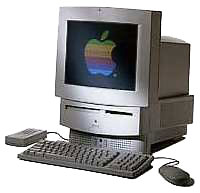 which was the essentially an LC III in an all-in-one
form factor that owed much inspiration to the innovative Mac
Classic.
which was the essentially an LC III in an all-in-one
form factor that owed much inspiration to the innovative Mac
Classic.
At the time, MacBoutique in Montreal was the first mail-order Mac systems reseller in Canada, and they offered the LC III for Can$1,795 with an 80 MB hard drive, or for Can$1,899 with a 160 MB hard drive. Adding a monitor, keyboard, mouse, and CD-ROM drive would bring the total damages to about Can$2,500, but they also offered the LC 520, which was targeted mainly at the education market, for Can$2,400. This included a built in Sony Trinitron 640 x 480 monitor, keyboard, mouse, 2x CD-ROM drive, built in stereo speakers, and a 160 MB hard drive. I decided to go with the 520.
I was pleased with my purchase. The 520's 25 MHz 68030 processor supplied a lot more speed than the old Plus could muster, the Trinitron was a lovely monitor (still one of the best CRTs I've seen), and having 8 MB of RAM was a luxury - I could keep all of my applications open! The 160 MB hard drive seemed cavernous, although I soon discovered how illusory that impression was. Having a CD-ROM drive was a whole new adventure in computing.
On the downside, the 520's floppy drive seemed cheap and rough compared with the smooth and slick "slurp" floppy drive in the Plus, although it did have the happy facility of being able to read and write 1.4 MB high-density floppies as well as PC formatted disks.
I also was not smitten with the LC 520's angular styling, and it never grew on me. The sound quality from the built-in speakers was a disappointment, with very pour bass response and distortion at more than moderate volume.
Back in the positive column, the 520 had a comprehensive complement of Mac ports, including modem and printer serial ports, a SCSI port, two ADB ports, mic and sound out ports. The motherboard could slide out of a hatch in the back like pulling a drawer out in a cabinet, making things like RAM upgrades or PRAM battery replacement a breeze. There was also a PDS slot, but I never figured out anything useful to do with it.
The LC 520 served as my workhorse Mac for nearly three years, and it is still working fine as my wife's word-processing and email machine at 8.5 years old. It has been very reliable, the only serious problem being when the sound output became erratic about eight months into its first year, at which time the cooling fan also became very noisy (a coincidence). Apple replaced both the motherboard and the fan under warranty, and the LC has been as dependable as an anvil ever since.
It is also extremely forgiving and flexible. My favorite LC 520 story is the time when my son Tristan was working on an old Power Mac 9500 and needed a SCSI hard drive for testing. The 520 happened to be dialed up to the Internet at the time, but Tristan just pulled the back cover off, yanked out the 160 MB Quantum hard drive, did whatever he needed to do on the 9500, and then replaced the hard drive in the LC, which had remained running and dialed up to the Internet throughout.
I eventually upgraded the RAM to 20 MB, with a 16 MB upgrade (which involved removing a 4 MB SIMM from the RAM slot), and added a U.S. Robotics 28.8 modem for Internet use. The old 520 does email very efficiently with Eudora Light 3.1.3 and surfs the Web somewhat less satisfactorily using Netscape 4.0.4 or iCab.
The LC 520 originally shipped with System 7.1, which was a very stable and nice Mac OS version. I eventually upgraded through Systems 7.5, 7.5.3, 7.5.5, 7.6, and 7.6.1. I ultimately "downgraded" back to 7.5.5 after I discovered that my scanner software wouldn't work with System 7.6.x. However, I retained the Open Transport from 7.6 for Internet support.
The LC 520 was produced for seven months, then replaced by the short-lived (production wise) LC 550, which was pretty much identical save for a slightly faster 33 MHz '030 chip. There were also Performa versions of these machines which shipped with keyboards, mice, and bundled software, including a Performa 560 - the "Money magazine edition," which came bundled with personal finance software.
Yet another variant in this form factor was the Macintosh TV, but with a very cool black case
and matching keyboard, 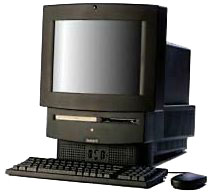 mouse, and remote-control, and
an internal TV tuner. Unfortunately, this configuration was limited to
a maximum 8 MB of RAM. The Mac TV had a 33 MHz 030 chip.
mouse, and remote-control, and
an internal TV tuner. Unfortunately, this configuration was limited to
a maximum 8 MB of RAM. The Mac TV had a 33 MHz 030 chip.
The LC 550 was soon superseded by the LC 575 (Performa 575, 577, 578), which replaced the old '030 with a 68LC040 chip running at 33 MHz, had a bigger (250 MB) hard drive, and added a "Communications Slot" for an Ethernet card or internal fax/modem. The LC 550 and later also dispensed with the 520's rock-solid and silent running Sony 2x caddy-loading CD-ROM drive, replacing it with a more convenient (but unfortunately much less reliable) Matsushita tray-loading 2x drive.
The final edition of the all-in-one 500 series was the LC 580 (Performa 580, 588), which was to the modular LC/Quadra/Performa 630 what the LC 520 had been to the LC III, and the LC 575 had been to the LC 475/Quadra 605. It was also the last 68k desktop Mac marketed (at least in Canada). The 58x model retained the 57x's 33 MHz '040 chip, but it replaced the lovely Trinitron with a cheaper, grainier, less flat monitor, and the SCSI hard drive with a cheaper, higher capacity IDE drive. The 58x also had two RAM upgrade slots. Some of the Macintosh TV's functionality was incorporated in an optional TV tuner, and standard RAM was upgraded to 8 MB, with the maximum RAM pushed to 52 MB.
In my opinion, the LC/Performa 57x is the most desirable of these machines, with its faster '040 speed and Trinitron monitor. They're all too slow and limited for anything but the most undemanding use these days, but they still can serve as a cheap (under $100) but reliable Mac for word processing, email, and casual Web surfing - or as a simple to use and rugged starter Mac for young children.
From the mailbag:
From Dave Jacquith
Subject: 4 year report on StarMax 3000
The StarMax 3000 that I am using is now four years old, and never a problem with it have I experienced, however it vaguely resembles the machine that was original. New hard drive, maxed out RAM, G3 processor, USB slots, new mouse(s), ethernet card, etc.
But I am afraid the practicality of continuing to depend on it is rapidly coming to a close.
The RAM restrictions are overwhelming me (a graphic artist), making it quite impossible to carry on with this machine, so retirement is just around the corner. I'll keep it and continue to use it, but only for Internet stuff and letter writing.
It was a good investment and a fine little machine.
Dave Jacquith
- Hi Dave,
I agree with your assessment.
Charles
Further Reading
- The friendly 500 series, Adam Robert Guha, Apple Archive, 2001.05.18. A look at the compact, friendly, inexpensive LC and Performa 500 series
Join us on Facebook, follow us on Twitter or Google+, or subscribe to our RSS news feed
Charles Moore has been a freelance journalist since 1987 and began writing for Mac websites in May 1998. His The Road Warrior column was a regular feature on MacOpinion, he is news editor at Applelinks.com and a columnist at MacPrices.net. If you find his articles helpful, please consider making a donation to his tip jar.
Links for the Day
- Mac of the Day: PowerBook 1400, introduced 1996.10.01. Considered by many the best pre-G3 PowerBook with a small footprint and great keyboard.
- Support Low End Mac
Recent Content
About LEM Support Usage Privacy Contact
Follow Low End Mac on Twitter
Join Low End Mac on Facebook
Favorite Sites
MacSurfer
Cult of Mac
Shrine of Apple
MacInTouch
MyAppleMenu
InfoMac
The Mac Observer
Accelerate Your Mac
RetroMacCast
The Vintage Mac Museum
Deal Brothers
DealMac
Mac2Sell
Mac Driver Museum
JAG's House
System 6 Heaven
System 7 Today
the pickle's Low-End Mac FAQ
Affiliates
Amazon.com
The iTunes Store
PC Connection Express
Macgo Blu-ray Player
Parallels Desktop for Mac
eBay

