
Empowered
One Year with My 'Free' Mac mini
- 2006.11.20
I've been lounging in the Low End Mac break room for a year now, telling jokes by the water cooler, drinking copious quantities of Earl Grey tea, and occasionally returning to my desk to get an article written.
Of course, there is no LEM break room, but the editorial staff does have its own email list, which is sort of the same thing. I've gotten to know several of our writers through email, both on and off the list. They're a talented group with vast experience in an impressive variety of areas.
Dan Knight has been a great editor. He makes very few changes to my submissions, but the ones he does make are well targeted. The result is that it almost looks like I can write.
In keeping with my column name, I have often tried to impart the kind of information that will help to "empower" low-end consumers like myself. The majority of your email has been very supportive, and I appreciate it when you take the time to let me know what you think - whether you agree with me or not. I do reply to all of the reader mail I get. To date, that has been 82 emails, not including additional replies from the same senders.
My mini's First Year
December marks one year since I started using a G4 Mac mini. For something the size of a fruitcake, the mini is a powerful little computer. Mine has seen daily use for word processing, browsing and email, web graphics, sound and music editing, and more. My wife also has a user account on the mini and uses it for Web access and word processing.
You might know that I'm also a fan of the Myst game series. The G4 mini's built-in graphics have handled these games admirably (with the exception of Myst URU, which is only for Windows).
After two weeks of use, I upgraded the mini's memory to 1 GB. I later purchased a 160 GB external FireWire hard drive, and I've been using that as my boot drive. The mini's original 40 GB drive is now residing in my Dual USB G3 iBook, replacing the slower, lower capacity one it came with.
Other peripheral purchases have been an iMic USB audio interface and a Hyundai N91S 19" LCD monitor from TigerDirect.com. The final cost of the monitor was $140 after rebates. The quality of this monitor is not quite on a level with higher-cost, better-known brands, but it works fine for the work I do and is far superior in clarity to every CRT monitor I've ever used. The deals are out there, if you're willing to do the extra work involved.
mini Reliability
Although this mini has withstood its first year of hard hard use and has come through it like a champ, two small problems emerged.
As I have mentioned before, my only option to connect to the Internet is dialup. I connect over old, worn out, noisy phone lines. On a good day I can get an average of 24-28 kbps. And if it rains hard, I might not be able to connect at all!
I'm on a first name basis with the phone company repair man.
In October, the mini's internal modem suddenly started to refuse to hang-up, perhaps in protest. It would disconnect from the ISP normally but leave the line open.
Since I got my mini through a "free" promotion (see Yes, You Can Get a "Free" Mac mini - but Is It Worth the Hassles?), it was purchased by the promoter about two months before I got it, so by the time the modem started acting up, the warranty had expired. (An unexpected drawback of the "Free Mac mini" bargain.)
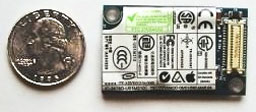 This same model of internal modem
(Model: U01M210) was also used in the iMac G5, eMac, some PowerBook
G4s, and other Macs, so I had no problem finding a used
replacement, which has been working fine.
This same model of internal modem
(Model: U01M210) was also used in the iMac G5, eMac, some PowerBook
G4s, and other Macs, so I had no problem finding a used
replacement, which has been working fine.
Why this failure occurred is unknown. I use the surge protector that's incorporated into my battery backup. I was unable to find information about similar failures, so this may be an isolated incident. If the replacement fails, I will probably just add a USB modem to my already cluttered work space.
Do You Have the Correct Time?
With my slow connection, I have all user configurable automatic connecting and updating features turned off. At times I also browse with images disabled.
Since my date and time is not set automatically by Apple's time server, I have noticed that my mini's clock loses just over a minute a month. This isn't an excessive amount, and most users will never know if their clock is slow unless they, too, turn off the automatic updating.
It's interesting that the cheap quartz clock on my office wall is accurate to within several seconds between each seasonal time change.
All factors considered, the Mac mini has been a near-perfect fit
for my computing needs, and I expect it to continue to be for years
to come. 
About LEM Support Usage Privacy Contact
Follow Low End Mac on Twitter
Join Low End Mac on Facebook
Favorite Sites
MacSurfer
Cult of Mac
Shrine of Apple
MacInTouch
MyAppleMenu
InfoMac
The Mac Observer
Accelerate Your Mac
RetroMacCast
The Vintage Mac Museum
Deal Brothers
DealMac
Mac2Sell
Mac Driver Museum
JAG's House
System 6 Heaven
System 7 Today
the pickle's Low-End Mac FAQ
Affiliates
Amazon.com
The iTunes Store
PC Connection Express
Macgo Blu-ray Player
Parallels Desktop for Mac
eBay

