
The Low End Mac Mailbag
Mac vs. PC Design, 9 vs. X, Mac 512K Value, Nonprofit Macs, G Wireless, and More
Dan Knight - 2003.06.17 - Tip Jar
- Mac vs. PC Design, no contest
- 9 vs. X
- Bitch Magnet
- Switching to OS X
- Value of a Mac 512K
- Migrating from OS 9 to OS X
- Refurbishing Older Macs
- Ted Parks on Low Income Macs
- Interface Nightmares?
- Dual Boot Power Mac G4
- G Wireless on Older Macs
Mac vs. PC Design, no contest
Responding to my comments in Mac vs. PC Design, William Jackson writes:
I just read Randy Brutno's comments on Mac vs. PC design and tend to agree with him. I have searched high and low for a PC with some style and frankly I think they're all shadows of the, admittedly dated, Power Mac. I've got one of those newer, more attractive HP machines (and yes, it is an improvement over models from years past) but it sits stuffed under my desk.
My Quicksilver on the other hand sits on top of the desk beside my
21" Studio display and looks amazing. I personally feel that the
Quicksilver was a better looking machine than the Mirrored drive door
version that replaced it. I've never warmed up to the new Power Mac.
The original Blue and
White one was a work of art. The Graphite model that followed it
was a tasteful 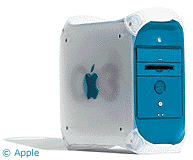 update
and looked better. The Quicksilver improved on the Graphite as the
lines got cleaner and the machine took on a smoother appearance.
update
and looked better. The Quicksilver improved on the Graphite as the
lines got cleaner and the machine took on a smoother appearance.
The Mirrored drive door model was the first one in the line that to me looked forced, and I think that's where things went wrong. It looks like a Quicksilver that's been crossbred with one of those Aluminum clone PC cases.
Apple designs never seem to appear to be "slapped together" or to have things added on after the fact. Unfortunately, that's exactly what the current Power Mac looks like. It looks like a Quicksilver that was attacked by someone trying to mod the case and it just didn't work.
That's my opinion though
The blue & white was a thing of beauty, albeit a bit garish in color. The original iMac and iBook had equally inspired designs. I agree that graphite looked more professional, but I never took to the Quicksilver models with their rounded drive doors. I definitely agree that mirrored drive doors are a step in the wrong direction.
9 vs. X
Ben Brenker writes:
I've been reading LEM for a while now, and I figured I would toss my .02¢ into the dice game.
I had been a frequent Mac OS user all through high school, from OS
7.X on a IIcx in 1990 when I
first walked through the doors of the graphic arts room, through 8.x
when I left years later, running on a 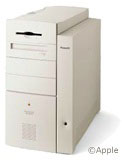 (then) awesome 8600. I remember from that time
thinking how impressive and mature the Mac OS was when compared with
the Win 3.1 box we had at home then. I was fairly well versed in both,
and the Mac was just a better user experience.
(then) awesome 8600. I remember from that time
thinking how impressive and mature the Mac OS was when compared with
the Win 3.1 box we had at home then. I was fairly well versed in both,
and the Mac was just a better user experience.
Things changed, as things often do, and I ended up selling all of my equipment (Including all of the equipment of my 8 line MajorBBS) and became an auto mechanic. I had become burned out, and my computers were traded for tools. I floated around with Windows boxes when I needed to use Internet machines, but I never fully delved back into the world of the computer user - nor did I miss it all that much.
I had friends that were MAChine-heads and Windozers, but none of it drew me, until I went to a flea market and saw an 8600/200. I didn't know what it was other than obviously an Apple machine, and I just knew I wanted it. I managed to get it for $30 with a keyboard and mouse and took it home.
I was in the process of moving to Boston to live with my cousin again, and while I had been away living in CT he had collected a few low-end Macs without telling me. I brought the machine to his place, we fired it up, and it was in perfect order. 96 MB RAM, 1.2 GB drive, and it worked great.
OS 9 felt fairly familiar, like an old pair of shoes, and I slipped back into it. I found a USB 1.1 card at MicroCenter for $11, a 16" Apple Trinitron monitor for $5, a Maxpowr G3 400 upgrade card for $60, and a 21" Apple monitor for $60 at the MIT Flea market (the world's greatest secret). Later I found a 9600 for $40 that I gutted for other machines (my cousin needed the logic board for a Genesis MP quad 180 processor card that he got at the MIT Flea for $40), and I needed the RAM.
So now that you know I got back on the Mac for cheap, using a decent piece of used gear for under $250 including 256 MB RAM from OWC. I've got spanned monitors, and it's running Jaguar, which is the reason I've decided to write. I had to have it.
My cousin had found XPostFacto on OWC's site, and had been running OS X 10.1.5 on a 9500/200 when I finally moved in with him last fall, and I fell in love with it. It wasn't a barn burner, but it was usably fast, especially with his RAGE 128/PCI, and I knew I needed it for myself. After much trying I got it running on my now G3/400 8600, and with Chimera [now Camino, ed] I finally divorced myself from IE once and for all.
I had a lot of trouble trying to get Jaguar to run, but I made another determined stab at it once Safari came out. My cousin had acquired a B&W machine, and I loved Safari, and I knew that the future for Apple would be to only support applications for 10.2 onward.
Wanting a non-legacy Mac, I picked up a WallStreet that needed a new AC/sound board, (I soldered the broken one), and with only 96 MB RAM I installed Jaguar. This machine was destroyed days later in an incident with a local drunk, and it was replaced with a WS 266 from the MIT Flea that I got for $190 sans battery and CD. With the leftovers of my first WS I was in business. Nowadays I am a happy user. This machine needs more RAM, and one day I will reward it by going to 512 MB. I've been thinking of a G4 upgrade, but by then I think I'll be able to sell this WS on eBay, keep the money for the G4, and be well on the way to a 1st gen TiBook.
Even with only 128 MB RAM, I never use OS 9. The only reasons why it's on this machine are for a couple apps that pop up occasionally, and the odd backlight issue that pops up now and then. (When the AC power is disconnected after the battery has been removed, occasionally the backlight won't turn on automatically, and the solution is to boot into OS 9, shut down, restart, and reboot back into X. Weird, but it works.)
I understand that people don't want to upgrade due to the cost of upgrading their [Mac OS] 9 apps, but honestly, are they running these applications on the first computer they ever purchased? Have they ever heard of Moore's Law?
The nature of the beast of personal computing says that new and better things will come out, and most people will buy them.
I remember when Win95 came out, and how everyone called it a kludge, but it really was a lot better than 3.11, because it was designed to be. I don't imagine that the people clinging to OS 9 thought that when they bought their Macs they were never going to buy another computer, or that they would never go through a new OS. It's been, what, 5 years since [Mac OS] 9 and the killing of the legacy Macs?
It's been known that OS X was coming since Apple bought NeXT, so the only surprise is that X doesn't work like 9.
I can appreciate being familiar with an OS, and the issue of cost, but Jobs is right, and 9 is dead. The benefits of X far outweigh those of 9, just in the form of preemptive multitasking. This is something the Windows world has enjoyed for a long time now, and that alone is reason to switch.
I believe the thing that irks me the most though, is that these people are writing to a site called Low End Mac to complain about their new Macs and new OS. It seems to me by name alone it would be a site for older machines (and after reading the site, I believe I'm correct) and not exactly the right venue for ranting about how they can't boot OS 9 on their brand new Macs, or they won't buy a new machine until OS X is to their liking.
I suppose that I'm just waiting for a merger of OS 9 Forever with the Flat Earth Society and anxiously await the discovery of the Easter Bunny riding the Loch Ness Monster. I think I've run out of rant juice, but thanks for the time and words, keep 'em coming.
Low End Mac grew out of my need to support older Macs at my IS job and not being able to find a comprehensive, helpful resource covering compact Macs and the Mac II series. That was mid-1997, and the site soon grew to include Quadras, PowerBooks, and eventually Power Macs.
Based on the premise that every Mac becomes low end sooner or later - so we may as well start gathering information from the get go - we eventually reached the point where we were profiling new Macs as they were introduced.
Regardless, the focus of Low End Mac isn't older hardware, new hardware, older versions of the Mac OS, or OS X. It's getting the most value from your Mac, which may mean continuing to use an older model, maybe with some upgrades, or maybe replacing it with a newer (but still discontinued) Mac, or even buying the newest model if that's what best meets your needs. The key is having the right tool for whatever it is you use the Mac for.
Moore's Law is wonderful, but the entire computer industry today is predicated on obsolescence. On the Windows side, they figure you'll replace your computer every two or three years. On the Mac side, we tend to hold on for three to five years. Yet there are still people out there who love using a Mac Plus for word processing because it's quiet, compact, and fast enough.
Whether System 6, 7.5, 8.1, 9.2, or Jaguar is best is a personal decision - the same goes for the multiple flavors of Windows and the various Unix-like operating systems out there. Each has its place, although our bias says Mac hardware with a Mac OS is generally the best choice.
Contrary to you and Steve Jobs, we do not believe that OS 9 is dead, nor do we believe it ever will be. Heavens, there are people still using Apple II computers, DOS computers, and other "antiques" from decades past. Apple may no longer develop for OS 9 or encourage developers to support it, but that doesn't stop OS 9 and all of those classic applications from working just fine for years to come. That won't help Apple's bottom line, but our focus is value to the end user, not lining Apple's pockets.
People who have or see no reason to migrate to OS X will never have to do so, nor will they ever have to buy a Mac that can only boot into OS X. They can live with what works for them, whether that's on a NuBus Power Mac or a dual 1.25 GHz G4 powerhouse. And with upgrades, they can push the envelope beyond 1.25 GHz - but they'll never be able to buy a new Mac any faster than that if they want to boot into OS 9.
That's no different than Macs that didn't support System 6 or 7.x, or the way some Macs were left behind when 7.6, 8.0, and 8.5 were introduced. It's the natural evolution of personal computing.
I knew and loved System 6.0.3 and every version of the classic Mac OS that came after it. I was a power user, and until I had good reasons to switch to OS X, I didn't do so. I fell in love with Jaguar the day I installed it, and I can't see ever going back to OS 9 as my primary OS, but I don't hold it against anyone who doesn't make that choice. That classic Mac OS was wonderful; OS X is wonderful in different ways that don't meet the needs of all Mac users.
The multitasking is probably X's strongest point. I still use a lot of legacy software, but I can use my OS X applications while Claris Home Page has the classic environment hog tied during site uploads. That improves my productivity, making my 400 MHz TiBook a better tool than it was under OS 9. That's the kind of value LEM is about.
Bitch Magnet
Responding to my reply in re: Thinking Too Different, Johhny Squnt writes:
I'm familiar with the need to partition drives over 8 GB on tray-loading iMacs, beige G3s, and WallStreet PowerBooks. Been there. Done that several times. I do find it frustrating that Disk Utility will actually change the number you type in, so if you create a first partition of 8.0 GB it ends up as 8.07 GB. That's inexcusable.
That you don't know why is even worse. I thought you said you were good at crunching numbers (those of us who are can tell you are not). I know it's big fun to make up gripes and all, but geeze you're going overboard. You have begun bitching just for the sake of bitching. I'm sorry you have a part time job, I'm sorry everything didn't work out, but I get the feelin' you're blaming everyone but yourself. You took a gamble on the Internet, you lost.
On the other hand, it will come back around, if LEM keeps posting the less than decent crap they have been posting you won't enjoy the benefits. Get out there and recruit some decent writers, they'll write for free I bet and make LEM fun again, instead of the lame ass bitch magnet it has become.
Please enlighten me and explain it, because I can't understand why Mac OS X creates an 8.07 GB partition when I type 8.0 GB into Disk Utility, but that's the size it reports. I don't think it's a matter of number crunching; it's a matter of the OS refusing to do as told - and not telling you about it until you've created the partition. Believe me, I didn't make it up.
Then again, I don't hide behind a fake name, I do hold down two jobs, and I don't blame anyone for the state of the site. It's been a rough month with two weeks of unanticipated unpaid leave from my other job, but Low End Mac is doing quite nicely, thank you.
LEM is a lot of work, it's usually fun, and except for attracting a few curmudgeons such as yourself, it isn't generally perceived as a "bitch magnet."
Switching to OS X
We've received a lot of emails about the bouncing dock icons telling us how to turn them off. This one is from Maxx:
And that was another question my wife asked last night, "How do you stop the icons from bouncing." Sorry, Apple won't let you turn that off.
In Dock Preferences, uncheck "Animate Opening Applications" Rather than bouncing, the small black arrow under the icon will fade in and out, almost imperceptibly. I turned it back on after I discovered it was a very useful visual cue to let me know I did in fact click the icon and the application is currently loading.
Also, while Mac Basics is gone, Mac Help does have a Get Started guide for both Windows and Mac OS 9 users, and for users new to computers. Granted, it's not as nice as an interactive tool, but it's there.
I will admit that there are still some valid reasons for OS 9 users to not want to switch to X, but largely they won't switch to OS X for the exact same reason Windows users have always resisted switching to the Macintosh in the past - it's not what they have learned, it's not what they are used to. If those users approached OS X as a new platform, they would probably have a much better experience and may even find they like many things about it. It comes down to one basic human response: Change is bad. Whether Apple should try to emulate Windows or OS 9 to attract more users is a separate philosophical discussion.
I'd love to see some old Mac users switch to OS X, but the only way I see that happening is if Apple makes some minor improvements to OS 9 and calls it the next OS 10. I still know people who use Commodore 64s for their computing needs. Some people just won't move. Apple's best chance for increasing market share and sales is to attract people willing to take a chance, willing to use something new for it's benefits. If Apple targeted only the existing user base, at absolute best they could keep their market share at <= N.
When you first launch Mac OS X, Apple has a wonderful program that helps you set up your Mac step by step. Enter your ID. Create a password. Configure for the Internet. This would be a perfect opportunity for Apple to add another screen: Learn about OS X.
From here it could take the user on one of four paths: Mac users, Windows users, Unix users, and new users. Then Apple could clearly explain how to do some of the basic things like setting up a printer, connecting to a network, saving a file, etc.
This may all be covered by the Help system, but a lot of us have come to expect very little of help systems after Balloon Help and other less-than-useful help systems we've been subjected to in the past.
Whether Apple could have made OS X more like the Mac or more like Windows is irrelevant at this point. It's far more like NeXTstep than either, and all indications are that it's going to stay that way. Instead of trying to make the transition as simple and painless as possible, Apple took Think Different to heart and broke decades worth of human interface guidelines.
Change can be good. Change can be bad. Parts of OS X are wonderful. Other parts aren't. Overall it's an improvement, but Apple's still getting some of the basics right. OS X is an immature operating system (more precisely an immature interface on a mature OS), but it's growing up fast.
Still, if Apple wants to grow their market, they need to attract both existing Mac users and Windows users. The more obstacles they can remove, the more readily users will consider switching from what they know to what Apple firmly believes is a much better OS.
Value of a Mac 512K
Erin C writes:
I just won an
eBay auction for a 512k Mac, and I'm trying to
find a value for it. I know that there are collectors out there, and
I'm 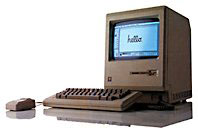 wondering what the value would be
now. The Mac is in complete working condition. Here is a link to the
auction I won it has all the details. [Link removed - expired] I'm not
sure if I want to sell it, because I'm a Mac fanatic myself, but I
would still like to know what it's worth on today's market. I realize
that it is one of the first Mac's and that's why I bought it. Can you
help me out or direct me to someone who can?
wondering what the value would be
now. The Mac is in complete working condition. Here is a link to the
auction I won it has all the details. [Link removed - expired] I'm not
sure if I want to sell it, because I'm a Mac fanatic myself, but I
would still like to know what it's worth on today's market. I realize
that it is one of the first Mac's and that's why I bought it. Can you
help me out or direct me to someone who can?
Low End Mac is about using computers, not about collectibles. A few Macs - particularly the original 128K model and the 20th Anniversary Macintosh - have become valuable collectibles, but we're more interested in them as usable computers or functional examples of older designs.
I have no idea where you'd find a collector's value for old Macs.
Migrating from OS 9 to OS X
On the topic of migration, Steven Hunter writes:
We've been moving Mac users to OS X as they get new machines. The number one problem that I see isn't that OS X is any more difficult than OS 9, it's just unfamiliar.
What Apple needs to do is have a program that users can run that takes them step-by-step through the changes between OS 9 and X. Once we do that with users here, they're off and running. Just pointing out where the functions of the Chooser went (print center and Connect to...) would answer 90% of the questions we get when people move to OS X.
Just my $.0314159.
I couldn't agree more.
Bouncing Dock Icons
David Pekarsky writes:
Perhaps you would like to publish this on the LEM Mailbag, as it holds true, at least for any of the builds of OS X that I have used:
And that was another question my wife asked last night, "How do you stop the icons from bouncing." Sorry, Apple won't let you turn that off.
Under the dock portion of system preferences, merely uncheck "Animate Opening Applications" and, viola, application opening sans bouncing! Instead of this, the OS flashes the black triangle (arrow) on and off until the application has finished opening. I have icon bouncing as well as dock magnification turned off which greatly aids the tremendous load placed upon my Series II G3 300 MHz PB (WallStreet) in terms of its GUI load.
You probably need not publish this as it is just rather requiring advice of yours if you get the chance:
This (1st paragraph) does help while I wait it out to make my decision on a processor upgrade for the machine or rather switching everything over to my new-to-me B+W G3 with its new 10k SCSI drive, which I currently use for some graphics work and the very occasional game over X as well.
Perhaps you have some advice on this. I am leaning towards moving everything and keeping the PowerBook as the "other" computer role as this is dual monitors "low end" style.
Thanks for such a great site; you really are such an asset to the Mac web and community!
PS: If you really want the "under the hood" part of X, you might try typing >console as your name in the login window which a blank name and password field as opposed to the user name + picture and password field; it is a system pref option under login I believe. You can control-D to get back out into Aqua and the OS.
There are a lot of helpful tricks for getting the most out of OS X on slower hardware. Smaller icons, turn off bouncing, switch to thousands of colors - all can help.
Congratulation on your b&w G3, it sounds like the kind of workhorse we would have loved when I worked in publishing. The 10,000 RPM SCSI hard drive will really rock.
Your WallStreet should make an excellent field computer, the role my 400 MHz TiBook will take over once I get my 700 MHz eMac (any day!) and have the backlight on the PowerBook fixed.
Refurbishing Older Macs
Jacque Greenleaf writes:
Ted Parks asked about refurbishing old Macs for low-income folks...
Because of your experience as publisher of Low End Mac, I wanted to ask if you knew of other programs similar to the one I am involved in. My dream (at this point, admittedly, only that) is to have a nonprofit that would perhaps refurbish Macs for low-income parents, perhaps also buying the licenses to assemble a software library for the machines. What is being done in this area? Is this kind of program common?
Mac Renewal in Eugene, Oregon, does exactly this.
Thanks for the info. From the Mac Renewal home page: "MacRenewal is a non-profit group dedicated to the restoration and redistribution of Macintosh computers to members of our community who do not have access to computer technology."
Ted Parks on Low Income Macs
Tim Allison writes:
With regard to Mr. Parks' inquiry about organizations that run a program refurbishing and distributing Macs to needy families, my local (Chicago, IL) user group, The Rest of Us, has been running just such a program for several years. Run almost entirely by Mr. Bill Goosby <mailto:billg-at-iwic.net>, (who is also on the TRoU Board of Directors) has been running the program, which has been referred to as the Lawndale Timeshare Project. Based in Lawndale (a low-income neighborhood on Chicago's west side), the Timeshare Project recruits disadvantaged children to do volunteer work for area non-profit organizations, in return for credit that they can apply toward computers, peripherals, software, etc. Beyond this, I am not sure of any others that the LTP helps, or any other details, but I would advise contacting Mr. Goosby directly for more information. In terms of size,
The LTP gives several computers to needy families and organizations each month, but they are severely backlogged on computer hardware. Currently, I know that Mr. Goosby needs more storage space for the computers, volunteers to help refurbish/prep machines, and licensed software (including Mac OS) that they can include with the machines they distribute.
Thanks for the info. System 7.5.3/7.5.5 can be downloaded for free from Apple's website and freely installed on any Macs that support it. WordPerfect 3.5e can also be freely downloaded and placed on such machines, although it's sometimes hard to locate a source for it. Other useful freeware includes Netscape, Internet Explorer, and BBEdit Lite. (iCab is also free, but it expires, which can be a real bother.)
Interface Nightmares?
Steve Cardella writes:
In response to another email, you write:
The biggest problem with your proposal is that Apple want everyone to have the same interface and work the same way. (Remember when they were the company for creative people, nonconformists, rebels?) Allowing users to migrate while using an interface that they're already used to apparently offends Apple. "My way or the highway" seems to be the attitude.
I don't expect Apple to change their attitude there, but I do hope that Panther will include more of the kind of support you mention.
Apple has very good reasons to "force" people to use a single interface.
- Marketing: You see the GUI, and you automatically recognize it as a Mac. It doesn't matter what the hardware looks like; you see a menubar at the top of the screen and you grin; it's a Mac!
- Usability: If you've got something that works well, why allow the user to screw it up? Apple does usability studies that are evident in their HIGs (Human Interface Guidelines) precisely so that applications are easy to use and consistent with other applications. For instance, keyboard shortcuts across the board: Quit, Hide, Copy, Paste, etc. Consistency is part of the key to making usable interfaces.
- Support: When someone does need help, a support person will know exactly how to guide the user, since the user cannot change menus, etc., and have those things work differently than out of box.
As a final note: Look at the state of X11 on Linux/Unix. There are two main types of "desktops," along with a slew of others. One cannot be sure how to configure, fix, etc., the computer via a GUI without knowing the distribution, desktop, window manager, and the person's second cousins' former college roommate. It is ultimately configurable, and therefore ultimately a nightmare for support and non-power-users.
P.S. The Humane Interface by Jef Raskins is an excellent book on the topic of GUI usability.
OS X users are already divided over dock placement (right, left, bottom, centered, linked to a corner, etc.) and appearance (some love the traditional Aqua GUI, while others love the brushed metal look of most newer iApps). It would be really nice if Apple gave us more choices - not less - so we could make all of our programs have the same appearance, whether we like the colorful Aqua GUI or brushed metal. Or maybe even something else.
Both versions of the Mac OS have strong usability, despite some differences. There are places where consistency really pays off, such as the menu bar at the top of the screen instead of within each window a la Windows.
I think the ideal solution to help users migrate to OS X is an Introduction to OS X that helps explain to Mac users (and Windows users) how to do the things they've done before in their new OS.
Dual Boot Power Mac G4
Shane Miller writes:
I went to purchase a G4 yesterday on the assumption of dual boot OS 9/OS 10. When I learned that this is no longer possible since ~ 1/1/2003, I decided to look into a new (pre-2003), used, or refurb dual boot G4. Please email me or phone me. I am looking to purchase within the week.
This is part of Apple's plan to move Mac users to OS X. The first step was installing OS X on new hardware. They later made it the default boot OS on new machines, and then began building machines that will only boot into OS X, which covers almost all of the models made today.
Low End Mac doesn't sell hardware, but we do run a weekly price tracker covering new, used, and refurbished Power Mac G4 machines. The hottest deals on fast, relatively recent Power Mac G4s that can boot OS 9 are a dual 867 MHz model for $1,549 and a dual 1 GHz machine for $1,899. Both are listed in today's update to the tracker.
G Wireless on Older Macs
Kevin Brennan writes:
Was reading your January "Musings" article in Low End Mac and wondering if you had any updates along those lines. Especially interested in if there will be any solutions for my 700 iBook, which I really like and don't see any other reason to switch to the G4 besides the wireless issue.
Have heard Apple say the older machines' communication bus can't handle anything beyond 20 Mbps, but also heard someone speculate an adapter might be possible that could plug into the FireWire port. Heard anything along those lines?
Thanks for any additional information.
The bad news is that the AirPort socket in your iBook isn't fast enough to support 802.11g, so there's no chance you'll ever see Apple produce an AirPort Extreme card for it. And, because the card was unique to Macs, you'll probably never see anyone else do it either.
That said, the 802.11g specification was finalized last week, and the IEEE went for a "truth in specification" policy of calling it a 20 Mbps protocol, since that's the data rate users can expect in the real world. That compares with about 5 Mbps for AirPort (which uses the 802.11b specification).
Most broadband Internet connections are in the 1-3 Mbps range, so for Internet access, there's not much reason to go with 802.11g wireless. However, if you're working on a local network, you will benefit from the greater speed of G Wireless when moving files between machines.
I haven't heard of an 802.11g adapter that connects via FireWire, but you can add a wireless access point that connects via ethernet for $100-150.
On a related note, Belkin announced last week that they have no intention of providing Mac drivers for their 802.11g PC Card, despite the fact that they had previously promised such drivers for both OS X and the classic Mac OS. I had been hoping to use one of their cards in my TiBook, since it would have been the only one with classic Mac OS support. I have updated the January article to reflect this.
Join us on Facebook, follow us on Twitter or Google+, or subscribe to our RSS news feed
Dan Knight has been publishing Low End Mac since April 1997. Mailbag columns come from email responses to his Mac Musings, Mac Daniel, Online Tech Journal, and other columns on the site.
Today's Links
- Mac of the Day: PowerBook 1400, introduced 1996.10.01. Considered by many the best pre-G3 PowerBook with a small footprint and great keyboard.
- Support Low End Mac
Recent Content
About LEM Support Usage Privacy Contact
Follow Low End Mac on Twitter
Join Low End Mac on Facebook
Favorite Sites
MacSurfer
Cult of Mac
Shrine of Apple
MacInTouch
MyAppleMenu
InfoMac
The Mac Observer
Accelerate Your Mac
RetroMacCast
The Vintage Mac Museum
Deal Brothers
DealMac
Mac2Sell
Mac Driver Museum
JAG's House
System 6 Heaven
System 7 Today
the pickle's Low-End Mac FAQ
Affiliates
Amazon.com
The iTunes Store
PC Connection Express
Macgo Blu-ray Player
Parallels Desktop for Mac
eBay

