
Mac Daniel's Advice
QuickCam + PowerBook = Webcam
Manuel Mejia Jr - 2000.08.23
Can an older PowerBook be used with a QuickCam-type video camera for taking photos for web sites?
I found your website on low-end Macs very intriguing. I am an avid Mac fan - I bought my first Mac in 1985 (a Fat Mac, which I still have and has been upgraded to a 4 MB Mac Plus).
I recently bought a blueberry iBook, and I think
it's great. But, now that I've bought the iBook, 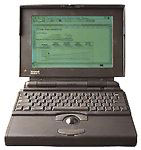 I'm looking for an alternate use for my old
PowerBook 145B.
I'm looking for an alternate use for my old
PowerBook 145B.
I am thinking of putting together a webcam with it, but I need more information.
1. Is it possible to hook up a Connectix Color QuickCam using the ADB port? If so, where can I find the camera and software?
Hunt around used Mac dealer web sites for the camera and software. I got my QuickCam through eBay.
My experience is based on using the grayscale QuickCam. It can be plugged into the ADB port. The PowerBook 145 will take still images as well as video. The catch is with the video: The data stream is so large that you will accumulate 100k of information in about 20 seconds. A full color image file would generate 100 KB of data in much less time. In field testing, my PowerBook 145 froze because the amount of data being recorded by the camera overwhelmed the 6 MB of memory. I was trying to film a scene in New Mexico, but there was way too much going on. On a test while on the plane to New Mexico, I successfully got video of the unchanging scenery of the seat in front of me and the cabin ceiling.
Software should be included with the camera. It may be on the Net. I have never needed to look for it. One problem - Connectix sold the QuickCam line to Logitech, so it may be difficult finding support or software for older models.
2. Will the color QuickCam work with the 145B, or will I need to get a black and white camera?
My preference is with the Grayscale. It is less demanding on the computer. You should be able to use color. This is especially true for still shots. Movie type images were meant to be done on Quadras, and the animation is slow (~16 frames a second). Television and film movies run at 24 frames per second. Movies may give the PowerBook trouble even with the extra RAM. You will need to experiment.
3. Do I need special software to display the image on a website? Where can I find this software and will it be compatible with my hardware and System?
Look for a piece of shareware call GIFConverter. The version that you need is at least 2.x. My preference is 2.3.1, since it allows one to make the PICT images that are generated by the QuickCam into .gif or .jpg images which can be posted on the Web. Earlier versions do not do .jpgs. Movies are a bit more complicated, since they require .mov file handling capability. My suggestion would be the shareware called Popcorn. Frankly, you may be better off staying with still images. Movies are good if you have 40 MHz processor machines or better.
4. I am currently running System 7.1.1. Do I need a more current version of the System software? Where can I get this?
The QuickCam software Needs at least System 7.0 - System 7.1 will work fine.
My PowerBook 145B has 8 MB of installed memory (16 MB with virtual memory on), a 320 MB hard disk, and a black/white (as opposed to grayscale) LCD screen. I have an external Supra LC 14.4 modem.
My wife and I are expecting a baby next year and I thought it would be cool to set up a site for Grandpa and Grandma.
I wish you the best on the family. Please let me know how the child and website work out.
To get an idea of the type of Web site you can set up using the equipment mentioned, go to my page, Welcome to the World of Recycled Parts Rocketry. I have a bio page with a picture of me taken by the grayscale Connectix QuickCam.
Manuel Mejia Jr is familiar with Mac IIs, LCs, and older PowerBooks. He uses his Mac LC, PowerBook 145B, and PB 100 with System 7.1 on a regular basis and recently added a Mac Plus running System 6 to his collection. He's quite familiar with both System 6 and System 7. He also owns the Pina books on repairing compact Macs from 128k through the SE. You can read more about Manuel's computers in Manuel Mejia Jr's Four Old Macs.
Join us on Facebook, follow us on Twitter or Google+, or subscribe to our RSS news feed
Not sure if you should upgrade your old Mac or replace it? Check the Mac Daniel index to see if we've already addressed your problem.
Today's Links
- Mac of the Day: Performa 5200, introduced 1995.04. The first PowerPC all-in-one was also one of the worst Macs ever made.
- Support Low End Mac
Recent Content
About LEM Support Usage Privacy Contact
Follow Low End Mac on Twitter
Join Low End Mac on Facebook
Favorite Sites
MacSurfer
Cult of Mac
Shrine of Apple
MacInTouch
MyAppleMenu
InfoMac
The Mac Observer
Accelerate Your Mac
RetroMacCast
The Vintage Mac Museum
Deal Brothers
DealMac
Mac2Sell
Mac Driver Museum
JAG's House
System 6 Heaven
System 7 Today
the pickle's Low-End Mac FAQ
Affiliates
Amazon.com
The iTunes Store
PC Connection Express
Macgo Blu-ray Player
Parallels Desktop for Mac
eBay

