
Mac Daniel's Advice
Creating a New User to Solve Display Problems
Dan Knight - 2005.08.03
I've had a love-hate relationship with Safari for years. Well, maybe it's not Safari, but it's the JavaScript that Safari uses.
You see, I love playing online euchre on Yahoo! Games, and none of the current Mac browsers work the way Internet Explorer does on Windows. Even outdated IE 5.2 for Mac OS X almost gets it right.
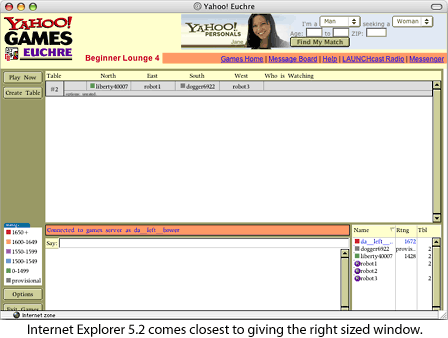
The first problem is displaying the "lounge" windows on the Mac's screen. The window is always too small for the contents, but that doesn't happen in IE on Windows. You'd think they don't test on other platforms....
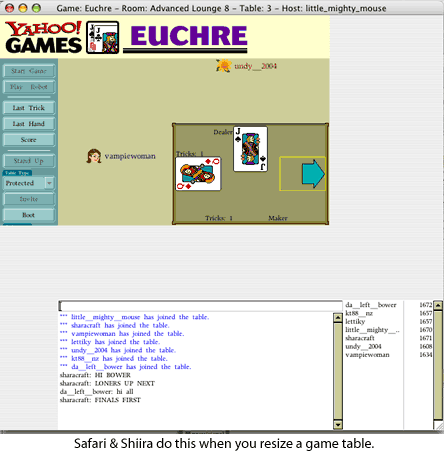
The second problem, which I've really only noticed since moving to Tiger and Safari 1.3, is that when I resize a "table" window or a "score" window, it doesn't get redrawn properly. (This is also the case with Shiira, which uses the same rendering engine as Safari.)
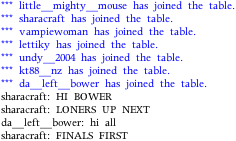 The third
problem is reading the tiny text in the lounge, table, and score
windows. Teeny tiny type - it was larger in Safari 1.2. I'm
thinking maybe as itsy bitsy as 7 or 8 pixels high. See for
yourself in the text on the right.
The third
problem is reading the tiny text in the lounge, table, and score
windows. Teeny tiny type - it was larger in Safari 1.2. I'm
thinking maybe as itsy bitsy as 7 or 8 pixels high. See for
yourself in the text on the right.
Note that this will probably look nice if you have a laptop or a desktop computer with an LCD. It won't, however, look crisp and legible if you're running your eMac at 1280 x 960, which is my normal setting.
Once upon a time I used Firefox - my default browser, although it has its own issues - to play games on Yahoo!, but somewhere along the way the combination of Firefox and Yahoo! Games broke. I get an error message asking me to make sure Java is enabled when I try to enter a lounge (this after my Mac briefly displays the lounge).

Java is enabled. So is JavaScript.
I can't even log into Yahoo! Games with iCab 3.0, although there was a time when I did use iCab for online euchre.
OmniWeb 5.1? I can't log into Yahoo! Games, but it won't display the lounge. Sigh.
Opera 8 works, but I've got the same small text and undersized windows. On the other hand, at least it doesn't mess up a table window when I resize it. This may become my default for gaming - time will tell.
Tiny Text Solution
The easiest way to solve the fuzzy tiny text problem is to switch my eMac to a lower resolution. The problem with that is that it moves and resizes windows in all of my open applications.
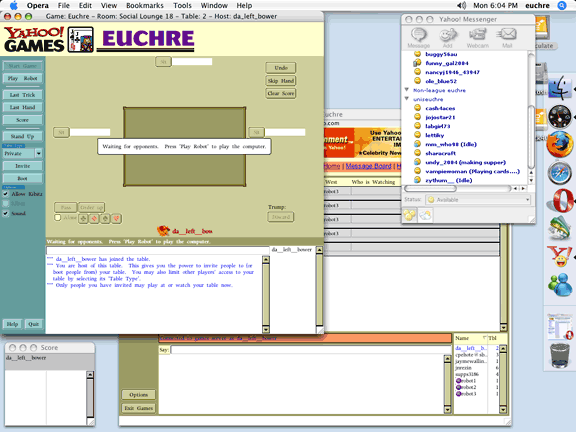
The solution occurred to me last week: Create a new user called "euchre" and set the display to 1152 x 864. That's just enough bigger that the teeny tiny text is no longer fuzzy - and the resolution is still high enough to have an open lounge window, table windows, score window, and Yahoo! Messenger (which we use to communicate in most of the leagues I'm a member of).
Here's how it looks. Note that I have the regular browser window minimized so there are only four open windows. (This image is half the size of the screen and intended to show my working layout, not be something legible.)
To speed up switching, you'll need to have Fast User Switching enabled (in System Preferences > Accounts). I didn't set a password for this user. Now I can just select "euchre" as the user in the menu bar and watch my eMac make the switch. The only catch so far is that if Classis is running in my main session, when I switch back the Classic apps are all limited to the 1152
x 864 portion of my 1280 x 960 display.Launching "euchre" is fairly fast, since there's no need to load all of the extras I use in my main account. I've even give this user a boring light blue background so it won't detract from game play.
All in all, a fairly simple and elegant solution that you may
find useful for playing games or other activities. 
Join us on Facebook, follow us on Twitter or Google+, or subscribe to our RSS news feed
Not sure if you should upgrade your old Mac or replace it? Check the Mac Daniel index to see if we've already addressed your problem.
Today's Links
- Mac of the Day: WallStreet PowerBook G3, (1998.05.04. WallStreet came in three screen sizes along with speeds from 233 to 292 MHz.)
- Support Low End Mac
Recent Content
About LEM Support Usage Privacy Contact
Follow Low End Mac on Twitter
Join Low End Mac on Facebook
Favorite Sites
MacSurfer
Cult of Mac
Shrine of Apple
MacInTouch
MyAppleMenu
InfoMac
The Mac Observer
Accelerate Your Mac
RetroMacCast
The Vintage Mac Museum
Deal Brothers
DealMac
Mac2Sell
Mac Driver Museum
JAG's House
System 6 Heaven
System 7 Today
the pickle's Low-End Mac FAQ
Affiliates
Amazon.com
The iTunes Store
PC Connection Express
Macgo Blu-ray Player
Parallels Desktop for Mac
eBay

