
Mac Daniel's Advice
I Have a New Hard Drive, but How Do I Move Everything from the Old One?
Dan Knight - 2005.02.07
Ken Sonenclar writes:
I enjoyed your 9/10/04 piece about the utility of a slot-loading Mac for running OS X [Why the Slot Loading iMac Is a Good Choice for OS X]. Purchasing a new eMac freed up this old buzzard (a graphite DV special), and I want to upgrade it along the lines you suggest: 512 MB RAM, an AirPort card, and an 80 GB hard drive.
>"One question, perhaps silly, but this will be my first attempt at swapping memory and a drive. Though it looks easy enough, how does one go about transferring the contents of the 13 GB drive that I'll be removing to the new drive? Or is that not possible?
>"And do I leave the existing 128 MB while adding the 512 MB, or is there there only room for one or the other?"
Second question first. The iMac DV SE shipped with 128 MB of RAM. That's a single memory module, and the slot-loading iMacs have two memory module slots. Updrading is as easy as snapping the RAM into place - once you have the computer open.
By adding 512 MB, you'll have 640 MB total RAM, a very nice setup indeed.
Swapping out hard drives isn't difficult - again, once you've found your way into the iMac's guts. Moving the data is another story, since the iMac only has one hard drive bay.
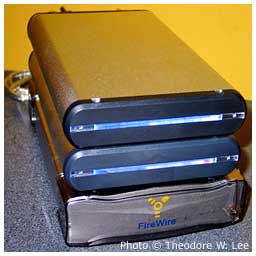 I'd
recommend picking up an inexpensive FireWire (or combo FireWire and USB
2.0) drive enclosure. I've used several different ones over the years,
and my current choice is the Triumph Venus 3.5" enclosure (top two
drives in photo on right), which is available in FireWire-only
and FireWire/USB
2.0 versions from the PC Micro Store. (Check with dealmac for
specials on these. I've seen them listed quite frequently, sometimes
for $30-35 including hookup cables.)
I'd
recommend picking up an inexpensive FireWire (or combo FireWire and USB
2.0) drive enclosure. I've used several different ones over the years,
and my current choice is the Triumph Venus 3.5" enclosure (top two
drives in photo on right), which is available in FireWire-only
and FireWire/USB
2.0 versions from the PC Micro Store. (Check with dealmac for
specials on these. I've seen them listed quite frequently, sometimes
for $30-35 including hookup cables.)
I'm sure there are lots of other good enclosures out there, but these are compact, quiet, and solid. There's no cooling fan, and the aluminum enclosure is just big enough to hold a 3.5" IDE drive and the bridge electronics that let it work with USB and/or FireWire. Theodore W. Lee of OS X Factor also gives this enclosure raves.
Regardless of which enclosure you buy, it's usually a pretty easy process to drop in your old drive, close things up, wire it up, turn it on, and have your Mac see it. You might not even need to change any jumpers - or you might. Check the documentation that comes with the enclosure and the jumper settings on your drive before you put it inside the new case.
Once it's connected, I suggest you boot from the external drive and download Carbon Copy Cloner (donationware, see our review) or SuperDuper (shareware, see our review). Either program can duplicate the complete file structure from your old drive to your new one, making whatever changes are necessary so the new drive will be bootable.
I used to use CCC for duplicating hard drives, but I've found SuperDuper does a whole lot more than clone one drive to another, so I've paid my shareware fee and now use it as my backup software.
Once you're finished duping your drive, set your new drive as your startup disk, restart, and enjoy the additional speed and storage space on the new drive.
As for the old drive, you might want to turn it into an emergency drive by leaving all the System files and utility programs on it. In the unlikely event your iMac or eMac should have a hard drive problem, you could boot from the external drive - a lot faster than CD-ROM - to run diagnostics and attempt repairs.
With SuperDuper, my external drives are bootable mirrors of the
drives in my two eMacs and my PowerBook G4, which gives me
both an emergency disk and a full backup in a rugged, compact package.

Join us on Facebook, follow us on Twitter or Google+, or subscribe to our RSS news feed
Not sure if you should upgrade your old Mac or replace it? Check the Mac Daniel index to see if we've already addressed your problem.
Today's Links
- Mac of the Day: PowerBook 1400, introduced 1996.10.01. Considered by many the best pre-G3 PowerBook with a small footprint and great keyboard.
- Support Low End Mac
Recent Content
About LEM Support Usage Privacy Contact
Follow Low End Mac on Twitter
Join Low End Mac on Facebook
Favorite Sites
MacSurfer
Cult of Mac
Shrine of Apple
MacInTouch
MyAppleMenu
InfoMac
The Mac Observer
Accelerate Your Mac
RetroMacCast
The Vintage Mac Museum
Deal Brothers
DealMac
Mac2Sell
Mac Driver Museum
JAG's House
System 6 Heaven
System 7 Today
the pickle's Low-End Mac FAQ
Affiliates
Amazon.com
The iTunes Store
PC Connection Express
Macgo Blu-ray Player
Parallels Desktop for Mac
eBay

