
Mac Daniel'sAdvice
Should I Buy a Used G4 or a New Mac mini?
Dan Knight - 2005.01.17
Over on Somethingawful.com, there's an interesting discussion asking whether buying a usedPower Mac G4 andupgrading it makes sense in light of the Mac mini's release last week.
Good question. And if any of you have or are considering buying aPower Mac G4 and upgrading it, it makes sense to compare it to themini.
The Power Mac
The Power Mac in question is a 450 MHz computer with 1.25 GB of RAM,a 120 GB hard drive, and OS X for $400, along with whateversoftware is installed on the hard drive. (We won't deal with thelegality of that. We just want to look at the hardware.)
To get the G4/450 up to speed, the potential buyer plans on adding afaster G4 processor (see our Guide to Power Mac G4 Upgradesfor Power Mac G4 with AGP Graphics) and a better video card. Alltold, he plans to invest about $800 in buying and upgrading thecomputer.
The Mac mini
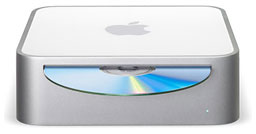 The Mac mini sells for $607 with 256 MB ofRAM, an 80 GB hard drive, OS X 10.3, and Apple's keyboard/mousekit. It runs at 1.25 GHz, which is even faster than the 1.2 GHz upgradebeing considered, and it has a 167 MHz system bus (vs. 100 MHz in theolder G4). The graphics subsystem probably outperforms anything he'sgoing to find for the AGP 2X bus in the Power Mac.
What he gains is a brand new computer with a warranty, a slightlyfaster CPU, a faster system bus, and better graphics in a very small,very portable package.
What he loses is 1.25 GB of RAM (the mini tops out at 1 GB, andthat adds over $200 with third-party RAM), an internal 120 GB harddrive (Apple offers nothing larger than 80 GB with the mini) that'sprobably faster than the mini's internal laptop drive, three PCI slots,and extra internal drive bays.
Decisions, Decisions
Probably the biggest factor in this particular case is the softwarethat his brother is leaving on the hard drive - it's worth more thanhe's asking for the computer. Legal? Probably not, but who's going toknow?
With that consideration, I'd pick the Power Mac G4/450 in aheartbeat. It's got the software, RAM that will cost over $200 to matchin the mini, and a lot more expansion options: hard drives, CPUupgrades, video cards, and RAM can be boosted to 2 GB if the 1.25GB installed ever becomes insufficient.
If I were comparing a used G4/450 in a more typical configurationwithout "leftover" software, it would be a different story. Looking atour best buys from last week's Best Used Power Mac G4Deals, we find:
- 350, 256/10/DVD, $349.99
- 450, 256/20/DVD, Zip 100, $399.99
- 450 dual, 256/30/DVD, $485
- 533, 256/40/DVD, $495
- 533 dual, 256/40/DVD, $639
- 733, 256/60/CD-RW, $629
- 867, 512/40/CD-RW, $899.99
- 1.25 GHz dual, 512/80/Combo, $1,199.99
Cost to boost RAM to 1.25 GHz is about $150. Cost of a 7200 rpm80-120 GB hard drive is about $80. Cost of a CPU upgrade, $200-300.Cost of a better AGP video card, $120 (Radeon 9000 Pro). Totalupgrades: $550-650, assuming the buyer doesn't want to add a Combodrive.
We're looking at a rock bottom price of $900 before shipping, butyour needs are probably a bit different. You might not need that muchRAM. You might be happy with the standard video card. You might findthe computer fast enough.
Those are all things to weigh in configuring your low-end G4 system.Determine how much speed you'll need and the best way to get there -buy a slower Mac and upgrade or just buy a faster computer, forinstance. Live with a slower Mac today, and upgrade the CPU when youcan afford it.
There are lots of options, but the three numbers you want are thecost of buying a used Power Mac G4 and configuring it for immediateuse, the cost of that plus planned upgrades, and the cost of asimilarly configured Mac mini.
The $499 Mac mini matches the speed of a Power Mac G4/1.25 at abouthalf the price. You lose expansion slots and fast, high capacityinternal hard drives, but $500 pays for a lot of peripherals - or asecond Mac mini! The mini is definitely going to impact the prices ofused G4 Power Macs, which will also drive G3 prices down.
Here's how I'd configure a Mac mini:
- G4/1.25 GHz model, 80 GB hard drive, 256 MB RAM, $549
- 1 GB of RAM, $225
- Wireless mouse and keyboard, probably Logitech, $80
Total cost is just over $850, and performance matches my 1.25 GHz eMac, so I know I'd behappy with it, although it would be nice if Apple offered a faster,higher capacity hard drive.
That's about the same price as the G4/867 listed above, which hashalf the RAM, half the drive capacity, CD-RW instead of a Combo drive,and about 70% as much computing power as the Mac mini.
Like I said, this is really going to impact the value of used PowerMacs. Now you can get the power, forfeit the internal expansion, save abundle, and have a brand new computer. The used Power Mac G3 and G4market will have to adjust.
Yes, some people need those slots and drive bays, but most Macbuyers never add a PCI card or second hard drive. For them, the Macmini is a dream come true - everything they want at an unheard ofprice. 
Join us on Facebook, follow us on Twitter or Google+, or subscribe to our RSS news feed
Not sure if you should upgrade your old Mac or replace it? Check the Mac Daniel index to see if we've already addressed your problem.
Today's Links
- Mac of the Day: PowerBook 500 Series, introduced 1994.05.16. 'Blackbird' includes a 25 to 33 MHz 68040 along with smart batteries and grayscale or color displays.
- Support Low End Mac
Recent Content
About LEM Support Usage Privacy Contact
Follow Low End Mac on Twitter
Join Low End Mac on Facebook
Favorite Sites
MacSurfer
Cult of Mac
Shrine of Apple
MacInTouch
MyAppleMenu
InfoMac
The Mac Observer
Accelerate Your Mac
RetroMacCast
The Vintage Mac Museum
Deal Brothers
DealMac
Mac2Sell
Mac Driver Museum
JAG's House
System 6 Heaven
System 7 Today
the pickle's Low-End Mac FAQ
Affiliates
Amazon.com
The iTunes Store
PC Connection Express
Macgo Blu-ray Player
Parallels Desktop for Mac
eBay

