
Mac Daniel's Advice
Is the Tray Loading iMac a Good Choice for OS X?
Dan Knight - 2004.09.07
Apple introduced the original iMac in May 1998, and it was first available for sale on August 15, 1998. Some stores held midnight sales to take advantage of the pent-up demand.
Six years is a long time in the computer industry, and the question of the day is whether a machine that felt pretty speedy running Mac OS 8.1 can perform comfortably using Mac OS X.
iMac Basics
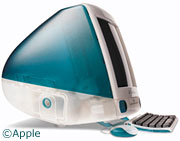
The old G3 iMacs had a 15" CRT display, relatively slow hard drives, and had a tray-loading CD-ROM mechanism. The tray-loading iMac was never shipped with a DVD or CD-RW drive, let alone a Combo drive. However, there are third-party CD-RW drives available for the tray-loaders for as little as US$135.
The hard drive is a standard IDE mechanism, and you can install drives up to 120 GB in size. A fast drive with a large buffer is always nice, but keep in mind that throughput is limited to 16.7 Mbps.
The early iMacs used USB as their only expansion port and were not designed for processor upgrades. There are several third-party CPU upgrades available, and Sonnet's HARMONi models even as a FireWire port.
UPDATE: The Sonnet HARMONi card was incompatible with early versions of Mac OS X 10.4. The FireWire port would tie up 100% of CPU resources. This problem was fixed in version 10.4.7 (if not earlier). If you have a HARMONi card that's had this issue, be aware that updating to 10.4.7 or newer should fix it.
There were four different tray-loading iMacs. All tray-loading models shipped with just 32 MB of RAM and include a 24x CD-ROM drive and a v.90 modem. Here's a quick overview:
- Revision A: Bondi, 233 MHz G3, 4 GB 4400 rpm hard drive standard. Supports 192 MB RAM, possibly more. 2 MB video RAM, expandable to 6 MB. ATI Rage IIc video chipset. Mezzanine slot. First iMac with IrDA support. Requires Mac OS 8.1 or later.
- Revision B: Bondi, 233 MHz G3, 4 GB 4400 rpm hard drive standard. Supports 192 MB RAM, possibly more. 6 MB video RAM. ATI Rage Pro video chipset. Mezzanine slot. Last iMac with IrDA support. Requires Mac OS 8.5 or later (8.6 or later recommended).
- Revision C: Five colors, 266 MHz G3, 6 GB 4400 rpm hard drive standard. Supports 384 MB RAM, possibly more. 6 MB video RAM. ATI Rage Pro Turbo video chipset. No Mezzanine slot. Requires Mac OS 8.5 or later (8.6 or later recommended).
- Revision D: Five colors, 333 MHz G3, 6 GB 4400 rpm hard drive standard. Supports 384 MB RAM, possibly more. 6 MB video RAM. ATI Rage Pro Turbo video chipset. No Mezzanine slot. Requires Mac OS 8.5 or later (8.6 or later recommended).
iMac Drawbacks
These old, tray-loading iMacs can run Mac OS X. We have a pair of Rev. D models at home with 10.3. They're no speed demons, but they're functional. And they point out some of the issues you'll deal with using OS X on a tray-loading iMac.
 The first issue is memory expansion.
Although you can run OS X with as little as 128 MB of RAM, you
won't be happy doing so. OS X will use your Mac's hard drive to
create virtual memory when it runs out of RAM, and that's several
orders of magnitude slower than memory chips.
The first issue is memory expansion.
Although you can run OS X with as little as 128 MB of RAM, you
won't be happy doing so. OS X will use your Mac's hard drive to
create virtual memory when it runs out of RAM, and that's several
orders of magnitude slower than memory chips.
One of our iMac 333s has 320 MB total RAM (a 64 MB module in the short slot, 256 MB in the long one) and runs OS X pretty comfortably. The other one won't see more than 128 MB in the long slot even if we plug in a 256 MB module. So that iMac has only 192 MB, and it's noticeably slower running OS X because it has to depend on virtual memory so often.
The second big tray-loading iMac problem is shared with the WallStreet PowerBooks and beige G3 Power Macs - any drive over 8 GB must be partitioned, the first partition must be smaller than 8 GB, and these models will only boot from OS X if it's installed on the first partition.
Our iMac with 320 MB of RAM has an older, slower hard drive. The one with 192 MB RAM has a high speed 20 GB* drive split into three equal partitions of about 6 GiB apiece - install OS X, add several applications, and 6-8 GiB becomes restrictive in a real hurry.
|
* GiB is used to distinguish a binary or "digital" gigabyte (2^30 or 1,073,741,824 bytes) from the decimal giga- prefix that indicates 1,000,000,000 (10^9). I use the term here because in my experience OS X won't boot from a partition larger than 8 GB on tray-loading iMacs, beige G3s, and WallStreets - yet most software, including Apple's disk utilities, reports binary GB (GiB). Thus, creating an 8 GB partition using most tools results in an 8 GiB partition, which is too big to use. I dislike the GiB label, because in computer terms GB has almost always referred to binary gigabytes. The great exception has been hard drives, which are marked as, say, 80 GB when they are actually 80 decimal GB and format to around 74 GiB. This has lead to lawsuits against drive manufacturers, and some people suggest using GiB for digital gigabytes as one way of clarifying the difference between two types of gigs - or megs or kilos or teras. Better a little education than a new term, IMHO, but it does simplify the discussion in this article. We will not normally use KiB, MiB, GiB, or TiB at Low End Mac. dk |
On the other hand, the faster hard drive does offer faster data access, virtual memory is much faster than with the older, slower drive in the other iMac, and that gives each of our iMacs roughly equal overall performance in OS X.
Processor Upgrades
If you've already got the iMac, already have plenty of RAM, and already have a decently large, fast hard drive, you might be able to justify $250-369 for a processor upgrade. Maybe.
With all of the other limitations of the tray-loading iMac, don't buy one with the intention of adding a processor upgrade. If you have one and choose that route, consider one unique feature of the Sonnet offerings - they add a FireWire port along with a 500 or 600 MHz CPU. Unless you do a lot of graphics or video work, the higher cost of a G4 probably isn't justified.
OS X Suggestions
It's possible to pick up any of the tray-loading iMacs for under US$200 (plus shipping) if you shop around, but the newer slot-loading iMacs start at about US$30 more (350 MHz slot vs. 333 MHz tray), don't have the 8 GB issue of tray loaders, and support up a 1 GB of RAM. If you're buying a used iMac to run OS X, I'd suggest you skip right past the tray-loaders and choose a slot-loading model.
If you already have a tray-loading iMac and want to run OS X on it, step one is to maximize RAM. Many iMacs support 256 MB memory modules in both slots, but not all do, and there's no way to know in advance whether yours will or not. Some people have 512 MB in their tray-loading iMacs. Get there if you can, settle for 288-384 MB as a second choice, and live with 160-192 MB only if you absolutely must.
Next find a fast, moderate capacity hard drive. The IDE specification supported by G3 iMacs won't work see the whole drive if it's larger than 128 GB (about 120 GiB), so don't spend the money for anything 160 GiB or larger. Speed matters. Although today's drives will be faster than the iMac's data bus, that means you'll be getting all the hard drive performance your iMac is capable of.
My first choice would be a new 7200 rpm hard drive with an 8 MB buffer. Second, a 2 MB buffer. Third, a 5400 rpm drive. Capacity? 80 GB drives are pretty much a commodity these days, often on sale at around US$80 (sometimes with a rebate). Smaller drives may be available for a bit less, but the difference is usually inconsequential.
Avoid used hard drives. Pulls, drives taken out of a new computer so a faster and/or higher capacity drive can be installed are often good deals - when you can find them.
And don't forget that the first partition must be no more than 8 GB in size. That's 8,000,000,000 bytes, not 8 GiB (8,589,934,592 bytes). Drive Setup in the Classic Mac OS and Disk Utility in OS X work in GiB, so choose 7.4 GiB as your first partition size to keep it within the 8 GB limit.
Upgrading a tray-loading iMac so you can use OS X won't be cheap. You'll probably spend $300 for RAM, a hard drive, and a copy of OS X - and that's part of the reason I suggest buying a slot-loader instead of a tray-loader for the small difference in price.
Still, you can run OS X on the early iMacs. Just don't expect earth shattering performance. Even with plenty of RAM and a fast hard drive, the slower video chips, system bus, and CPU speeds mean performance will range from tolerable to acceptable.
To get the most of out limited resources, run as few apps at once as
possible to avoid depending on virtual memory.

Revised 2004.09.08 to correct and clarify use of GB vs. GiB.
Reviesed 2004.09.09 to include Rev. B as IrDA model.
Join us on Facebook, follow us on Twitter or Google+, or subscribe to our RSS news feed
Not sure if you should upgrade your old Mac or replace it? Check the Mac Daniel index to see if we've already addressed your problem.
Today's Links
- Mac of the Day: 266 MHz iMac G3, introduced 1999.01.05. The first multicolored iMac runs at 266 MHz, loses infrared communication.
- Support Low End Mac
Recent Content
About LEM Support Usage Privacy Contact
Follow Low End Mac on Twitter
Join Low End Mac on Facebook
Favorite Sites
MacSurfer
Cult of Mac
Shrine of Apple
MacInTouch
MyAppleMenu
InfoMac
The Mac Observer
Accelerate Your Mac
RetroMacCast
The Vintage Mac Museum
Deal Brothers
DealMac
Mac2Sell
Mac Driver Museum
JAG's House
System 6 Heaven
System 7 Today
the pickle's Low-End Mac FAQ
Affiliates
Amazon.com
The iTunes Store
PC Connection Express
Macgo Blu-ray Player
Parallels Desktop for Mac
eBay

