
Mac Daniel's Advice
Solving Startup Problems on Your Mac
Evan Kleiman - 2002.09.16
Q. My Mac has a flashing question mark on start up. What do I do?
A. The flashing question mark has been one of the biggest problems plaguing Mac users since day one. The computer not finding a System Folder on your hard drive - or not finding your hard drive at all, for that matter - causes this. Today we'll look at the possible causes and solutions to this problem.
The computer not being able to find a System Folder on your hard drive is at the root of this problem. Everything else works fine - if not, you'd get a "sad Mac" instead of the happy Mac. But what causes the System Folder not to be seen, and how can you fix it?
The hard drive, CD, etc., that you normally use to boot is not connected
When I first purchased my B&W G3 through eBay, I got a flashing question mark when I turned it on. After multiple attempts to start my machine, I discovered that the hard drive had been disconnected. Being an internal drive, all I needed to do was open up the computer and reattach the cable. Most of the time this won't really be the solution to your problem, because it takes a lot to knock a cable out of place inside a computer.
However, if you use an external hard drive, this is more likely be the case. Check the connection from the back of the drive to the back of your computer. Make sure the cable - whether it be USB, FireWire, or SCSI - is connected on both sides, that the cable is intact, and that the drive is turned on and receiving power. I've had many destroyed USB and power cables thanks to vacuum cleaners and other things of the likes.
A third solution to this cause of the flashing question mark is actually the opposite of the two aforementioned examples. Sometimes, older Macs have a disk caught in the floppy drive and are trying to boot from it. To solve this, shut down the computer and either insert a straightened paper clip into the hole near the drive or restart the computer while pressing down the mouse button to eject the disk.
If none of these work, it's time for the next cause of this malicious malady.
There is a corrupted or "non-blessed" System Folder on the drive
To boot your computer into the Mac OS, a System Folder is needed. This folder contains such items as desk accessories, fonts, and control panels. It most importantly also contains the System file and the Finder. Without these two files, the System Folder will not boot.

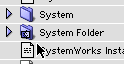
To rule this out, you'll need to boot your computer from a different hard drive partition or the system software CD or diskette. Now that you've done that, open up your normal hard drive in icon view and look at your System Folder. Does it have a plain folder icon (like System in the above image)? If so, this is your problem. If it does not have the normal System Folder icon , with the picture of the Mac Picasso Logo or the mini Happy Mac, it does not contain both a Finder and System or it is not a "blessed" System Folder.
- Editor's note: It is possible to have multiple System Folders on a single partition, in which case each will have both a System and a Finder, but only one will be blessed. If you do that, we recommend you download System Picker from Apple's FTP site and use it to bless the System Folder you wish to boot from.
The solution is simple. Find and restore the missing System or Finder file - or install a new System Folder from one of your back up or reinstall disks. (You still have them, right?)
Many things can cause an unblessed System Folder. Most of the times, it is caused by human or software error, so it doesn't usually "just happen." I've dealt with my own unblessed System Folders for such reasons as overuse of ResEdit, accidental deletion, and a horrible run in with the nVIR virus, the only virus I've encountered in six years of Mac use.
But if none of these seem to be the solution for you, it's time to move on to the next cause.
There is no System Folder at all
This is caused by only a few possible events. Usually a person or a virus simply deleted the System Folder. Another possibility is that you're not booting up from a bootable hard drive. However, this is not very likely. Nonetheless, in either case, it's easy to fix this problem.
First, boot up from your system software back up disk, then go to the Startup Disk control panel. It will be inside your System Folder on the drive. You'll be unable to go to the Apple Menu to access it, like normal, because Apple wanted to save space when they made the back up disks, so they didn't include the "Apple Menu Options" control panel.
To fix this problem, once you're in the Startup Disk control panel, see if your hard drive is selected. If it isn't, select it. Now open up your hard drive in the Finder. If you don't see a System Folder where it should be, it is necessary to reinstall the System Folder. Do this from the rescue disk you've just booted from and restart; you should be good from there!
The last cause of this problem is not as routine, since it can only occur with a new hard drive or after a system software update.
You have a bad disk driver
The disk driver is the thing that tells your computer how to talk to the hard drive. However, if you have the wrong driver, it will not work. To remedy this you'll need to update the driver. This can be done with either the software provided by the hard disk manufacturer or Apple themselves.
Launch either Apple's HD SC Setup, Drive Setup, or the utility provided by the hard drive vendor, depending on which type of hard drive you have. You can also use a third-party driver utility, such as Drive7 or FWB Hard Disk Toolkit. Once these programs are used, you can update your driver.
If none of these solutions works, it's time for a last minute effort.
It was just a momentary thing
This actually is a large percentage of the occurrences. To solve it, use all of the normal panaceas. Zap the PRAM (cmd-opt-P-R) on bootup, or just restart your computer. Another solution could be reinstalling the system software anyway, or rebuilding the desktop from another disk. Utilities such as Apple's Disk First Aid, TechTool Lite, Disk Warrior, Norton Utilities, and the like can help with some problems.
If none of these solutions work, then it's time to go to a
professional, because something might be broken, and it's time to get
it replaced. 
Join us on Facebook, follow us on Twitter or Google+, or subscribe to our RSS news feed
Not sure if you should upgrade your old Mac or replace it? Check the Mac Daniel index to see if we've already addressed your problem.
Today's Links
- Mac of the Day: PowerBook 500 Series, introduced 1994.05.16. 'Blackbird' includes a 25 to 33 MHz 68040 along with smart batteries and grayscale or color displays.
- Support Low End Mac
Recent Content
About LEM Support Usage Privacy Contact
Follow Low End Mac on Twitter
Join Low End Mac on Facebook
Favorite Sites
MacSurfer
Cult of Mac
Shrine of Apple
MacInTouch
MyAppleMenu
InfoMac
The Mac Observer
Accelerate Your Mac
RetroMacCast
The Vintage Mac Museum
Deal Brothers
DealMac
Mac2Sell
Mac Driver Museum
JAG's House
System 6 Heaven
System 7 Today
the pickle's Low-End Mac FAQ
Affiliates
Amazon.com
The iTunes Store
PC Connection Express
Macgo Blu-ray Player
Parallels Desktop for Mac
eBay

