
Mac Daniel's Advice
Picking a Computer for Christmas
Manuel Mejia Jr - 2001.11.08
So you want to buy a computer for Christmas and do it for less than $600? Miracles like this can and do happen to people every day of the year! It would be a good idea to do thing through some issues before making your purchase.
The Golden Question: Why do you need a computer in the first place?
This is the most important question to ask when making a purchase. The future use of said machine will depend on the answer. Are you in need of a writing machine, a graphics machine, or an Internet machine? How much time do you plan to spend behind this machine? Is this machine meant to "keep up with the computing power of the neighbors?" Are you planning to use the computer as a tool to oversee a small business or a social organization? How much space in the house, apartment, or trailer do you have to store an operate the computer? Do you need the ability to print a color image? Are their little children running around said house, apartment, or trailer? Who is the primary user of the computer?
All of these questions (and perhaps others that I have not
thought of) play a role in answering this question. They will also
dictate whether you need a new $1,000 machine or a low-end
computer. If your are dealing with an eight-year-old child who
wants to learn how to type and create drawings that he or she can
color in with a marker, a $60 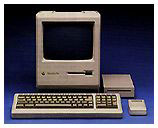 investment in a Mac Plus with an ImageWriter II printer
or a $100 investment in a Mac IIcx or
an LC II with a StyleWriter 1200 printer
(all used equipment) will meet and exceed the needs of that child
and provide the rest of the family with a useful tool for other
tasks like running a spreadsheet that tracks membership dues for
the local social club.
investment in a Mac Plus with an ImageWriter II printer
or a $100 investment in a Mac IIcx or
an LC II with a StyleWriter 1200 printer
(all used equipment) will meet and exceed the needs of that child
and provide the rest of the family with a useful tool for other
tasks like running a spreadsheet that tracks membership dues for
the local social club.
In terms of software, a quick search of the Internet will turn up software that will handle typing, drawing, and spreadsheets. One will sometimes even get needed software with the computer !
If you are an adult with a need to do high end graphic work, Web page design, run state of the art Internet applications like IRC and JAVA, or keep up with the neighbors, then you will need a newer computer like an iMac and spend that $1,000. It is a small machine, and it is immune from laughter from your neighbors because it is so old.
Getting a laptop can blunt their laughter, because laptops are conceived as "modern" (even if it is a PB 100 with a black and white screen and based on early 1990s technology). However, laptops are fragile machines and not the best computer for a precocious eight year old. The laptop is even worse if there is a four year old in the house who sees the laptop and uses it as a toboggan or an island for dolls or toy soldiers. A desktop computer is far more resistant to these problems.
If you use a digital camera, you must get a state of the art computer because you will need the USB ports to download the images. Early digital cameras used to download images by old fashioned serial cables. Those cameras seem to be out of style these days.
What computer is best for you? It depends on your needs and preferences. Computers and their software and accessories are as varied as the people who use them. Shop wisely and get the most for the buck.
Further Reading
- Best Used Mac Buys looks at ten Macs considered "best buys" by Low End Mac.
Join us on Facebook, follow us on Twitter or Google+, or subscribe to our RSS news feed
Not sure if you should upgrade your old Mac or replace it? Check the Mac Daniel index to see if we've already addressed your problem.
Today's Links
- Mac of the Day: 266 MHz iMac G3, introduced 1999.01.05. The first multicolored iMac runs at 266 MHz, loses infrared communication.
- Support Low End Mac
Recent Content
About LEM Support Usage Privacy Contact
Follow Low End Mac on Twitter
Join Low End Mac on Facebook
Favorite Sites
MacSurfer
Cult of Mac
Shrine of Apple
MacInTouch
MyAppleMenu
InfoMac
The Mac Observer
Accelerate Your Mac
RetroMacCast
The Vintage Mac Museum
Deal Brothers
DealMac
Mac2Sell
Mac Driver Museum
JAG's House
System 6 Heaven
System 7 Today
the pickle's Low-End Mac FAQ
Affiliates
Amazon.com
The iTunes Store
PC Connection Express
Macgo Blu-ray Player
Parallels Desktop for Mac
eBay

