
Mac Daniel's Advice
Introduction to the X10 System
Evan Kleiman - 2001.09.24
Q. What is this X10 technology I've been hearing so much about?
A. Believe it or not, X10 software and technology has been around for a rather long time, but it was never really well known because it didn't really get the publicity it deserved.
To sum it up, X10 is a technology that allows you to remotely control anything that plugs in to the electricity in your house, using either a wireless RF remote, a power station, or even a computer, using one of more of the X10 receiver boxes.
How you can put all of this together to work with your house and your desired needs? It's easy.
Modules
First, you need figure out what your needs are. First, decide which devices you want to control via X10. In my room, I have a lava lamp, two black lights, two main lights, and two accent lights attached to X10 modules.
Next, you need to decide which kind of controllers you want on each object you are controlling. There are many types of devices. The most common ones are Light Modules: these are dimmable boxes, and when you press the "all lights on" button on your controller, they all turn on. Another is the appliance box, which is similar to the light boxes, except they do not respond to the "all lights on" button and do not dim. These are useful for any appliance or light you do not want to dim, such as a fluorescent light. It is also useful to hook up a coffee maker, etc. to, because you don't really want an empty coffee maker turning on every time you light up your room. The third type is a three prong appliance module; this is the same as the two prong version, except it will take grounded devices.
In my room, I have all four regular lights hooked up with light modules, but the two black lights and the lava lamp are hooked into appliance modules. This way, when coming into my room in the dark, I can press one button and have all of my normal lights turn on.
Controllers
Now that you've decided what you need, go and buy the boxes. Even Radio Shack carries the most common items for X10. However, you can also get these things from eBay and the X10 website.
You're going to need to buy a box for every individual unit you're going to be controlling separately, because X10 works by giving each box a letter and a number to distinguish it from the rest of your system. The reason X10 is so great is because you need to do any wiring - X10 boxes and controllers send their messages through the existing power wiring in your house.
A quick tip to save some money on your X10 purchases is to remember that you can hook two or more things into the same box, as long as you want them to have the same unit ID. For example, I have two accent type lights connected to the same box (by attaching them both into an extension cord and plugging the extension cord into the lamp module). This way, whenever I press the "5" button on my controller, they both turn on, and when I'd like to dim them, they both dim to the same lighting level.
Now that you have your X10 boxes, it's time for the magic - hooking them up and turning your room or apartment or house into the Star Trek room of the future. (C'mon, how many of you have wanted a room just like anyone from Star Trek when all you need to do is say "lights" and have all of the lights turn on?)
Once you have all of your boxes hooked up, you're going to need to get some kind of controller. If you're reading this article, you're probably going to want to use a computer as a controller. However, most of us don't automatically go to the computer to turn on lights, and computers don't always work the way you want them to, so I recommend spending the extra $15 or so to get another plug in controller, such as Radio Shack's Model 61-2677, available at all of their stores.
You can also get one of the many RF (Radio Frequency) controllers and a nifty small remote. Now that you have your extra controller, you can now figure out what solution you'd like to get for your computer.
In this case, it is better to use an older low-end Mac for your
X10 system, because all of the current Macs will require a
Serial-to-USB adapter to connect to the X10 controller. Any Mac
will work 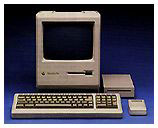 well for this, since it really doesn't
require a whole lot of resources. (Editor's note: A floppy-only
Mac Plus is a popular choice,
since it is small and very quiet.)
well for this, since it really doesn't
require a whole lot of resources. (Editor's note: A floppy-only
Mac Plus is a popular choice,
since it is small and very quiet.)
Software
First, choose your software. The three big ones out there are: X-Tension, MouseHouse, and Thinking Home. They all offer pretty much the same features, except for X-Tension, which allows scripting, a very more useful feature for making your room more like a Star Trek room, but more on that next week. All three of these programs are available from the products page on the X10 website.
Once you have your software, it is time to choose your hardware. For any Mac that only has USB support, you will need to buy some form of adapter. My favorite is the adapter from MouseHouse, called the Active Home Mac USB adapter; you can get it for around nine bucks (US) from MouseHouse Electronics.
Now that you have the software and cable, you need to get the hardware to control your new X10 setup with your computer. There are several options available, and my favorite is the Active Home series, by X10 and Active Home. You can find it for all kinds of prices at eBay, X10, or MouseHouse. If you're lucky, you can get a cheap deal on a starter package that has all of the things you need to get it set up, such as the RF controllers, the boxes, the computer hardware, and the computer software, but it always does seem, for me at least, that it is always cheaper to buy it by themselves instead of together.
Well, now it seems, after you've done all of this stuff, you're ready for life in the 23rd century, so have fun surprising everyone with your cool new "Star Trek" lights. Next week, we'll go over using scripting and speech recognition to make your room even more like Star Trek.
Editor's Note: I've been using X10 at home for years. It's a great way to turn lights on and off from bed, for instance. As Evan notes, they often have very impressive bundles available. Although the site seems for focus heavily on their Xcams, they have a lot of other useful products.
Join us on Facebook, follow us on Twitter or Google+, or subscribe to our RSS news feed
Not sure if you should upgrade your old Mac or replace it? Check the Mac Daniel index to see if we've already addressed your problem.
Today's Links
- Mac of the Day: Motorola StarMax 3000, (1999.09.07. This inexpensive clone used lots of off-the-shelf parts.)
- Support Low End Mac
Recent Content
About LEM Support Usage Privacy Contact
Follow Low End Mac on Twitter
Join Low End Mac on Facebook
Favorite Sites
MacSurfer
Cult of Mac
Shrine of Apple
MacInTouch
MyAppleMenu
InfoMac
The Mac Observer
Accelerate Your Mac
RetroMacCast
The Vintage Mac Museum
Deal Brothers
DealMac
Mac2Sell
Mac Driver Museum
JAG's House
System 6 Heaven
System 7 Today
the pickle's Low-End Mac FAQ
Affiliates
Amazon.com
The iTunes Store
PC Connection Express
Macgo Blu-ray Player
Parallels Desktop for Mac
eBay

