
Mac2Windows
Leopard Brings About a Few Changes for Boot Camp Users
- 2007.11.30 - Tip Jar
With the release of Leopard, a number of things have changed with Apple's Boot Camp technology for setting up an Intel Mac to dual-boot between Mac OS X and Windows XP or Vista. Some of these changes were anticipated; some are a bit of a surprise.
As anticipated, OS X 10.4 users running the Boot Camp beta are being told that the pre-release beta program ends on December 31, 2007. Along with the OS X 10.5 Leopard release in October - which includes Boot Camp as a standard feature - Apple had stopped making the Boot Camp beta software available for download. On November 28, Apple noted: "With the introduction of Leopard, the Boot Camp Beta program has ended. The Boot Camp Beta software will expire on December 31, and Apple won't offer further updates of Boot Camp Beta for Mac OS X Tiger." Existing Boot Camp partitions should continue to work after that date, though users of the beta software would be unable to use the Boot Camp Assistant to create or remove Windows partitions or create Windows driver disks.
However, there have been reports that Apple's OS X 10.4.11 update causes problems for users with Boot Camp Windows partitions on their hard drive; according to the report, some people updating to 10.4.11 with Boot Camp installed have been unable to restart after the update. The recommended solution has been to reformat and reinstall - and because the Boot Camp beta is no longer available, that could mean the end of those users' Boot Camp installations, at least if they're not planning to upgrade to Leopard. To avoid these problems, don't update to 10.4.11.
For users who have upgraded to Leopard, there are a few minor changes to Boot Camp. I upgraded a system that already had Boot Camp installed; the Leopard upgrade was unproblematic, and the Boot Camp installation continued to work as advertised.
However, when I started up the Boot Camp Assistant, I was surprised to see that there was no longer an option to create a Windows drivers disc - this had been an option throughout the various beta versions. Apparently this is no longer considered necessary; the Leopard disc 1 can be used in its place. In fact, any Boot Camp users upgrading to Leopard should boot to Windows and then insert their Leopard install CD, giving them the latest versions of Apple's drivers and utilities for Windows.
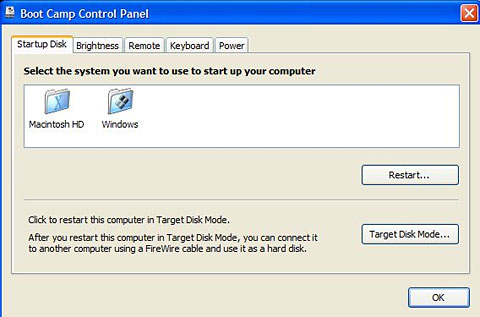
In Windows, where formerly Boot Camp added a Startup Disk control panel (just as it's in the OS X System Preferences), now in Windows Control Panel (at least in the "classic" view that shows all the various Control Panel icons) users get a Boot Camp icon instead. This includes several tabs: one to choose the startup disk, and others to set screen brightness, enable or disable the infrared remote, determine whether the keyboard's function keys are set by default to affect software (i.e. F1 for Help) or hardware (i.e. F1 to lower screen brightness, etc.), and whether the computer should restart after a power failure.
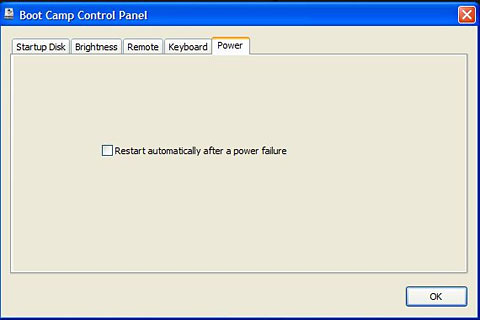
All these same options are available from the Boot Camp icon accessible in the lower-right System Notification Area (a.k.a. the Tray) in the corner of the Taskbar. I'm bemused by Apple's use of a multi-tab dialogue box for this - the options on each tab are pretty minimal; a simpler dialogue box could easily have presented all the options in an attractive manner.
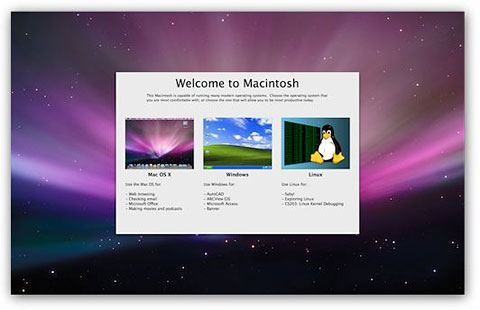
Boot Camp users (whether running Leopard or not) might be interested in the free BootPicker utility from Bombich Software. It's designed to increase the options available to Mac multi-boot users and may be especially useful to system administrators maintaining multiple networked Macs. It pops up an attractive screen immediately prior to log-in, allowing users to pick between Mac OS X, Windows, and Linux (which somewhat confusedly appears even if Linux is not installed).
Among other benefits, this gives users the option of booting to OS X or Windows at every restart without either selecting an OS in the Startup Disk preference item or holding down the Option key during restart.
On the other hand, it's yet another thing to slow down restart.
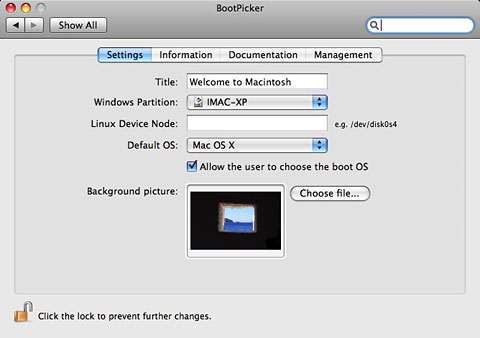
BootPicker installs as an OS X System Preference.

Join us on Facebook, follow us on Twitter or Google+, or subscribe to our RSS news feed
Alan Zisman is Mac-using teacher and technology writer based in Vancouver, BC, Canada. Many of his articles are available on his website, www.zisman.ca. If you find Alan's articles helpful, please consider making a donation to his tip jar.
Today's Links
- Mac of the Day: PowerBook 1400, introduced 1996.10.01. Considered by many the best pre-G3 PowerBook with a small footprint and great keyboard.
- Support Low End Mac
Recent Content
About LEM Support Usage Privacy Contact
Follow Low End Mac on Twitter
Join Low End Mac on Facebook
Favorite Sites
MacSurfer
Cult of Mac
Shrine of Apple
MacInTouch
MyAppleMenu
InfoMac
The Mac Observer
Accelerate Your Mac
RetroMacCast
The Vintage Mac Museum
Deal Brothers
DealMac
Mac2Sell
Mac Driver Museum
JAG's House
System 6 Heaven
System 7 Today
the pickle's Low-End Mac FAQ
Affiliates
Amazon.com
The iTunes Store
PC Connection Express
Macgo Blu-ray Player
Parallels Desktop for Mac
eBay

