
Mac2Windows
VMware Fusion Beta 3 Adds New Features, Takes a Giant Step Toward Release
- 2007.04.11 - Tip Jar
Competition is a wonderful thing - the existence of the Mac OS prods Microsoft into improving Windows (and vice versa - yes, Mac fans, Apple has included features that appeared first in Windows).
Mac users wanting to run virtualized sessions of Windows or
other PC operating systems are benefiting from the hot competition
between current Windows-on-Mac favourite Parallels Desktop
and VMWare Fusion
(still in beta for Mac).
In January, I noted the emergence of VMWare Fusion, that company's first Mac virtualization product, going head to head with the prerelease beta of Parallels Desktop 2.0. Since that column, Parallels Desktop 2.0 has been officially released.
VMWare Fusion has not yet made it to official release, but the company recently released Beta 3, with improved performance and new features. It can be downloaded for free, and registration with VMWare is required in order to get a needed serial number.
The user agreement for running Fusion Beta 3 "restricts formal reviews of this beta product. This restriction will be lifted when the product becomes generally available this summer." I've been granted permission to write about this beta for Low End Mac at this time as long as I restrain myself from commenting on performance or comparing features to other products - these are reasonable restrictions, since prerelease products have not yet been tuned for performance and may be missing features (or including features) compared to the eventual release versions - so no comparisons between Fusion Beta 3 and Parallels Desktop in this article!
New to Beta 3: The ability to make use of an already-installed copy of Windows XP in a Boot Camp partition, letting an existing Windows installation do double-duty by allowing users to boot directly to it or to run it as a virtualized session on top of Mac OS X.
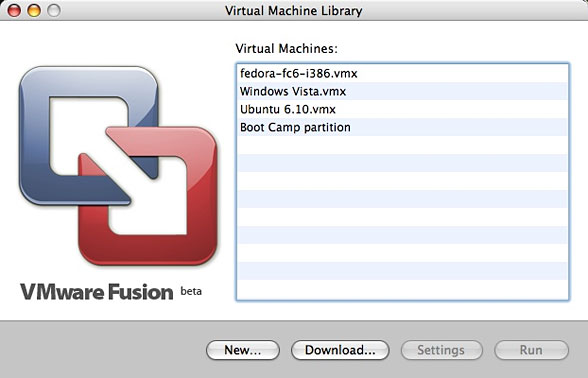
This is a neat trick: VMWare's software virtualizes video, sound, and network adapters that don't exist on Macs, so it's interesting that a single Windows installation can cope with these changes. In fact, it copes surprisingly well. When starting up Fusion for the first time, my existing Boot Camp partition was listed in the "Virtual Machine Library", along with the virtual machines I had created using the earlier beta version. It was not necessary to create a new virtual machine to make use of this feature.
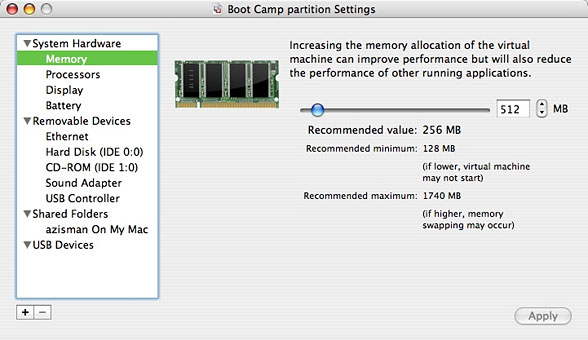
It was, however, useful to click on the Settings button and increase the amount of memory allocated up from the default 256 MB. I opted for 512 MB, in my opinion the lowest reasonable amount for Windows XP.
Also new in the settings is an option to Accelerate 3D graphics, which VMWare notes is "currently experimental". I didn't test this, but it could be a big step forward for Windows virtualizers, making it possible to play Windows games with good performance without having to boot directly into Windows using Boot Camp.
Fusion also includes an option to use two virtual processors and offers USB 2.0 support and the ability to automatically connect new USB devices. The user's Home folder can be set as a shared partition, one route to moving files back and forth between the Mac and Windows sessions.
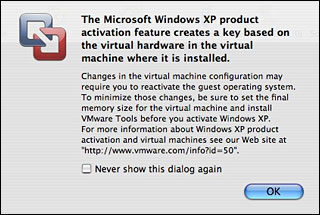 After checking the settings, I started up my existing Boot
Camp Windows XP installation running under Fusion. Fusion posted a
warning.
After checking the settings, I started up my existing Boot
Camp Windows XP installation running under Fusion. Fusion posted a
warning.
Windows XP and Vista make use of Microsoft's Product Activation feature; they need to be activated in order to use them over extended periods of time and to make use of Windows Update. And as VMWare notes, making changes to the hardware setup can nullify activation. Their suggestion: Make your changes, including installing the VMWare Tools prior to activating.
Each time Fusion starts up, it repeats that activation warning - at least until you check the option to stop showing it. It follows it with a request for a password; I don't know why.
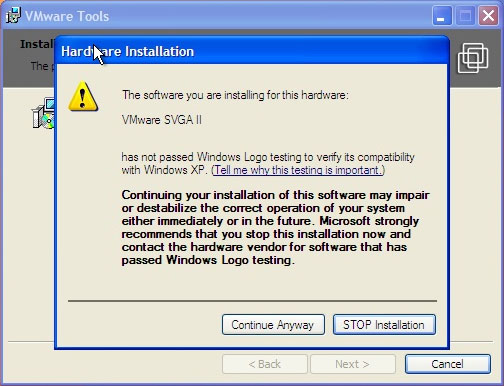
XP started without problem; sound, video, and networking all worked even prior to installing the VMWare Tools. Nevertheless, I installed the tools, which is an option in the Virtual Machine menu. Doing so loads a CD image and installs replacement video, network, and mouse drivers promising improved performance. The Tools also make it easier to switch between the Windows and Mac desktops and to drag and drop between them.
Note that Windows complains that these new drivers "have not passed Windows Logo testing". This is the case with many (or most) Windows drivers; ignore the warnings and proceed anyway.
As I noted in my earlier column, the Fusion window includes a toolbar with large icons along the top; these icons, allowing users to turn hardware such as CD-ROM, Sound Adapter, USB printer, etc. on or off are potentially useful (though they duplicate functions available from the menu bar). However, depending on your Windows desktop size and the resolution of your Mac's monitor, this tool bar may make the window too tall to display without scrolling.
The View menu includes the ability to turn off toolbar display. (VMWare Tools display driver seems to use a default 1024 x 745 resolution that fits everything on screen and displays the toolbar too . . . a handy thing since the option to turn off the toolbar doesn't seem to stick between sessions).
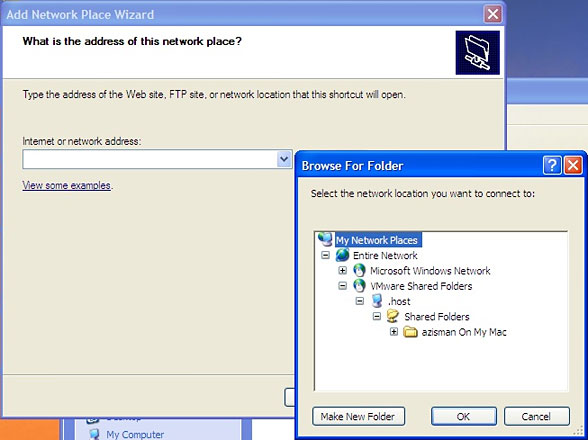
Nicely, one of the features of the VMWare Tools install allows dragging and dropping between the Mac and Windows desktops. Less nice: The location of my shared Mac Home folder wasn't immediately obvious. It didn't appear as a link on the Windows desktop or in My Computer.
Firing up My Network Places didn't show it either, until I opted to Add a New Network Place. There, in addition to the standard list of Microsoft Windows Network shares was a new VMWare Shared Folders item - drilling down, I was able to locate my Mac Home folder. It works, but like many things in Windows, you need to know where to look.
Okay, my Boot Camp partition's Windows XP installation worked as a virtual session; the next question was whether it would continue to allow me to boot to Windows. Remember, in order to work properly, it would need to use the correct video, sound, and network drivers for the hardware actually installed on my iMac.
(Normally, my Mac has an icon for my Boot Camp Windows partition on my desktop; when Fusion is making use of that partition, the icon disappears. When quitting Fusion, it takes a moment or two for the drive to mount again. Until that happens, the Windows partition is not listed in the Startup Disk system preference).
Shutting everything down, I rebooted my Mac, this time choosing to boot to the Windows partition. (A reminder to Boot Camp users: pressing the option/alt key when you hear the boot chime lets you manually choose to boot to Mac OS X or Windows, a handy trick if you've haven't used the Startup Disk preference or if [as in my case] the Windows partition hadn't been remounted on the Mac desktop.)
And again, everything worked. Without apparently spending time discovering new hardware, the Boot Camp installation started up with the correct video, network, and sound drivers in operation. This is immediately noticeable: in Boot Camp, I have Windows set to use my 17" iMac display's full 1440 x 900 pixels; running in a Fusion window on my Mac desktop, I prefer to set the display at 1024 x 768 (or, in this case, 745) pixels. I can move from one to the other without needing to manually fiddle with display settings. Nice.
For me, the ability to make use of a Boot Camp installation of Windows XP is an important addition to Fusion; as a result, I no longer need two XP installations - one for Boot Camp, the other to run in a virtual session while running OS X.
But that's not the only thing new to Fusion Beta 3; many users will find the new Snapshot feature especially useful. This lets users capture a "snapshot" of the current state of their Windows machine. Later, if a software or driver install (or virus or spyware) makes the system unusable, they can revert back to the snapshot. (They will, however, lose any work saved since making the snapshot. Note that this option is not available when running a Boot Camp installation.)
As with the previous betas - and unlike Parallels - Fusion Beta 3 supports 64-bit operation, allowing extra performance from the Mac's CPU(s) and allowing users to make use of 64-bit PC operating system versions. The new beta offers users the option to turn off debugging features for increased performance.
Also new in Beta 3: a Windows Easy Install feature makes creation of a new Windows virtual session quick and easy.
VMWare has yet to announce pricing for Fusion; I don't know whether they will match the pricing of VMWare Workstation for Windows and Linux (US$200), match the free availability of Microsoft's Virtual PC for Windows or VMWare's free Server or Player versions for Windows and Linux, or set some other price point. (Fusion's beta version is freely available for now).
VMWare Fusion Beta 3 is a big improvement over the previous
prerelease version. I'm looking forward to this summer's release.

Join us on Facebook, follow us on Twitter or Google+, or subscribe to our RSS news feed
Alan Zisman is Mac-using teacher and technology writer based in Vancouver, BC, Canada. Many of his articles are available on his website, www.zisman.ca. If you find Alan's articles helpful, please consider making a donation to his tip jar.
Today's Links
- Mac of the Day: Power Mac G3 All-in-one, introduced 1998.04.15. The 'molar' has 3 PCI slots, a built-in 15" display, and weighs nearly 60 lb.
- Support Low End Mac
Recent Content
About LEM Support Usage Privacy Contact
Follow Low End Mac on Twitter
Join Low End Mac on Facebook
Favorite Sites
MacSurfer
Cult of Mac
Shrine of Apple
MacInTouch
MyAppleMenu
InfoMac
The Mac Observer
Accelerate Your Mac
RetroMacCast
The Vintage Mac Museum
Deal Brothers
DealMac
Mac2Sell
Mac Driver Museum
JAG's House
System 6 Heaven
System 7 Today
the pickle's Low-End Mac FAQ
Affiliates
Amazon.com
The iTunes Store
PC Connection Express
Macgo Blu-ray Player
Parallels Desktop for Mac
eBay

