
Mac2Windows
Windows Security for Mac Users
- 2006.04.18 - Tip Jar
Alan Zisman has reviewed Apple's Boot Camp and Parallels Workstation for Low End Mac, but before we publish those reviews, we want you to be prepared for the dangers inherent in having a computer running Windows connected to the Internet. We'll post the Boot Camp and Workstation reviews later in the week. Dan Knight, publisher
If you're a Mac user who's started to run Windows, whether using
Virtual PC or Guest PC (or other emulator) on a PowerPC Mac, or via
Apple's Boot Camp or Parallels
Workstation virtualization software
on a new Intel Mac, then you need to be aware of Windows' security
issues.
Opinions are divided about whether the Mac is less prone to security attacks because it's more secure by design or simply because the vast numbers of Windows systems make them a more tempting target. I suspect the reality is a combination of the two.
No matter why, though, the fact remains that going online running Windows is putting your computer at risk. Online, a Windows system becomes a target - whether it is a dedicated Windows PC or Windows running (one way or the other) on Apple-branded hardware.
If you've got the time and inclination to dig deep into Windows security issues, you might like to pick up a copy of Andy Walker's Absolute Beginner's Guide to Security, Spam, Spyware & Viruses ($14.29 from Amazon.com).
If you lack the time or inclination to work through 360 pages, here's the short version.
Do You Need to Be Online in Windows?
Do you really need to take your Windows system online? If your Mac is your full-time computer and you only run Windows for a specific piece of software - say Microsoft Access or Publisher or AutoCAD, maybe there's no need for your computer to be online while you're running Windows.
If your computer isn't online it won't be vulnerable to online attacks. Unplug the network cable and turn off the WiFi access. Use the Mac OS for Internet access.
But if you're going online when you're in Windows:
Start with a Firewall
A firewall monitors the data coming into (and in some cases out of) your computer across the network, allowing you to block hackers trying to get at your computer. Firewalls can be implemented in hardware or software. If you're connecting to a wired or wireless router, its Network Address Translation provides a hardware level of firewall protection. As well, Windows XP Service Pack 2 (the version of Windows you need to use with Apple's Boot Camp) includes the Windows Firewall, which is turned on by default. (If you're using an earlier version of Windows with emulation or virtualization software, there is no built-in firewall software).
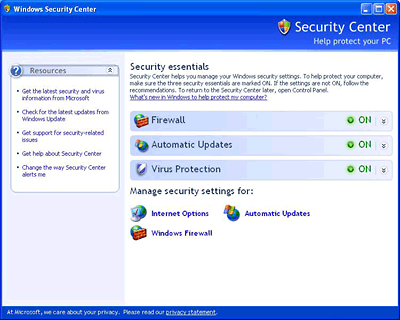
To check whether the Windows Firewall is turned on, look in the Start Menu's Accessories/System Tools program group for the Security Center (Windows XP SP2 only).
Better though, is a firewall that monitors both incoming and outgoing signals. While a router and the Windows Firewall both monitor incoming hack attempts, neither offer any protection against malware that's been installed on your computer and is trying to "call home".
Worth checking out is the free Zone Alarm Basic firewall from Zone Labs. But be warned: when you first start using Zone Alarm, be prepared for a lot of alerts as it checks with you whenever a new (to it) piece of software tries to access the Internet.
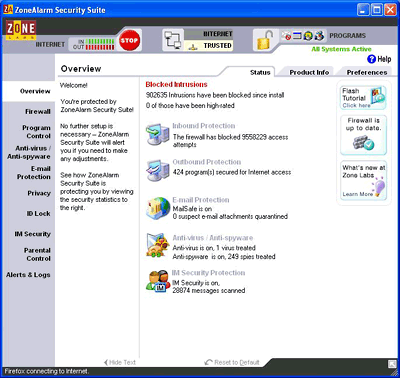
If you're convinced that program is trustworthy, you can allow it access, perhaps checking Zone Alarm's option to always allow that program access. But if Zone Alarm is warning you of a program you didn't expect, you may choose to block it from accessing the Net. (Note that every time you update, say, your antivirus program, Zone Alarm will treat the update as a new program, again requiring your permission before it can update its virus definitions).
Stay on Top of Viruses
The discovery of a few low-risk viruses affecting Mac OS X made the news earlier this year, but Mac users can still boast of the relative safety of their computer platform. With tens of thousands of viruses, Trojans, and worms aiming at Windows systems, antivirus protection is a must for Windows users.
 There are several
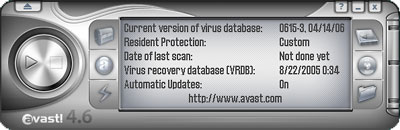
good free options, at least for noncommercial home users. Two I
like are AVAST and AVG. In both cases, be prepared to
register to get the serial number needed to keep the software
running beyond a 30-day trial. (You'll need to renew your
registration every year or so). Best-of-breed commercial products:
F-Secure Anti-Virus (US$65)
or Eset NOD32 ($40).
There are several
good free options, at least for noncommercial home users. Two I
like are AVAST and AVG. In both cases, be prepared to
register to get the serial number needed to keep the software
running beyond a 30-day trial. (You'll need to renew your
registration every year or so). Best-of-breed commercial products:
F-Secure Anti-Virus (US$65)
or Eset NOD32 ($40).
Even with up-to-date antivirus software running, Windows users need to be cautious about email (and instant messenger) file attachments - I've received files infected with viruses too new for my antivirus software to recognize.
Be wary of unexpected attachments, even if they appear to come from users you recognize; many viruses hijack a user's email address book (particularly if they use Microsoft Outlook or Outlook Express); so infection-bearing email can come from your Windows-using friends without them knowing that their computer sent it.
If in doubt, query the sender before opening an attachment.
Spyware Is This Year's Virus
When a Windows system starts acting sluggish or "funny", many users immediately suspect that their computer has been infected with a virus. More often these days, it's fallen prey to multiple spyware and adware infestations, hijacking the Internet Explorer start page, popping up ads (even when you're not using your browser), "phoning home" to report what web pages you've visited (aren't you glad you're blocking them with Zone Alarm?), and more.
Far too many systems have multiple infestations, each running in the background, sapping system resources, and causing system instability and crashes.
Your system may pick up spyware or adware in a number of ways. Many so-called free programs available for downloading are "sponsored" by adware; the fine print of the End User License Agreement (which you most likely agreed to without reading it) may have mentioned that your were agreeing to install more than you thought. Many popular peer-to-peer (music sharing) programs include multiple adware installations, for instance.
Some online ads quietly install spyware when you click on them. While Mac OS X generally requires explicit user permission when installing software, if you're logged into Windows with administrative privileges (which is how most people run Windows), software can install itself without the user's awareness.
Microsoft is apparently designing its upcoming Vista operating system to be more Mac-like in requesting user permission before software can install itself. In the meantime, your Windows online experience can be safer if you're logged on as a user with limited permissions.
Sadly, many online ads warning that "your system may be infected with spyware" install spyware while pretending to scan your system.
Sadly, many online ads warning that "your system may be infected with spyware" install spyware while pretending to scan your system. Distrust all so-called anti-spyware software advertised online!
In general, anti-spyware software is not yet as sophisticated and automated as antivirus software. If you're running Windows 2000 or XP, a good free choice is Microsoft's Windows Defender, formerly known as Microsoft Antispyware. (Yes, Microsoft - though it's based on a commercial program, Giant Antispyware, purchased by Microsoft).
Users of older Windows versions are best-served with the free Spybot Search and Destroy. Spybot can be installed to run in the background, warning the user when software tries to set itself up to run at startup, though the options in the warning dialogue box can be hard to click; it should be manually updated and run on a regular basis.
While you can "roll your own" free suite of firewall, antivirus, and anti-spyware software, Zone Lab's Internet Security Suite (US$70, renewable annually) includes all those components with a single interface. If you're shopping for a commercial anti-spyware product, check out eTrust PestPatrol (US$40) or PC Tools Spyware Doctor (US$30).
Keep Up to Date
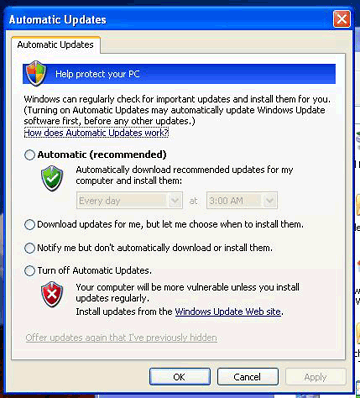
Make sure your firewall, antivirus, and anti-spyware software are up-to-date; ideally you're using products that update themselves. Recent Windows versions can be set to connect to Microsoft Update and download and install critical updates automatically in the background. It's well worth doing.
Minimize Microsoft
It may seem ironic to go to all this trouble to run Windows on your Mac only to avoid Microsoft programs, but the reality is that Microsoft's Internet Explorer browser and Outlook and Outlook Express email software have been malware magnets. From time to time you may need IE; some websites simply don't work right if accessed on your Mac or using some other browser even in Windows. But going online in Windows will be safer if you use Microsoft's browser and email software as little as possible.
Consider making Mozilla Firefox browser and Thunderbird email software your defaults. Firefox is expandable with extensions; one, IE Tab, can be load a page onto a Firefox tab using IE's browser engine, letting you make use of IE to view pages that are problematic in Firefox.
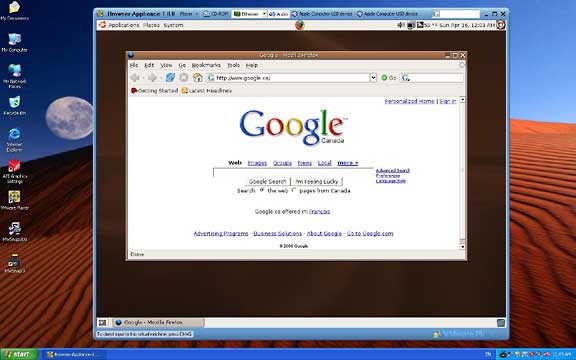
Or try this: VMware produces virtualization software that can be used to run other PC operating systems in a window within Windows or Linux - without the performance penalties of traditional emulators that Mac-users may be familiar with. VMware offers a free VMware Player that can be used with a large number of pre-made operating system images. Consider downloading it along with the Browser Appliance - a 280 MB download that includes a stripped-down version of Ubuntu Linux and the Firefox browser.
When you need to go online after using Boot Camp on your Mac, do it through VMware's Browser Appliance. You may be running Windows, but you're browsing using the far safer Firefox running on Linux.
Or just reboot to the Mac OS.

- Link: Absolute Beginner's Guide to Security, Spam, Spyware & Viruses
- Link: Zone Alarm Basic
- Link: AVAST
- Link: AVG
- Link: F-Secure Anti-Virus
- Link: Eset NOD32
- Link: Windows Defender
- Link: Spybot Search and Destroy
- Link: Zone Lab's Internet Security Suite
- Link: eTrust PestPatrol
- Link: PC Tools Spyware Doctor
- Link: Firefox
- Link: Thunderbird
- Link: VMware
Join us on Facebook, follow us on Twitter or Google+, or subscribe to our RSS news feed
Alan Zisman is Mac-using teacher and technology writer based in Vancouver, BC, Canada. Many of his articles are available on his website, www.zisman.ca. If you find Alan's articles helpful, please consider making a donation to his tip jar.
Today's Links
- Mac of the Day: Power Mac G5 (Early 2005), introduced 2005.04.27. At 2.7 GHz, the fastest G5 CPU Apple ever used, also 16x SuperDrive and it shipped with OS X 10.4 Tiger.
- Support Low End Mac
Recent Content
About LEM Support Usage Privacy Contact
Follow Low End Mac on Twitter
Join Low End Mac on Facebook
Favorite Sites
MacSurfer
Cult of Mac
Shrine of Apple
MacInTouch
MyAppleMenu
InfoMac
The Mac Observer
Accelerate Your Mac
RetroMacCast
The Vintage Mac Museum
Deal Brothers
DealMac
Mac2Sell
Mac Driver Museum
JAG's House
System 6 Heaven
System 7 Today
the pickle's Low-End Mac FAQ
Affiliates
Amazon.com
The iTunes Store
PC Connection Express
Macgo Blu-ray Player
Parallels Desktop for Mac
eBay

