
Mac2Windows
Windows XP on Macintel a Reality
- 2006.03.23 - Tip Jar
When Apple released the first of its Intel-based Macs, there was immediate interest in running Windows on them - not necessarily to replace Mac OS X, but as an additional option, allowing Macintel owners to run software (like Microsoft Access database) that doesn't have Mac equivalents without performance-sapping workarounds like Virtual PC (which isn't available for the new Macs in any event).
There was an initial optimism; it ought to be easy. After all, these Mac models were using the same sort of Intel CPU as all millions of Windows systems. But as I pointed out in my January 24th article, Windows on Intel Macs? OS X on PCs? Don't Hold Your Breath, it was harder than it looked.
The Intel Macs use a new-generation startup called EFI Extensible Firmware Interface) rather than the PC-standard BIOS used on nearly all Windows systems. Windows XP (and earlier versions) has no built-in support for EFI.
In fact, while there was early hope that EFI would be supported in the upcoming Windows Vista operating system, Microsoft recently announced that only 64-bit versions of Vista would have EFI support.
The Intel Macs are 32-bit systems.
As it became clearer that getting Windows to work on the Intel Macs would be a challenge, Houston shipping broker Colin Nederkoorn decided to formalize the challenge. He offered what started off as a $100 reward and solicited donations to up the ante for the first demonstration of Windows running on a new Mac. Eventually nearly US$14,000 was donated to OnMac.net.
There were some conditions: Windows needed to coexist with the Mac OS, the two operating systems must not interfere with one another, and upon boot up, a user would need to be able to choose between the two operating systems.
On March 16th, two Bay Area software developers, Jesus Lopez and Eric Wasserman, won the prize. (Lopez says he never owned a Mac before buying one to work on the challenge).
Details of the steps necessary to create a dual-boot system have been released and are available for download from OnMac.net. They have been open-sourced, allowing the developer community to improve on them.
I haven't tested them, but while they appear do-able, they're not for the faint of heart. As a first step, they require setting up separate partitions on the Mac's hard drive for OS X and Windows. Using Disk Utility on the OS X install CD, this would require nuking your current OS X installation and all the hard drive contents. An EFI bootloader is included in the download.
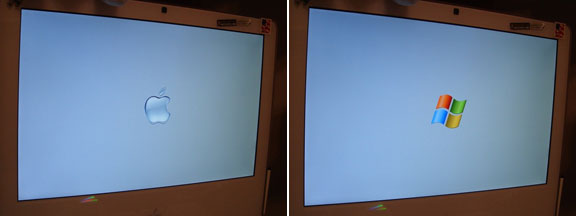
Apparently, when the grey screen with the Apple logo appears at the beginning of startup, this process allows a user to press the down-arrow; that brings up a Windows logo on the grey background. Pressing enter confirms the choice of Windows, and bootup continues to the Windows XP system.
The solution has been demonstrated working on 17" versions of the Intel iMac, the new Intel Mac mini models, and the MacBook Pro.
Nederkoorn is hoping that the open-source development will help it
evolve into something that's easier to apply for nontechnical computer
users. 
Join us on Facebook, follow us on Twitter or Google+, or subscribe to our RSS news feed
Alan Zisman is Mac-using teacher and technology writer based in Vancouver, BC, Canada. Many of his articles are available on his website, www.zisman.ca. If you find Alan's articles helpful, please consider making a donation to his tip jar.
Today's Links
- Mac of the Day: Power Mac G3 All-in-one, introduced 1998.04.15. The 'molar' has 3 PCI slots, a built-in 15" display, and weighs nearly 60 lb.
- Support Low End Mac
Recent Content
About LEM Support Usage Privacy Contact
Follow Low End Mac on Twitter
Join Low End Mac on Facebook
Favorite Sites
MacSurfer
Cult of Mac
Shrine of Apple
MacInTouch
MyAppleMenu
InfoMac
The Mac Observer
Accelerate Your Mac
RetroMacCast
The Vintage Mac Museum
Deal Brothers
DealMac
Mac2Sell
Mac Driver Museum
JAG's House
System 6 Heaven
System 7 Today
the pickle's Low-End Mac FAQ
Affiliates
Amazon.com
The iTunes Store
PC Connection Express
Macgo Blu-ray Player
Parallels Desktop for Mac
eBay

