
Mac2Windows
Using a Shared Windows Printer from Your Mac with OS X 10.4
- 2006.02.01 - Tip Jar
Each version of OS X has done a better job than its predecessors of "playing nice" with Windows networks. OS X 10.0 didn't have Windows networking at all; as with the classic Mac OS, 10.0 users needed a third-party program like Thursby's Dave to connect to shared Windows folders.
Mac OS X 10.1 added support for the open source SMB (a.k.a. Samba) clone of Windows' network client, but users had to enter connection information manually in the Finder's Go to Server dialogue box.
Starting with OS X 10.2, Apple started to make it easier by attempting to recognize nearby Windows networks.
Today, with OS X 10.4, it's generally reasonably easy for users with home and small business networks: Windows network shares (usually) show up in the Finder, and can be accessed without needing to be able to enter something like: smb://P4_10/DOWNLOAD
Shared Printer Shortcomings
Making use of a shared printer connected to a Windows computer is still not as straightforward a process, however.
Some of the reasons go way back to the Mac Dark Ages. Let's go back to the early 1990s, when up-to-date Mac users might be running something like System 7.1. At that time, some printers had printer drivers that allowed them to be shared between Macs on an AppleTalk network. The LaserWriter 8 driver allowed many Postscript printers to be shared easily, for instance.
But most other printer drivers couldn't be used to share printers. Apple even distributed replacement sharable printer drivers for some of their models.
On the other side - starting with Windows for Workgroups 3.10 and continuing through Windows 95 and later versions - Microsoft made printer sharing an operating system feature, not a printer driver feature. In those network-enabled versions of Windows, any printer could be shared. (In fact, if a printer is shared, in many cases, the sharing computer can distribute drivers to other connected Windows computers as needed. A very slick feature - when it works).
Even when OS X provided an opportunity for Apple to recreate the Mac operating system from the ground up, the ability to access a printer across a network remained, at least in part, a function that might or might not be included in each individual printer driver.
Take my HP PSC950 all-in-one. Apple includes printer drivers for it in recent versions of OS X, and HP has drivers online. This printer works fine with either driver when connected directly to my Mac's USB port. And it works fine when it's connected to a Windows PC on my home network.
But neither Apple's not HP's driver let me print to that printer from my Mac when it's shared from my PC, even though other Windows systems (and even Linux systems) print to it across the network just fine.
Shared Printer Solution
The solution comes from the open source community; in this case, from an open source project that was originally known as Gimp-Print, and is now known as Gutenprint. Gutenprint offers a set of open source networkable printer drivers that directly support a wide range of printers and can be used with an even wider range of printers. (See the list of officially and unofficially supported models.)
Their HP DeskJet series 900 driver lets me print to my PSC950.
Apple, in fact, started to include the Gimp-Print drivers as part of the base installations with OS X 10.3 and included updated versions with OS X 10.4. It works, but it's not perfect. In my case, text and simple graphics print fine, but photos seem to be dithered. If there's a way to get the driver set for better photo quality, I'd be happy to hear about it.
With OS X 10.4, Apple has done a better job of locating printers connected to Windows networks. With earlier versions of OS X, you had to know what the printer's "share name" was on the Windows network and the connected computer's network name, and then you had to enter that information manually in a dialogue box. Then (without knowing whether you'd gotten those names right or not), you had to manually pick the correct driver from a long list.
 Now Apple eliminates some
(though not all) of the guesswork. To set my Mac to print to my
shared printer, here's what I have to do:
Now Apple eliminates some
(though not all) of the guesswork. To set my Mac to print to my
shared printer, here's what I have to do:
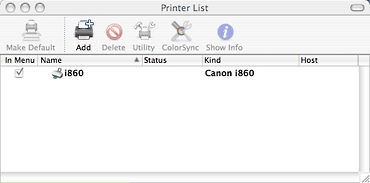
1. Open the Printer Setup Utility (in the Applications/Utilities folder). Click the Add button.
2. Click the More Printers button. In the resulting Printer Browser window, make sure that the top option is set to Windows Printing and the second option is set to Network Neighborhood. You should the name of your Windows workgroup. Double-click it to get a list nearby computers in your Windows workgroup, then double-click the computer that has the printer attached. (You may be asked for the name and password of a valid user for that computer; you can add these to your keychain to avoid future log-ins). At that point, you should see the shared printer.
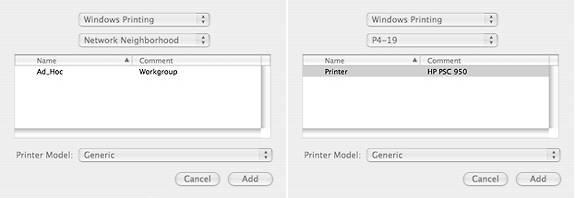
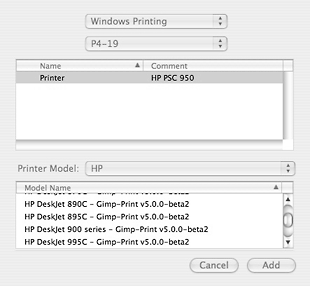 3. At that point, you may be tempted to click the Add
button . . . but don't. Look at the bottom of the
dialogue box - while it's got the printer's shared name (and, in my
case, a comment that identifies the printer model), as far as your
Mac is concerned, it's a "Generic Printer". Unless you're only
planning to print plain text, that won't do. Trust me.
3. At that point, you may be tempted to click the Add
button . . . but don't. Look at the bottom of the
dialogue box - while it's got the printer's shared name (and, in my
case, a comment that identifies the printer model), as far as your
Mac is concerned, it's a "Generic Printer". Unless you're only
planning to print plain text, that won't do. Trust me.
Instead, you need to take a look at the dropdown list of Printer Models. If you see your printer listed, you're in luck. In my case, though, there's no PSC950 listed among the HP models, since the driver for that doesn't work across Windows networks. Instead, I pick the HP DeskJet 900 series Gimp-Print driver, and (finally) click Add.
The new printer shows up in my printer list, and works just fine (as long as I don't expect photo-quality graphics).
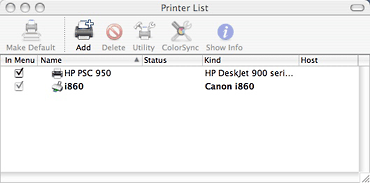 Compared to the fully manual
process needed in OS X 10.2 and 10.3, 10.4 is semiautomatic.
"Tiger" finds the shared Windows printer for you, but you still
have to know which driver to use with it.
Compared to the fully manual
process needed in OS X 10.2 and 10.3, 10.4 is semiautomatic.
"Tiger" finds the shared Windows printer for you, but you still
have to know which driver to use with it.
It's easier than it used to be, but for too many printers it's still not automatic enough or intuitive enough, so the Gimp-Print list of supported printers remains a vital resource.
The Gimp-Print project lists a couple of dozen developers,
document writers, and others who have helped with this open source
project, along with project manager Robert Krawitz. They all get my
thanks! 
- Link: Gutenprint
Join us on Facebook, follow us on Twitter or Google+, or subscribe to our RSS news feed
Alan Zisman is Mac-using teacher and technology writer based in Vancouver, BC, Canada. Many of his articles are available on his website, www.zisman.ca. If you find Alan's articles helpful, please consider making a donation to his tip jar.
Today's Links
- Mac of the Day: SuperMac S900, introduced 1996.08. This very expandable tower supports dual CPUs, has 6 PCI cards. and includes many drive bays.
- Support Low End Mac
Recent Content
About LEM Support Usage Privacy Contact
Follow Low End Mac on Twitter
Join Low End Mac on Facebook
Favorite Sites
MacSurfer
Cult of Mac
Shrine of Apple
MacInTouch
MyAppleMenu
InfoMac
The Mac Observer
Accelerate Your Mac
RetroMacCast
The Vintage Mac Museum
Deal Brothers
DealMac
Mac2Sell
Mac Driver Museum
JAG's House
System 6 Heaven
System 7 Today
the pickle's Low-End Mac FAQ
Affiliates
Amazon.com
The iTunes Store
PC Connection Express
Macgo Blu-ray Player
Parallels Desktop for Mac
eBay

