
Mac2Windows
'Just Say No to Microsoft' Fails to Convince
- 2006.01.17 - Tip Jar
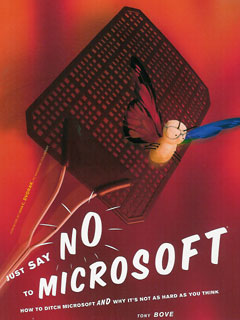
As Mac users, we've already made a choice to say "no" to the majority computing platform, so many of us may be interested in Tony Bove's Just Say No to Microsoft (No Starch Press, US$24.95) with its subtitle, "How to ditch Microsoft and why it's not as hard as you think".
Bove focuses on how to replace Microsoft Windows with Macs and Linux operating systems - and how users who remain Windows-users can make their systems as Microsoft-free as possible with alternatives to Internet Explorer, Microsoft Office, Windows Media Player, and more.
He offers a history of Microsoft as it rose to dominate the field of personal computer operating systems and productivity software, chapters on Mac and Linux, and looks at alternatives to the various Microsoft Office programs and Windows Media Player. That's followed by network and Internet alternatives and a 12-step program for kicking the Microsoft addiction.
 The book is an often-sprightly read with a
combination of humour, anger, and practical tips.
The book is an often-sprightly read with a
combination of humour, anger, and practical tips.
It Doesn't Quite Work
But for me, it doesn't quite work. Bove seems trapped by his anti-Microsoft frame. As a result, complicated procedures in Windows or Microsoft software are always pointed out negatively, while often-complicated procedures in Microsoft alternatives are simply ignored.
This starts on the first page of the introduction, where Bove notes his elation at running OpenOffice.org's office software on his PowerBook. "Not a piece of Microsoft code in sight." True, but also no mention of the effort it takes to get the non-OS X-native OpenOffice.org software up and running on his PowerBook - if this had been a piece of Microsoft software, you can bet he would have complained loudly.
"To get high-quality sound from an iMac, PowerBook, other Macs, or iPods, you can connect them to your home stereo equipment." Guess what? You can do this with a Windows PC as well, and in exactly the same way Bove describes - running a cable from the sound output jack to your home stereo.
Bove makes light of Linux limitations as well; he suggests that computers with 64 to 128 MB of RAM "can run Linux with all its bells and whistles". Don't bet on it; up-to-date Linux distributions can be very nice and very usable, but they're also pretty much as RAM-hungry as up-to-date Mac OS X or Windows installations, at least if you want "all the bells and whistles".
He highlights a report of a college technologist turning 133 Mhz Pentium systems into "serviceable Internet kiosks for the college's students"; just add Linux, CD-ROM drives, and more RAM. Sorry, but more RAM, CD-ROM drives, and Windows would probably make slow but usable Internet kiosks as well.
Just Plain Wrong
We get errors of fact. Linux-father Linus Torvalds is described as "a student programmer in Norway" (he's Finnish), while Bove claims, "Word documents are now the most common carrier for viruses", which was once the case but certainly hasn't accounted for any of the most common infections of the past few years.
Bove has a thing against PowerPoint as well, which he describes as "a dinosaur stalking the new world of interactive media that simply won't give up". By confining a presenter to "a single pre-set path, limiting the creator's options, discouraging spontaneity, and diminishing flexibility" he gets to blame the software (and Microsoft) for business and government stupidity. He then goes on to promote PowerPoint alternatives including OpenOffice.org's Impress presentation module and Apple's Keynote, but fails to realize that these alternatives equally tie presenters to a linear set of onscreen slides.
Blaming NASA's Columbia space shuttle disaster or the war in Iraq on PowerPoint presentations may make for good clean fun, but it's not clear to me that history would have been any different if the presenters had been using non-Microsoft software.
And that's ultimately the problem with this book: It's great to provide users with alternatives to the Microsoft mega-standards, and this book does a pretty good job of pointing out a range of alternatives. But accuracy is also important, and it's important to compare alternatives by the same standards as Microsoft's products.
Microsoft may have a lot to account for; unfortunately, with its
factual errors and in-your-face biases, "Just Say No..." isn't the
book to convince many users to "ditch Microsoft". 
Join us on Facebook, follow us on Twitter or Google+, or subscribe to our RSS news feed
Alan Zisman is Mac-using teacher and technology writer based in Vancouver, BC, Canada. Many of his articles are available on his website, www.zisman.ca. If you find Alan's articles helpful, please consider making a donation to his tip jar.
Today's Links
- Mac of the Day: PowerBook 165c, introduced 1993.02.10. The first color PowerBook had an attractive screen, slow graphics.
- Support Low End Mac
Recent Content
About LEM Support Usage Privacy Contact
Follow Low End Mac on Twitter
Join Low End Mac on Facebook
Favorite Sites
MacSurfer
Cult of Mac
Shrine of Apple
MacInTouch
MyAppleMenu
InfoMac
The Mac Observer
Accelerate Your Mac
RetroMacCast
The Vintage Mac Museum
Deal Brothers
DealMac
Mac2Sell
Mac Driver Museum
JAG's House
System 6 Heaven
System 7 Today
the pickle's Low-End Mac FAQ
Affiliates
Amazon.com
The iTunes Store
PC Connection Express
Macgo Blu-ray Player
Parallels Desktop for Mac
eBay

