
Mac2Windows
Virtual PC 7 Puts a (Sluggish) Windows PC on Your Mac
- 2004.10.11 - Tip Jar
Shortly after Microsoft bought out the Virtual PC franchise from longtime Mac developer Connectix in 2003, it hit a stumbling block - VPC 6.x didn't work on Apple's new high-end G5-powered hardware.
Just as English is written from left to right while Hebrew and Arabic go from right to left, Mac and PC processors read bytes of data in opposite directions. G3 and G4s support a "pseudo little-endian mode" feature that increased performance when emulating a Pentium-style CPU. While faster and more powerful overall, the G5 lacked that mode, making earlier versions of VPC-Mac unusable on Apple's flagship systems.
Rewriting the program to provide G5 support, VPC 7 was pretty much ready this past summer, but Microsoft chose to hold off its release while awaiting Windows XP Service Pack 2, preferring to give its customers the security features built-into that Windows update. The September release proved to be well timed, coming out at about the same time as Apple's release of the iMac G5 that brought the G5 processor to a wider market.
VPC 7 is being released on its own in a variety of versions and as part of Microsoft Office Professional 2004 - the part of MS Office Pro that differentiates it from the previously released Office Standard. VPC pricing depends on the Windows version that is bundled along with it: With Windows XP Pro or Windows 2000 Pro, it lists for US$249; with XP Home, its US$219. If you want to roll your own operating system, it's US$129. And owners of VPC versions 5 or 6 can upgrade for US$99.
Hardware requirements are relatively steep: Microsoft suggests at least a 700 MHz G3 or better, OS X 10.2.8 or 10.3.x, 3 GB of free drive space, and at least 512 MB of memory. More is better - that's because VPC is trying to emulate a complete Windows PC on your Mac. You'll need enough RAM to keep your Mac's operating system happy plus enough memory for the emulated PC, and modern versions of both OS X and Windows can never have too much memory.
I tested VPC 7 on an iBook G4/800 with 640 MB of memory, a system relatively close to Microsoft's minimum requirements.
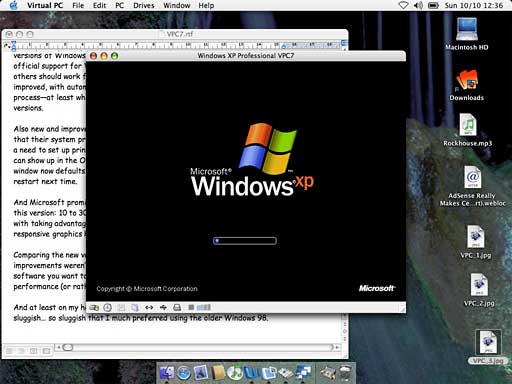
While it's an interesting technical achievement to make your Mac pretend to be a PC and good fun to watch Windows boot up in a window on your OS X desktop, why bother?
Microsoft's polling suggests that more than half of surveyed Mac users expressed a need to access Windows-only software, at least some of the time. Many businesses use Microsoft's Access database, for instance, included in the Windows Office Professional product and not available in a Mac version.
Web developers need to be able to see how their output will look on a PC running the Windows Internet Explorer; viewing it in the Mac version isn't good enough. (And sadly, too many bank and e-commerce sites will only work with Windows Internet Explorer. My daughter was unable to register for her college courses from her Mac; she had to move to a PC to sign up for this term's classes.)
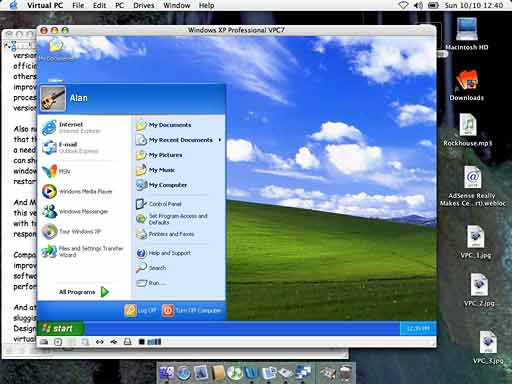
I moderate an online discussion group hosted on FidoNet running on several hundred old-style BBSs worldwide. While I can log on and view messages using telnet on OS X's Terminal, it's more convenient to download entire packets of messages and read and respond offline. I've found software to do that in Windows, but not for the Mac.
Sure, you could buy a low-end PC for only a couple of hundred dollars more than the cost of a copy of VPC, and it would offer better performance than VPC (at least on my iBook!), but it wouldn't allow access to the Mac clipboard or easy access to files on the Mac. And it would take up a lot more desk space.
Assuming you've got powerful enough hardware with enough memory and free drive space, creating a Windows PC using VPC is pretty straightforward. If you've got a copy with a bundled operating system, it's a matter of installing VPC, then choosing the menu option to create a new virtual PC. Because the copy of Windows bundled with VPC is preconfigured for your virtual hardware, it's faster than installing Windows on a real PC.
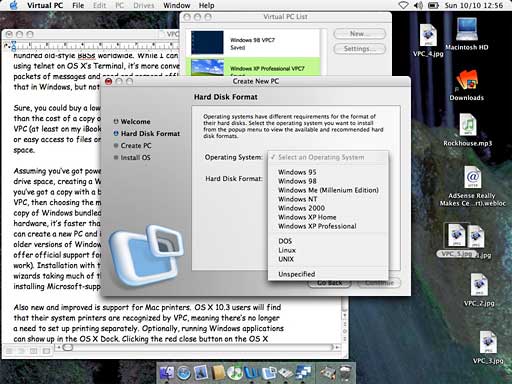
Alternatively, you can create a new PC and install the operating system of your choice, including older versions of Windows and some versions of Linux (some Linux distributions will not work, and Microsoft's support for Linux is, not surprisingly, limited). Installation with the new version has been improved with automated wizards taking much of the guesswork out of the process - at least when installing Microsoft-supported operating systems.
Also new and improved is support for Mac printers. OS X 10.3 users will find that their system printers are automatically used by VPC, meaning there's no longer a need to set up printing separately.
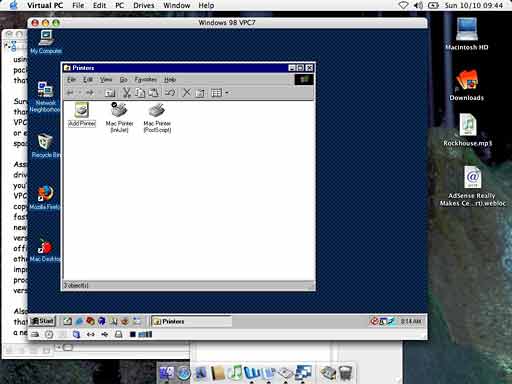
Running Windows applications can optionally show up in the OS X Dock. Clicking the red close button on the OS X window now defaults to Fast Save, putting VPC to sleep, enabling a quick restart next time.
Microsoft promises, along with G5 support, better performance with this version: 10 to 30% faster startup, refresh, and response times, along with taking advantage of Mac OS X's OpenGL graphics routines for more responsive graphics handling.
Comparing the new version to the older VPC 6.01 on my iBook, however, the improvements weren't dramatically noticeable. As with previous versions, if the only-on-Windows software you want to run is games, get a PC - you won't find VPC's graphics performance (or rather, lack of performance) acceptable.
And at least on my hardware, Microsoft's latest Windows XP was pretty sluggish - so sluggish that I much preferred using the older Windows 98. Designed for an older generation of (real) PCs, it was much happier with the virtual PC that I could offer it.
Still, if you're one of Microsoft's estimated half of Mac-owners who need to run a Windows-only application now and then and you don't have a real PC handy, VPC is probably worthwhile, especially if you want to use a Mac at work where the company requires you to use a custom-built corporate Windows application.
If you've got a G5 Mac, such as the new iMac, Virtual PC 7 is
your only choice. But if you've already running a recent VPC version,
I'm not sure there's enough new and improved in version 7 to justify
the US$100 upgrade cost. 
Join us on Facebook, follow us on Twitter or Google+, or subscribe to our RSS news feed
Alan Zisman is Mac-using teacher and technology writer based in Vancouver, BC, Canada. Many of his articles are available on his website, www.zisman.ca. If you find Alan's articles helpful, please consider making a donation to his tip jar.
Today's Links
- Mac of the Day: DayStar Genesis, introduced 1995.10.30. The first 'Mac' with multiple processors, technology Daystar licensed to Apple.
- Support Low End Mac
Recent Content
About LEM Support Usage Privacy Contact
Follow Low End Mac on Twitter
Join Low End Mac on Facebook
Favorite Sites
MacSurfer
Cult of Mac
Shrine of Apple
MacInTouch
MyAppleMenu
InfoMac
The Mac Observer
Accelerate Your Mac
RetroMacCast
The Vintage Mac Museum
Deal Brothers
DealMac
Mac2Sell
Mac Driver Museum
JAG's House
System 6 Heaven
System 7 Today
the pickle's Low-End Mac FAQ
Affiliates
Amazon.com
The iTunes Store
PC Connection Express
Macgo Blu-ray Player
Parallels Desktop for Mac
eBay

