
Mac2Windows
SharePoints Unlocks Hidden Network Flexibility in OS X
- 2004.06.23 - Tip Jar
Each major update of OS X has tried to do a better and better job of playing nice with the Windows Networking used by large numbers of home and businesses. Version 10.1 added support for the open source SMB (Samba) port of Windows Networking but left it up to users to discover how to connect.
Version 10.2 (Jaguar) listed Windows networks in the Finder's Go/Connect to Server menu, making it easier to log-on, and added an option to turn on Windows Sharing in the Sharing system preference, making it possible (on a good day) for Windows users to work with shared files on the Mac.
Panther added networks (including Windows networks) in the handy toolbar on the left side of Finder windows. (Though easier to use, Panther's network connections seem more finicky than Jaguar's, at least in my experience. When they work, they work well, but far too often, they seem to fail to connect).
As with Jaguar, turning on Windows sharing in the Sharing system preference makes it easier to add a Mac to a Windows network than to add a Windows system.
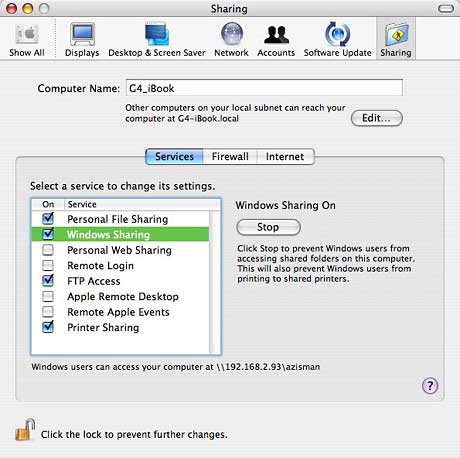
Turning on Windows networking in this way is easy but limited - it shares the contents of your Home folder, including Documents, Music, Desktop, and more. For many users, this will be all they need to let their Mac share files with Windows computers.
In other cases, though, it's not enough. Some users may need to set a particular workgroup name. Others may want to share files residing on a different drive such as an external FireWire drive, or on a folder outside their OS X Home folder. (Maybe they're still using a classic-mode program and saving work to an old-style Documents folder).
OS X is capable of far more networking options than Apple makes easily accessible in the Sharing system preference. If you're comfortable at the Unix command prompt (I'm not!), you can turn them on using the Terminal utility.
Much of this command line power is available, however, with the free (donations accepted) SharePoints from HornWare.
The downloaded SharePoints package contains two different versions of the program. Drag the application to a location of your choice (I put it in the Applications/Utilities folder), and it's ready to use. Alternatively, drag the preference pane into one of your Library/PreferencePanes folders, and it will appear as a system preference.
You can use either method or both to install SharePoints. Either way, the functionality and the user interface are the same.
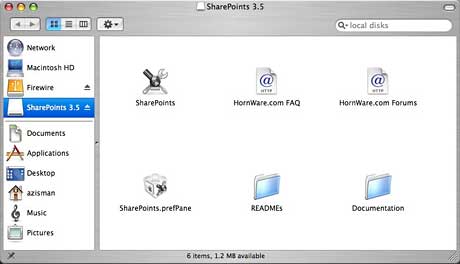
Networking can be complex, at least when you get beyond the deliberately simplified minimalism Apple presents in the Sharing system preference. As a result, the SharePoints interface is somewhat cluttered and can seem confusing or overwhelming.
Assuming you've turned on sharing in the Sharing preference pane, you can gain control over your share or share additional folders by opening either the SharePoints application or preference pane. To add an additional share, enter a name in the Share Name field.
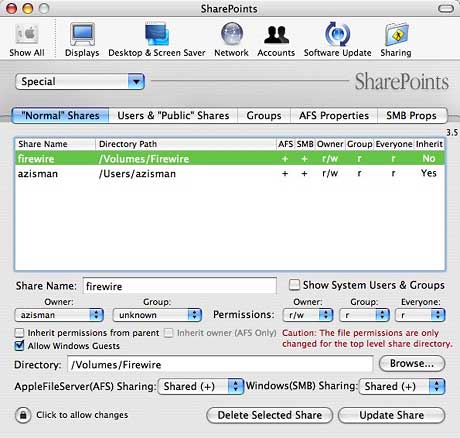
Click on the Browse button to locate the folder. You can select an entire drive, if you wish, as I did, sharing my external FireWire drive. Select to share this folder using AFS (Apple File Sharing), SMB (Windows networking), or both. Click on the Create New Share button and your share will appear in the main list. You'll need to click on the button to Restart SMB (or Apple File Sharing) Server before your new shares are available to other users.
Also included is the ability to create new file sharing users and control what they can access. You get control over OS X Groups, including the ability to add and remove individual users from groups. As well, you can set various properties both for Apple File Sharing and for SMB (Windows Network) sharing.
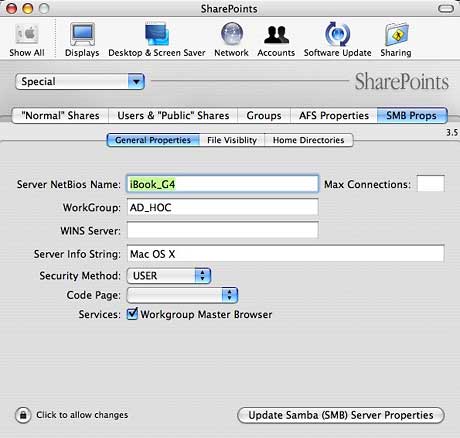
Most useful to me, having a home network that mixes Macs and Windows systems (and that uses a non-default workgroup name), is the ability to set the workgroup name. This makes it more likely that I'll be able to actually find my Macs from the Windows systems on my network.
SharePoints does a good job of giving users back the networking
potential that Apple chose to hide. Thanks to HornWare for making it
available for free, but please remember to send them a donation if you
find it useful. 
Join us on Facebook, follow us on Twitter or Google+, or subscribe to our RSS news feed
Alan Zisman is Mac-using teacher and technology writer based in Vancouver, BC, Canada. Many of his articles are available on his website, www.zisman.ca. If you find Alan's articles helpful, please consider making a donation to his tip jar.
Today's Links
- Mac of the Day: PowerBook 500 Series, introduced 1994.05.16. 'Blackbird' includes a 25 to 33 MHz 68040 along with smart batteries and grayscale or color displays.
- Support Low End Mac
Recent Content
About LEM Support Usage Privacy Contact
Follow Low End Mac on Twitter
Join Low End Mac on Facebook
Favorite Sites
MacSurfer
Cult of Mac
Shrine of Apple
MacInTouch
MyAppleMenu
InfoMac
The Mac Observer
Accelerate Your Mac
RetroMacCast
The Vintage Mac Museum
Deal Brothers
DealMac
Mac2Sell
Mac Driver Museum
JAG's House
System 6 Heaven
System 7 Today
the pickle's Low-End Mac FAQ
Affiliates
Amazon.com
The iTunes Store
PC Connection Express
Macgo Blu-ray Player
Parallels Desktop for Mac
eBay

