
Mac2Windows
iTunes Sharing Lets Mac Users Become Low-end Radio Stations
- 2003.05.28 - Tip Jar
Recently, Apple made some big moves on the digital music front, gaining a lot of press for its iTunes Music Store. At the store, Apple has made over two hundred thousand tunes available for download at US$1 each with the blessing of the recording industry, yet with fewer restrictions than other commercial music-downloading services. Even though it's currently limited to US-located Mac-owners, Apple's Music Store was able to boast over two million tunes downloaded in its first weeks of operation.
To make use of the iTunes Music Store., potential customers need to use iTunes version 4. While Apple stands to make a nice bundle of pocket change from the Music Store, there's another significant feature of the new iTunes that has gathered far less public comment.
iTunes 4 has a sharing feature that offers every user the potential to be (on a decidedly small-scale level) their own radio station. Yes, iTunes now does music streaming.
Go to the iTunes preferences, and you'll see a Sharing icon. Click
on it, and you'll see a simple-to-use set of options: 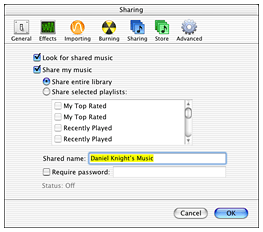 turn sharing on or off, share all songs in your iTunes
library (vs. specified playlists), and whether or not to
password-protect access to your iTunes library.
turn sharing on or off, share all songs in your iTunes
library (vs. specified playlists), and whether or not to
password-protect access to your iTunes library.
If sharing is turned on, that dialogue will also show how many people are currently accessing your shared library. With sharing turned on (and iTunes running), your Mac magically becomes a music-streaming server, letting users on other Macs listen to the songs in your iTunes library.
On Apple's iTunes web page, the feature is mentioned, but the discussion about it focuses on how it works with Rendezvous to automatically locate other Macs on a home network. Their example states: "Let's say, for instance, that you have thousands of AAC and MP3 music files stored on a Mac in your home office. With iTunes 4, you can stream that music to other Macintosh computers anywhere in your house."
Apple neglects to mention that this sharing isn't limited to other Macs on your local network. In fact, with sharing turned on your Mac will happily stream music to any other iTunes user across the Internet.
Major radio stations don't need to quake in their boots, however. There are a couple of pretty significant limitations built in.
iTunes sharing is limited to a maximum of five users at a time. This is probably a very good thing, as few of us have ISPs who would be happy with the bandwidth consumed if large numbers of people wanted to connect simultaneously. (To say nothing of the demands this would place on your Mac's hardware). In order to connect over the Internet, potential listeners will have to know your IP address beforehand. In other words, you can listen to the tunes stored in your home Mac's iTunes library while at work (assuming you also have a Mac at work). And you can send your IP address to a few friends, and they can listen to tunes stored in your iTunes library.
You probably don't know your IP address offhand. And if you're connecting to the Internet via a router (perhaps connected to a cable or DSL broadband modem), your Mac's IP address over the LAN isn't its address over the Internet.
You can find out the IP address your computer is using to connect to the Internet from WhatIsMyIP.com. And if there is a router in between your Mac and the Net, you will need to do a bit of configuration to allow requests made over the Internet to contact your Mac. On my wireless Linksys router, for instance, I had to log into the router's configuration program, go to the Advanced tab, then go to forwarding tab. There, I enabled Port 3689 for the Mac's network IP address. (If you have a dynamic IP address that changes frequently, you may want to sign on with a free service like dyndns.org that provides users with a virtual static address).
This is not quite as transparent as Rendezvous automatically locating other Macs on your home network, but it's not too hard to do, either.
Once that's done, your iTunes library is available online - at least to anyone who knows your IP address and the password that you've set.
There are a couple of ways to connect. You can click on the iTunes Advanced menu and choose its Connect to Shared Music item. Type in the IP address, and that library's share name should appear in the iTunes list of available sources. Alternatively, typing "daap:\\ip_address" in a browser should get you connected.
Some Mac users have gone public with this, offering their libraries to the world. iTuneShare is maintaining lists of users, organized by music category.
Unlike Napster, Limewire, Kazaa, and the like, iTunes file sharing lets remote users listen to tunes across the Internet or a local network, but it doesn't allow them to actually download the music files onto their local computer. I'm sure this was done on purpose, allowing Apple to argue that this iTunes feature isn't there to encourage pirating of copyrighted music.
A number of programs have been posted that get around this
limitation, allowing users to actually copy music files from one Mac to
another, but we're not going to tell you where to find them.

|
Update: As we go to press, Apple has released iTunes 4.01, which disables sharing your playlist over the Internet. If you want to be able to share your tunes over the Internet, do not update to iTunes 4.01. See iTunes update disables Internet playlist sharing on MacCentral for more info. dk |
Join us on Facebook, follow us on Twitter or Google+, or subscribe to our RSS news feed
Alan Zisman is Mac-using teacher and technology writer based in Vancouver, BC, Canada. Many of his articles are available on his website, www.zisman.ca. If you find Alan's articles helpful, please consider making a donation to his tip jar.
Today's Links
- Mac of the Day: Power Mac G3 All-in-one, introduced 1998.04.15. The 'molar' has 3 PCI slots, a built-in 15" display, and weighs nearly 60 lb.
- Support Low End Mac
Recent Content
About LEM Support Usage Privacy Contact
Follow Low End Mac on Twitter
Join Low End Mac on Facebook
Favorite Sites
MacSurfer
Cult of Mac
Shrine of Apple
MacInTouch
MyAppleMenu
InfoMac
The Mac Observer
Accelerate Your Mac
RetroMacCast
The Vintage Mac Museum
Deal Brothers
DealMac
Mac2Sell
Mac Driver Museum
JAG's House
System 6 Heaven
System 7 Today
the pickle's Low-End Mac FAQ
Affiliates
Amazon.com
The iTunes Store
PC Connection Express
Macgo Blu-ray Player
Parallels Desktop for Mac
eBay

