
Mac2Windows
Gimp-Print to the Rescue
Letting Macs with Jaguar Print on Windows Networks
- 2003.01.15 - Tip Jar
Whether at work or at home, a lot of people use Macs alongside Windows PCs. Up until recently, however, while it was easy to network Macs to share files and printers, and it was relatively easy to network Windows PCs, neither breed of computer did a very good job of talking to the other.
Sure, if you were in a large workplace with a Novell or Windows NT or 2000 server, maybe your network administrator enabled Mac services, letting your Mac interact (though as a bit of a second-class citizen) on the corporate network. But rest of us had to install relatively expensive third-party software like Thursby's Dave on the Macs or Miramar System's PC MacLAN on the PCs to let the two systems communicate in a more or less natural way.
Apple realized that it's a Windows world out there and that the longtime Mac ability to read PC files and disks wasn't enough. As a result, Mac OS X 10.1 added support for SMB, an open-source implementation of Windows-style networking. Jaguar (OS X 10.2) took it a couple of steps further, letting users browse Windows networks the same way they could browse Macintosh networks. As well, Jaguar lets users opt to turn on Windows File Sharing, using the Sharing system preference so that their Mac appears in the Windows Network Neighborhood.
Printing on a Windows Network
With Jaguar, Macs do a pretty good job of sharing files with Windows networks without needing additional software. But even with Jaguar, sharing Windows printers remains a challenge.
Jaguar promises support for CUPS (Common Unix Printing System) for printing on Windows networks, but it's not as easy to access this as OS 10.2's Windows file sharing support.
In the first place, the option is hidden. Open Print Center and click on the Add icon - and you won't see Windows printing as an option. You have to hold down the Option key, click Add, then select Advanced. Finally, you get the option to print to a Windows Printer via SAMBA.
While Windows lets you browse for a networked printer, once you find this option in Print Center, you have to know some geeky stuff. As with SAMBA file-sharing in OS X 10.1, you need to know the network name of the computer you're connecting to and the printer's share name. (You can find these out by checking the properties of a networked printer on a Windows computer).
To access the HP PSC950 connected to my Pentium 4, I might need to enter smb://P4-19/HPPSC950. If it's connected to a Windows NT, 2000, or XP system, you'll also need to add in a valid username and possibly a password, making the whole less-than-intuitive thing something like smb://alan:mypassword@P4-19/HPPSC950.
We're still not out of the woods, however. Besides needing to enter a valid device address, you need to select a printer driver. But when you look at the list of supported printers, it's pretty slim.
If you were using a Windows computer to connect to a Windows networked printer, the other computer would (most times) happily supply any driver needed. But it's not about to supply a driver to a Mac. And the Mac has a shortage of drivers for networking printers - whether attached to Windows systems or even to other Macs.
Some of that's historic. In Windows, networking a printer has been an operating system function; if a computer has printer sharing turned on, any attached printer can be shared. On the other hand, Windows makes working with printers connected directly to an ethernet cable or even connected by USB a bit of a challenge.
For years and years, the Mac has made it easy to use printers connected directly to the network, or to share printers connected to a networked computer - but only for selected printer models. Unlike Windows, printer sharing has been a function of individual network drivers. Some drivers, like the widely used LaserWriter 8 driver, were easy to network. Other drivers, however, simply didn't offer network support for their printers.
OS X offered a chance to change that, but (at least so far), that hasn't been something that Apple has been interested in. So even with new, native OS X printer drivers, some printers can work across a network and others can't.
For example, I have a home network with a mix of Macs and Windows systems. My main printer is an HP PSC 950 all-in-one. HP has produced a native OS X driver, and it works fine when plugged into a Mac. Plugged into a Windows PC, however, the driver that's installed on my Mac isn't available as an option. HP says that it didn't design that model for network printing (even though it prints just fine to my networked Windows computers).
Enter Gimp-Print. Despite the name, this open source project isn't just for the Gimp graphics program popular with Linux users. Instead, it's a set of drivers for a large number of Epson, Canon, Lexmark, HP, and miscellaneous PCL-printer language printers, with support for OS X 10.2.
It's a 5 MB download (plus a required second 5 MB download of
Ghostscript, which, along with Postscript emulation, provides needed
support for printing from Carbon applications). 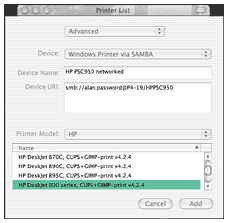 After installing and restarting, the number of printer
drivers listed by Print Center increases dramatically - as if by magic
- with the new models identifiable by the "CUPS+GIMP-print" after the
printer name.
After installing and restarting, the number of printer
drivers listed by Print Center increases dramatically - as if by magic
- with the new models identifiable by the "CUPS+GIMP-print" after the
printer name.
I wasn't quite out of the woods yet. My HP PSC950 still wasn't listed. Checking the list of supported printer's at Gimp-Print's website, I noticed that my model was listed as one of many models "not officially supported but reported to work with the listed driver."
Next to my printer's name was the model to pick to make it work.
Bingo! Success. My Macs could now print from the printer connected to the Windows XP box. Quickly, too.
Just one more hurdle. Initially, graphics print-quality was pitiful - photos were printing with poorly dithered colours. It turns out that the print settings (controlled in the Print dialogue box) were set low by default: 150 dpi, and print graphics as line-art. A few changes dramatically improved output.
Thanks to Gimp-Print, my Macs now print like full-members of my Windows network.
In addition to improving printing to Windows networks, installation
of Gimp-Print also adds to the number of printer models that are usable
when connected via USB or via IP printing.

Join us on Facebook, follow us on Twitter or Google+, or subscribe to our RSS news feed
Alan Zisman is Mac-using teacher and technology writer based in Vancouver, BC, Canada. Many of his articles are available on his website, www.zisman.ca. If you find Alan's articles helpful, please consider making a donation to his tip jar.
Today's Links
- Mac of the Day: PowerBook 1400, introduced 1996.10.01. Considered by many the best pre-G3 PowerBook with a small footprint and great keyboard.
- Support Low End Mac
Recent Content
About LEM Support Usage Privacy Contact
Follow Low End Mac on Twitter
Join Low End Mac on Facebook
Favorite Sites
MacSurfer
Cult of Mac
Shrine of Apple
MacInTouch
MyAppleMenu
InfoMac
The Mac Observer
Accelerate Your Mac
RetroMacCast
The Vintage Mac Museum
Deal Brothers
DealMac
Mac2Sell
Mac Driver Museum
JAG's House
System 6 Heaven
System 7 Today
the pickle's Low-End Mac FAQ
Affiliates
Amazon.com
The iTunes Store
PC Connection Express
Macgo Blu-ray Player
Parallels Desktop for Mac
eBay

