
Thinking From the Box
GEM, a Mac-like GUI and OS for Low-end PCs
Roger M - 2002.05.30
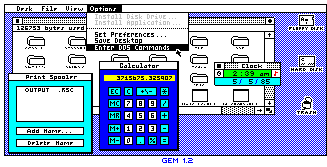 I used to wonder why no one came out with a Mac-like
GUI/OS for the PC long before Windows 3.1 or Windows 95. It turns out
someone did. Unknown to most people, Windows wasn't the first GUI for
PCs - GEM was.
I used to wonder why no one came out with a Mac-like
GUI/OS for the PC long before Windows 3.1 or Windows 95. It turns out
someone did. Unknown to most people, Windows wasn't the first GUI for
PCs - GEM was.
What is GEM? GEM (Graphical Environment Manager) was the first graphical user interface for the PC. It was developed by Digital Research and first shown in 1983.
The first version of GEM has been described as "the Mac OS running on a PC." In fact, one person told me when they saw GEM on a PC, they thought the fledgling Windows would be replaced by GEM. GEM was a lot like the Mac or Windows 95 - way back in the mid-1980s.
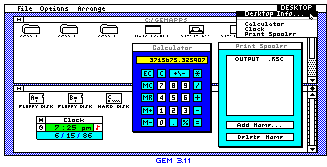 Later versions of GEM were altered a bit, as Apple
Computer thought GEM looked too much like the Mac GUI and took Digital
Research to court. The Trash icon was removed, and a few other things
were changed in later versions. Still, GEM continued to be developed
for the PC, and various GEM applications, such as word processors and
publishing software, were created for it.
Later versions of GEM were altered a bit, as Apple
Computer thought GEM looked too much like the Mac GUI and took Digital
Research to court. The Trash icon was removed, and a few other things
were changed in later versions. Still, GEM continued to be developed
for the PC, and various GEM applications, such as word processors and
publishing software, were created for it.
GEM was designed to run on early and mid-1980s PCs. As such, GEM is a good option for running on low-end PCs. Original GEM files and applications, now abandonware, can be downloaded from this page. [GEM was also ported to the Atari ST, a 68000-based competitor to the Mac. ed]
That is not all. GEM is not dead. GEM continues to be developed and
updated as FreeGEM.

Join us on Facebook, follow us on Twitter, or read Low End Mac's RSS news feed
Recent Content
Go to our home page for a listing of recent content.
About Low End PC Support Usage Privacy Contact

Follow
Low End PC on Twitter
Join Low End PC
on Facebook

Favorite Sites
MacWindows
Deal Brothers
DealMac
Affiliates
Amazon.com
The iTunes Store
PC Connection Express
Parallels Desktop for Mac
eBay