
The Lite Side
What Parts to Keep When Your Mac Dies
- 2003.10.14
This is Low End Mac. We like to tell you to keep your Macs running until they die, then fix them and keep them running a bit longer.
Dan's never done a survey, but I suspect our readers are the kind of folks who buy a car used and run it until it dies, fixing it until the repair costs exceed the monthly payments on a newer car. Nevertheless, the presence of smoke, clicking monitors, and the lack of a startup chime might just inspire you to finally get rid of the beast and seek a new machine.
We all know the problems with getting rid of old machines - many landfills won't accept them, and schools are saturated with machines faster than the one in your closet, so what do you do with the old beast?
Your local garbage service will advise you about your options, and when it is finally time to say good-bye, you might have second thoughts because of sentimental value. If you're in a hurry, perhaps you might need the Lite Side's
Guide to Stripping Down and Reusing a Computer
Traditional Solutions for Your Typical Mac Pack Rat
CD drives and other spindles: Remove and store in stacks. Really tall stacks.
Cooling fans: If you have 5-10 of them, you could build your own G5.
Keep the power cord - at last count, I have 137 of them. Takes three boxes.
If you have machines that can use it, take out the RAM, unless of course that is the part that has failed. If humanly possible, label the number of pins and the amount of RAM.
Remove hard drives and either reformat, reuse, or physically destroy. Don't lose terminators and ID jumpers!
Apple ImageWriter printers make good bookcases when set on their sides. HP LaserJets, the kind that used to use a cartridge for fonts, are also really good for this. All you need is some lumber for the shelving.
Apple inkjet printers are good for testing your Trebuchet.
Apple LaserWriter printers may still be working; if not, put in a place where people leave things that get stolen. Someone will take it.
Old ink and toner cartridges may work somewhere else in another device; check compatibility charts before chucking.
Internal cables for various components: Sort and store in Tupperware. If you can see dust in the floppy drive, chuck it. If it looks clean, put it in the stack. If there isn't one, count yourself blessed and move on.
Keyboards, cables, mice, mouse balls, and monitor cables all go in the designated boxes in the storeroom. Mouse balls go in a special jar that used to hold peanut butter. If it still holds a little peanut butter, it will cut down on theft of mouse balls.
PCI and other cards, in a bag which is labeled with the manufacturer name and function. If you like wash windows regularly and dry dishes by hand, you will probably want to pop a disk with the driver in the bag, too. An old video-in card can give an old Mac new life as a television monitor.
Odd little adapters such as older Mac-video-to-VGA, VGA-to-Mac, etc., in a special little box in the top shelf.
SCSI cables and terminators in a hallowed place.
ADB cables go in the video box with S-video cables.
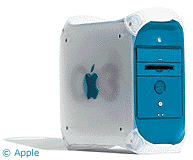 Apple Extended Keyboard: Attach to a
Blue and White G3 and
watch people's heads spin.
Apple Extended Keyboard: Attach to a
Blue and White G3 and
watch people's heads spin.
Speakers go in the . . . uh, let's see . . . speaker box.
LocalTalk cabling (useless for modern Macs) gets put wherever you put the mice that attach to the original Mac Plus prior to the development of ADB cables.
Computer-to-speaker cables in the audio box next to those adapters from the Shack that you never find a permanent use for.
PC cables, such as printer cables, serial keyboard extenders, etc., all jumbled up in a big box in the basement. You never know.
If the monitor functions, keep it.
If there is separate VRAM, store and label.
Processor accelerator cards might pick up a few bucks on eBay or the Low End Mac Swap List.
Turn the hulk of an all-in-one into a fish tank - a Macquarium.
If you have anything left after all of that, you're on your own!
About LEM Support Usage Privacy Contact
Follow Low End Mac on Twitter
Join Low End Mac on Facebook
Favorite Sites
MacSurfer
Cult of Mac
Shrine of Apple
MacInTouch
MyAppleMenu
InfoMac
The Mac Observer
Accelerate Your Mac
RetroMacCast
The Vintage Mac Museum
Deal Brothers
DealMac
Mac2Sell
Mac Driver Museum
JAG's House
System 6 Heaven
System 7 Today
the pickle's Low-End Mac FAQ
Affiliates
Amazon.com
The iTunes Store
PC Connection Express
Macgo Blu-ray Player
Parallels Desktop for Mac
eBay

