
Mac Lab Report
Organize and Track Your Book, Video, or CD Collection with Delicious Library
- 2004.11.29
Rating: 
I have a collection of hundreds of science fiction novels, mostly paperbacks. I used to read more B.C. (before children), but I still manage to squeeze in a novel on an airplane ride now and then.
Anyway, I've long debated creating a database of the books I own and adding a sentence or two about each. My favorites are hard science fiction by authors such as Larry Niven, Robert L. Forward, and Greg Bear, for example.
Creating a database has always been a snap with an application like FileMaker; the part I didn't want to get into was the data entry. Then I discovered Delicious Library by Delicious Monster Software.
I do pay for the occasional shareware. Usually, though, I use software for a while before deciding. If I really do use it on a regular basis, I register. If I don't, well, then, I don't.
I registered Delicious Library the same day I tried it. That's how good it is.
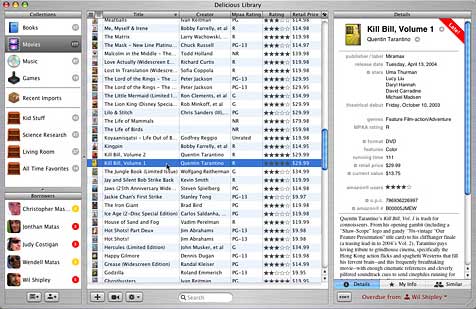
This OS X-only program uses an iTunes-like interface to organize your books. Even better, you are spared the burdensome task of data entry because (I swear I am not making this up) Library uses your iSight or wireless barcode scanner to scan the barcode on the cover of your book and nearly instantly look up your book on Amazon's public book database. It then downloads all the usual information, such as author, publisher, publication date, and - believe it or not - a picture of the book's cover, which it places in your virtual bookshelf.
To use it, you merely hold the barcode in front of the visual-feeback iSight viewing window, wait for the beep, and you're done.
It gets better. Not only can it look up most books, it can be used to organize them as iPhoto and iTunes does, creating "bookshelves" for your books. You can even check them out to people in your address book, so it becomes another well-integrated application in the Mac universe.
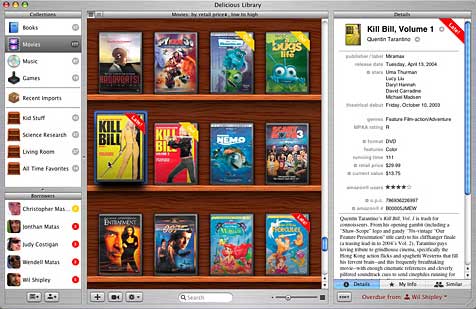
Books can be displayed as covers on shelves or in a more efficient list. Bookshelves can be sorted by a variety of characteristics such as title and author. The shelves themselves even gain labels such as "Asimov to Drake," which automatically change as you add books.
Delicious library does not automatically recognize all books. If a book is old, it may not be listed on Amazon. If the book's barcode has been overprinted with some custom vendor's label (such as happens at Wal-mart), then you may need to scan the bar code on the book's inside cover.
Delicious Library also tracks music CDs, videos, and games. I tested this with a couple of samples just to see - it knows these titles as well.
If Delicious Library cannot recognize your barcode, or the barcode is missing, you can still type in titles and authors, and it will present you with a list of titles to match your book. If you don't own the book, it allows you to order from Amazon.com, with, I imagine, a small cut going to the authors, such as happens when your web site is an Amazon affiliate.
The program is easy to use, useful, and does what it claims. The help files were useful for those titles the program didn't automatically recognize. If you keep books in a classroom, like I do, it is a great tool for checking them out and tracking who has borrowed what.
It would be nice if it recognized other kinds of barcodes besides UPC and Amazon barcodes - that way you could print your own barcode labels and track almost anything. That would be a great additional feature (especially if it was accompanied by its own barcode font).
Here at LEM, we often say software is "pricey," but in this case I think you could easily save $40 by better tracking the books, games, and videos loaned to friends.
I would say it is a well-made program, and if you need a library tracking program, well worth the price. It's also fun for a library geek like myself.
With a little work, such as better integration with Address Book (it didn't import all the people in my database) and networking between licensed client databases, a regular library could adopt this easily as a book tracking program.
I don't normally do stars or little Mac ratings, but here are some just for the effect: ****. Try this out and enjoy it.
Join us on Facebook, follow us on Twitter or Google+, or subscribe to our RSS news feed
is a longtime Mac user. He was using digital sensors on Apple II computers in the 1980's and has networked computers in his classroom since before the internet existed. In 2006 he was selected at the California Computer Using Educator's teacher of the year. His students have used NASA space probes and regularly participate in piloting new materials for NASA. He is the author of two books and numerous articles and scientific papers. He currently teaches astronomy and physics in California, where he lives with his twin sons, Jony and Ben.< And there's still a Mac G3 in his classroom which finds occasional use.
Today's Links
- Mac of the Day: PowerBook 1400, introduced 1996.10.01. Considered by many the best pre-G3 PowerBook with a small footprint and great keyboard.
- Support Low End Mac
Recent Content
About LEM Support Usage Privacy Contact
Follow Low End Mac on Twitter
Join Low End Mac on Facebook
Favorite Sites
MacSurfer
Cult of Mac
Shrine of Apple
MacInTouch
MyAppleMenu
InfoMac
The Mac Observer
Accelerate Your Mac
RetroMacCast
The Vintage Mac Museum
Deal Brothers
DealMac
Mac2Sell
Mac Driver Museum
JAG's House
System 6 Heaven
System 7 Today
the pickle's Low-End Mac FAQ
Affiliates
Amazon.com
The iTunes Store
PC Connection Express
Macgo Blu-ray Player
Parallels Desktop for Mac
eBay

