
Mac Lab Report
The X-keys Desktop Programmable Input Device
- 2004.05.06
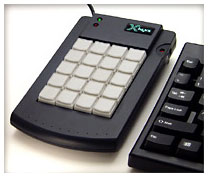
We recently purchased an X-keys® Desktop 20-key input device for use in controlling our planetarium software. We are using a modified version of Stellarium that displays a circular planisphere-like image suitable for use in 360° digital projectors. This setup has been described in an earlier article.
Stellarium is a wonderful program, but the keyboard commands are sometimes a little strange (possibly because the author is French?). It's also difficult to tell which key is which in the dark. When you're running a planetarium show, it's important to hit the right button.
This was an impulse purchase for me. I saw the device on a shelf at the brand new Fry's electronics in Concord, CA, and knew it would be perfect for the planetarium. I paid $79 for the device at Fry's, which is $20 less than the price on the manufacturer's website. If you get one, be sure you get the USB model (the macro software only works with OS X) and not the PS/2 model (PC only). There is, unfortunately, no version of the software for OS 9.
 Installation was simple, consisting of two
components you see at the user level: a macro creator and a macro
manager. The creator is how you map keyboard presses or other events to
individual keys on the 20-key pad. You can create multiple patterns of
buttons for the same device and save them separately.
Installation was simple, consisting of two
components you see at the user level: a macro creator and a macro
manager. The creator is how you map keyboard presses or other events to
individual keys on the 20-key pad. You can create multiple patterns of
buttons for the same device and save them separately.
The manager software loads the selected macro pattern. It remembers the last pattern loaded for the specific device, so all you have to do to activate the keys is start the software.
The device also has built-in memory - if you don't want to load the software, it behaves like a programmable keyboard when you place it in "learning" mode and press the keys on the keyboard and the key on the X-keys Desktop to record it.
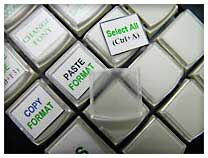 The key caps pop off easily (maybe too
easily in a school setting) for adding customized labels, and a
generous set of labels is included in the package. You can print or
hand write the labels, but when I used water-based ink it took a long
time to dry (over two hours). Template information is included so you
can use a variety of methods to make key labels.
The key caps pop off easily (maybe too
easily in a school setting) for adding customized labels, and a
generous set of labels is included in the package. You can print or
hand write the labels, but when I used water-based ink it took a long
time to dry (over two hours). Template information is included so you
can use a variety of methods to make key labels.
The device has a "2nd function" mode, where one key can be assigned as a shift key that activates a second function on all the rest. You can also pop off multiple keys and replace them with larger keys like a space bar or tab key. I think the thing has been designed with the maximum versatility and flexibility possible. You can even plug in two at a time.
There are other products from the manufacturer that include a joystick with a "truckload" of customizable buttons, an add-on function key bar, a switch box for controlling devices through "alternative" controls such as used in building simulator controls, and so on.
I have this idea about building a functional model of a Mercury space capsule with functional toggle switches controlling the A-OK Wings of Mercury simulator. There's a grant proposal hiding in there somewhere, I think.
Anyway, the X-keys device has the nice properties of working as advertised, contains nice features you don't discover until you open the box (like multiple keys combined into one), and contains adequate documentation and supplies. The controller software has an adequate interface considering you'll only use it occasionally for setting up the device. (And that's a compliment - I'm picky about interface issues. Even though the software is kind of plain-looking, it does the job and isn't confusing. What more could you ask for?)
I recommend this product - and by association all the other products from this vendor - if you're in market for a customizable keyboard-like device for any purpose.
Join us on Facebook, follow us on Twitter or Google+, or subscribe to our RSS news feed
is a longtime Mac user. He was using digital sensors on Apple II computers in the 1980's and has networked computers in his classroom since before the internet existed. In 2006 he was selected at the California Computer Using Educator's teacher of the year. His students have used NASA space probes and regularly participate in piloting new materials for NASA. He is the author of two books and numerous articles and scientific papers. He currently teaches astronomy and physics in California, where he lives with his twin sons, Jony and Ben.< And there's still a Mac G3 in his classroom which finds occasional use.
Today's Links
- Mac of the Day: Performa 5200, introduced 1995.04. The first PowerPC all-in-one was also one of the worst Macs ever made.
- Support Low End Mac
Recent Content
About LEM Support Usage Privacy Contact
Follow Low End Mac on Twitter
Join Low End Mac on Facebook
Favorite Sites
MacSurfer
Cult of Mac
Shrine of Apple
MacInTouch
MyAppleMenu
InfoMac
The Mac Observer
Accelerate Your Mac
RetroMacCast
The Vintage Mac Museum
Deal Brothers
DealMac
Mac2Sell
Mac Driver Museum
JAG's House
System 6 Heaven
System 7 Today
the pickle's Low-End Mac FAQ
Affiliates
Amazon.com
The iTunes Store
PC Connection Express
Macgo Blu-ray Player
Parallels Desktop for Mac
eBay

