
iNews Review
iPhone 'Way, Way Ahead' of Other Smartphones, Sight-free iPhone Dialing, ChocoShuffle Case, and More
This Week's iPhone, iPod, and Apple TV News
Compiled by Charles Moore and edited by Dan Knight - 2009.04.24
Mac notebook and other portable computing is covered in The 'Book Review, and general Mac news is in Mac News Review.
All prices are in US dollars unless otherwise noted.
News, Reviews, & Opinion
- iPhone 'Way, Way Ahead' of the Smartphone Pack
- 22 Ways to Make Your iPhone a Better Camera
- 8 Handy iPhone Camera Add-Ons
- Replacing iPod Battery Isn't Cheap or Easy
- Using an iPhone Abroad
- Make Your iPhone or iPod touch an Audio Receiver
Apps & Services
- DialX 1.0 - Sight-Free Dialing for iPhone
- Vopium for iPhone Eliminates Outrageous International Calling Fees
- My-Cast OneLook: Intuitive Weather Application for the iPhone
- Beauty & Health Online Network Introduces First Free 'Deals' App for iPhone and iPod touch
- NIV Study Bible Notes - New for BibleReader 4.0
- ColorSplash 1.2 for iPhone and iPod touch Adds Online Image Sharing
Accessories
- Charge Your iPod or iPhone with 2 AA Cells
- Belkin's New Micro Auto Charger and Dual Auto Charger
- D & H Distributing to Offer Speakal's Full Line of iPod Docking Stations
Protection
iPod and iPhone Deals
These price trackers are updated regularly.
- Best iPhone deals
- Best classic iPod deals
- Best iPod touch deals
- Best iPod nano deals
- Best iPod shuffle deals
News, Reviews, & Opinion
iPhone 'Way, Way Ahead' of the Smartphone Pack
Read Write Web's Sarah Perez says a new industry report from mobile analytics firm Flurry reveals some unique insights into the smartphone industry as of right now, confirming that the iPhone is king, smartphones are the new laptops, and iPhone applications can and do make money.
Link: The State of the Smartphone: iPhone is Way, Way Ahead
22 Ways to Make Your iPhone a Better Camera
PC Mag' Michael Muchmore says:
"The iPhone's biggest weakness is its 2-megapixel camera. Not to worry, though we've put together a whopping 22 tips and apps to help you get the most out of Apple's underpowered shooter."
Link: 22 Ways to Make Your iPhone a Better Camera
8 Handy iPhone Camera Add-Ons
PC Mag's Jennifer L. DeLeo says:
"Enhance your iPhone's mediocre built-in camera with a 6X zoom lens, flash, tripod, and more."
Link: Eight Handy iPhone Camera Add-Ons
Replacing iPod Battery Isn't Cheap or Easy
Hartford Courant's Kevin Hunt says:
"The $165 million in bonuses dished out to AIG executives last month was a national-scale raw deal. Today, I return to a more palatable, personal-scale raw deal: the exorbitant price ($49 and up!) that Apple wants to replace an iPod battery...."
Editor's note: Third-party replacement batteries are 60% less expensive - for those willing to spend a few minutes and replace the battery. dk
Link: Replacing iPod Battery Isn't Cheap or Easy
Using an iPhone Abroad
Mac Information's Simon Spence has posted a PDF guide on roaming changes for data and how best to avoid huge data bills when venturing abroad with your iPhone - how to use WiFi-only when roaming, and how to change your settings before stepping on that plane.
Link: Mac Information Guide: Using an iPhone Abroad
Make Your iPhone or iPod touch an Audio Receiver
Tidbits' Doug McLean reports that audio software developer Rogue Amoeba has announced the release of AirFoil Speakers Touch, an app for the iPhone and iPod touch that extends the capabilities of the previously available AirFoil application. AirFoil, available for the Mac and Windows, enables users to share audio from their computers to AirPort Express base stations, Apple TVs, Macs, PCs, and Linux boxes.
Link: Make Your iPhone or iPod touch an Audio Receiver
Apps & Services
DialX 1.0 - Sight-Free Dialing for iPhone
PR: iPhone development firm AFK Studio announced today the release of DialX 1.0, the first sight-free dialing application for iPhone OS. Through a combination of gestures and auditory feedback cues, DialX makes it possible to dial phone numbers without looking directly at the screen.
The application, works by univocally mapping simple, easy and imprecise gestures to a series of commands, such as dialing a number or removing the last digit entered. To assist the user in performing all the available tasks, DialX provides constant auditory feedback, reading back individual digits, commands and whole numbers. Through a simple series of taps, the user can then passed the phone number it has composed directly to the iPhone's built in phone application.
DialX was designed to be easy to use. Users will not need to learn complex gestures, and every command is reachable with a single finger. It is ideal for users who often need to dial without being able to look at the screen, and its professionally-designed high-contrast interface provides a valuable dialing aid for the visually impaired.
Minimum Requirements: First and Second Generation iPhone 2.2 or later
DialX is available exclusively in the iTunes App Store worldwide at a price of $1.99 or the local-currency equivalent. More information about the product, including a complete review guide, demo and creative, can be found on the DialX's website.
Link: DialX (available through the iPhone App Store)
Vopium for iPhone Eliminates Outrageous International Calling Fees
PR: Vopium, an international mobile communications company, has announced that it is extending its high-quality, versatile communication application to the iPhone. Powered by mobile VoIP and WiFi technology, Vopium enables users to easily make free and heavily-discounted international calls, saving up to 90% off traditional international mobile and landline costs. Consumers and businesses that download and register the application, which is now available in Apple's App StoreSM, will receive 30 minutes of free calls and 30 text messages (SMS) to get started. To view a step-by-step registration guide for the iPhone, visit http://vopium.com/iphone_landing.
Vopium's award-winning technology leverages mobile VoIP and WiFi to greatly reduce the cost of international calls made from mobile phones while also maintaining excellent call quality. Free and easy to download, Vopium integrates directly with the user's mobile address book, automatically rerouting all international calls via the least expensive method available. In addition to heavily discounted international calls, Vopium users can also slash the costs of sending text messages (SMS) abroad as each message costs only GBP 0.09.
"Vopium aims to deliver low-cost international calling to the masses and we currently support more than 500 devices to ensure that mobile subscribers everywhere can use our innovative technology," said Tanveer Sharif, Vopium's CEO. "To that end, we're extending support to the iPhone to enable millions of consumers and businesses to transform the powerful mobile device into the only solution they'll ever need to call the world at a fraction of traditional mobile operator costs."
Once the Vopium application is downloaded to the iPhone, it is tightly integrated with the user's address book. When an international number is dialed, the call is made using the cheapest method available while preserving the highest call quality. When using WiFi, Vopium iPhone users can call other Vopium WiFi users for free, regardless of the brand/model of their device.
Vopium: The Key Facts
- Vopium is free to download at www.vopium.com; iPhone users can download the application directly from the Apple App Store
- Vopium reroutes international calls as a local call to a Vopium gateway and then via global traffic carriers as ordinary voice traffic in order to ensure voice quality
- All new users are given 30 minutes of talk time and 30 international SMS for free
- Vopium is compatible with more than 500 handsets across Java, Symbian, BlackBerry RIM, and Windows Mobile, as well as offering a complete iPhone solution
- Calling internationally with Vopium can result in up to 90 percent savings versus traditional carrier rates; for an overview of current pricing, visit: http://vopium.com/tariff
- Calls made through Vopium are always routed using the cheapest method while preserving the highest quality
- Vopium WiFi users can call each other around the world for free
- Vopium users keep their own mobile number and SIM card, and maintain their numeric identity when making calls
- When a user calls from their home country, a local rate may be applied by their operator
- When calling from abroad a roaming charge will be applied by the subscriber's operator
- WiFi calls made with Vopium will not incur additional charges from a subscriber's operator
Vopium is a carrier-grade mobile telephony service designed to offer affordable and reliable international calls from any mobile handset. By using the Vopium application on their mobile to make calls from their home country, consumers and businesses alike can save up to 90% on international mobile and landline calls. Unlike more restrictive mobile VoIP solutions, Vopium supports hundreds of handsets across Java, Symbian, RIM, Windows Mobile and iPhone. Vopium uses intelligent routing and connection technology which automatically and seamlessly delivers the lowest cost connection for any international call. Vopium has offices in London, Copenhagen, Luxembourg and Pakistan. Vopium was recently awarded the Frost & Sullivan Technology Innovation Award.
Link: Vopium (available through the iPhone App Store)
My-Cast OneLook: Intuitive Weather Application for the iPhone
PR: Digital CycloneSM, Inc., a subsidiary of Garmin Ltd., the global leader in satellite navigation, announced today an addition to its popular product suite is now available on the iPhone. My-Cast OneLook is the most concise weather application available for the iPhone and lets users view animated radar, clouds and severe weather information.
My-Cast OneLook presents real-time weather data in a user-friendly and intuitive format:
- Unique weather information that displays current conditions, hourly and extended forecasts
- Animated NEXRAD radar and cloud imagery in high-resolution detail
- StormWatch notifies users of watches, warnings and advisories from the National Weather Service
- Almanac data plotted in relation to forecast
- My-Cast OneLook leverages the iPhone's touch interface and location capability, which allows users to see weather for their current location or anywhere in the United States. Multiple locations are remembered for quick recall.
"Weather has a daily impact on our lives. With My-Cast OneLook, users can quickly understand the most critical weather information, in just one glance," said Craig Burfeind, president of Digital Cyclone, Inc.
My-Cast OneLook is available immediately for an introductory price of $1.99.
Link: My-Cast OneLook (available through the iPhone App Store)
Beauty & Health Online Network Introduces First Free 'Deals' App for iPhone and iPod touch
PR: Now you can find the latest in beauty and health bargains and resources in your local community while on the go, thanks to the new free iPhone and iPod touch application called Beauty & Health Deals from HealthNews.org, an Irvine, California online health information referral network. The free app is available from the Apple iTunes App Store.
Mobile, one touch access to local health and beauty resources that are offering discounts is also enhanced by a search button that will locate health care and fitness experts based on your current or customized location, according to officials with HealthNews.org. Profiles and bios of local health and fitness experts are also featured as well as directions and direct contact information.
"For those on the go, this app can provide the most up to the minute deals in the beauty and health industry, from the nearest yoga studio, day spas or personal trainer to tattoo removal, pilates, beauty and fitness pros," said Ali Jahangiri, chief executive officer of HealthNews.org, which counts thousands of local and regional health and beauty experts on its search applications.
Also featured on the iPhone and iTouch app are the site's built-in glossary and a customized "favorites" section for easy access.
Link: Beauty & Health Deals is available through the iPhone App Store
NIV Study Bible Notes - New for BibleReader 4.0
PR: April showers bring new Olive Tree offerings, in resources and in BibleReader features! The NIV Study Bible Notes are now available for BibleReader 4.0. We are pleased to make this important Bible study resource available for your iPhone or BlackBerry. You can also learn about the newest BibleReader feature: split screens on iPhone.
Compiled by an international team of scholars from five English-speaking countries, the NIV (New International Version) Bible is the world's best-selling Bible translation.
The NIV Study Bible, crafted by the same acclaimed translation team, is a best-selling study Bible based on the NIV Bible.
 Now available for iPhone and BlackBerry for the first time, the
NIV Study Bible Notes will transform your mobile NIV Bible into a
treasury of instant commentary from today's top evangelical scholars.
The NIV Study Bible Notes include:
Now available for iPhone and BlackBerry for the first time, the
NIV Study Bible Notes will transform your mobile NIV Bible into a
treasury of instant commentary from today's top evangelical scholars.
The NIV Study Bible Notes include:
- over 20,000 notes, including 800 new notes since the 1996 edition
- introductions and outlines for each Bible book
- numerous charts, diagrams, and illustrations integrated into the text
- 16 full-color maps
- 900 character profiles of important Biblical figures
- 425 archaeology notes and other historical information
- Index to Subjects - find Bible verses on particular topics
- Index to Notes - find NIV Study Bible Notes commentary on particular topics
- almost 3,000 Personal Application notes
Split Screens for iPhone BibleReader Version 4.06
BibleReader 4.06 for iPhone supports split screens!
Instead of opening and closing books to compare alternate translations, read textual notes, and check commentary resources, you can now read Bibles and other books side-by-side.
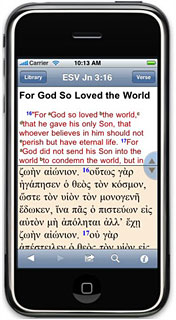 First, make sure you've downloaded an updated version of
BibleReader from iTunes. Then, use the blue slider button to drag the
screen border wherever you want it. As you scroll, the two windows will
stay in sync based on Bible verse, which means the notes or commentary
you need are always visible. The split-screen feature comes with fully
adjustable settings: turn synching on and off or move the slider button
to different locations (if you're left handed, for example, or if your
iPhone is in a protective case). Split screens are fully functional in
landscape view as well.
First, make sure you've downloaded an updated version of
BibleReader from iTunes. Then, use the blue slider button to drag the
screen border wherever you want it. As you scroll, the two windows will
stay in sync based on Bible verse, which means the notes or commentary
you need are always visible. The split-screen feature comes with fully
adjustable settings: turn synching on and off or move the slider button
to different locations (if you're left handed, for example, or if your
iPhone is in a protective case). Split screens are fully functional in
landscape view as well.
Want to learn more?
At the Olive Tree Blog, you can check out a short instructional video by StephenJ, one of Olive Tree's engineers, on how to use the split-screen feature to enhance your Bible reading and study.
All BibleReader Apps on iTunes have been updated to version 4.06. You can update your BibleReader for free! Are you new to the iPhone platform? Download our Free BibleReader app from iTunes to explore its features.
Remember, the iPhone BibleReader and all iPhone books and Bibles also work on iPod touch.
Link: Olive Tree (available through the iPhone App Store)
ColorSplash 1.2 for iPhone and iPod touch Adds Online Image Sharing
PR: Hendrik Kueck announces the release of ColorSplash 1.2, an update to his highly popular image editing app for the iPhone and iPod touch. Now users can easily upload and share their edited images on social networking sites Facebook, Flickr, and Twitter. ColorSplash lets users give photos a dramatic look by converting them to black and white while keeping chosen details in color. ColorSplash's intuitive and responsive user interface makes photo editing and sharing easy and fun.
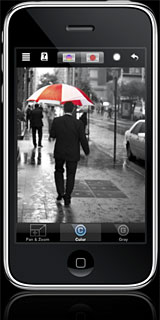 ColorSplash
lets users interact directly with the photo via the device's touch
screen. The user's finger acts as a brush that removes (or restores)
color from the original image. The application's seamless zoom allows
for smoothly zooming in and out using a two finger pinching gesture,
enabling detail-work with pixel-accuracy.
ColorSplash
lets users interact directly with the photo via the device's touch
screen. The user's finger acts as a brush that removes (or restores)
color from the original image. The application's seamless zoom allows
for smoothly zooming in and out using a two finger pinching gesture,
enabling detail-work with pixel-accuracy.
Users can now upload their ColorSplash pictures directly from the program to Facebook, Flickr, or Twitter accounts. This is accomplished easily and effectively from a menu in the program. A short tutorial video coaches users through the process, if they wish.
Feature Highlights:
- In addition to saving the new images to the users' photo album, ColorSplash supports saving multiple sessions so users can resume work on an image at a later point
- Transparent brushes can be used to partially de-saturate regions of an image, and users can choose between hard- and soft-edged brushes
- An alternative display mode shows colored regions tinted in a vibrant red, making it easier to see and adjust the boundaries between color and black & white regions
- ColorSplash supports both portrait and landscape orientation, and users can switch to and from full-screen mode with the tap of a finger
- ColorSplash features unlimited undo, detailed in-program help, and lets users configure several advanced options in the Settings application
- Users can upload pictures directly from ColorSplash to their Facebook, Flickr, or Twitter accounts
- Short tutorial videos clearly explain the use of the app's image editing and sharing features
System Requirements: Any iPhone or iPod touch with firmware version 2.0 or higher
ColorSplash is available now for purchase at a price of $1.99, distributed exclusively through Apple's App Store. Review copies are available to the media upon request.
Link: ColorSplash (available through the iPhone App Store)
Accessories
Charge Your iPod or iPhone with 2 AA Cells
Blogger Terry White observes that if you're an iPhone user you can probably always use some more juice. Especially if you're a traveler, and reviews the Energizer Energi To Go portable power for iPod - a simple device that you pop 2 AA batteries (included) into it and flip out the 30 pin dock connector and sit your iPod or iPhone on it to begin charging.
Editor's note: You can buy Energizer Energi To Go for the iPhone and iPod from Buy.com for $9.99 with free ground shipping. dk
Link: Charge Your iPod or iPhone with a Couple of AA's
Belkin's New Micro Auto Charger and Dual Auto Charger
PR: Keep your iPhone, iPod, BlackBerry, or other USB charging device, charged while in the car - Micro Auto Charger's design adds no extra bulk as it sits nearly flush with your dashboard
Belkin's new Micro Auto Charger and Dual Auto Charger charge your iPod or iPhone battery in your car, making it convenient to power up a dead phone or iPod.
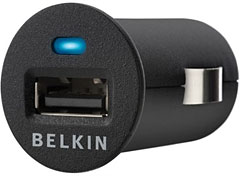 Micro Auto Charger is packaged in a compact design and adds no
extra bulk to your dashboard. Sitting nearly flush with your dashboard,
the Micro Auto Charger still allows room on its lip for you to easily
detach it from your dashboard. It also charges at 1 amp - ideal for
iPhone devices and certain GPS systems in that it will charge at the
device's fullest power.
Micro Auto Charger is packaged in a compact design and adds no
extra bulk to your dashboard. Sitting nearly flush with your dashboard,
the Micro Auto Charger still allows room on its lip for you to easily
detach it from your dashboard. It also charges at 1 amp - ideal for
iPhone devices and certain GPS systems in that it will charge at the
device's fullest power.
With its two USB ports, the Dual Auto Charger lets you charge your iPod through one port while charging your cell phone in the other, simultaneously. One quick-charge port powers at 1 amp for your iPhone, and the second port charges at 500 milliamps, which will support iPod devices and cell phones such as BlackBerry phones.
iPod/iPhone Micro Auto Charger
Low-profile charger sits flush in your dash and charges your iPhone at the fastest possible speed
- Quick-charge port for fastest possible charge
- Sits nearly flush with car dashboard
$14.99
iPod/iPhone Micro Auto Charger with Charge Sync Cable
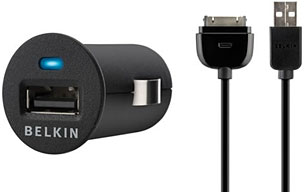 Low-profile charger sits flush in your dash
and charges your iPhone at the fastest possible speed.
Low-profile charger sits flush in your dash
and charges your iPhone at the fastest possible speed.
- Quick-charge port for fastest possible charge
- Sits nearly flush with car dashboard
- Charge Sync Cable for iPhone and iPod, 3 ft.
$19.99
Dual Auto Charger for iPhone and iPod
Keep your iPhone and iPod, or other USB charging device, charged while in the car. The Dual Auto Charger provides unlimited play, call, and standby time.
iPhone 3G/iPod Compatible
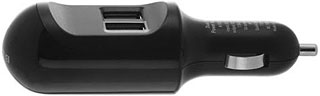 CLA includes 2 USB ports (1-amp, 500Mah) to charge
multiple devices at the same time:
CLA includes 2 USB ports (1-amp, 500Mah) to charge
multiple devices at the same time:
- 1A of power (for iPhones and GPS units),
- 500mA (for iPods and most mobile phones
1-amp USB outlet allows for faster charging on iPhone 3G
- Charge-and-sync cable for iPhone and iPod, 3 ft.
- Works with Motorola®, BlackBerry, and any mobile phone using a mini-USB connection
- Features 2 USB ports (one port at 1A and one port at 500mA)
- Quick-charge port for fastest possible charge
$29.99
- iPod/iPhone Micro Auto Charger
- iPod/iPhone Micro Auto Charger with Charge Sync Cable
- Dual Auto Charger for iPhone and iPod
- Micro Auto Charger
- Micro Auto Charger with Charge Sync Cable
D & H Distributing to Offer Speakal's Full Line of iPod Docking Stations
 PR: Speakal announces it has entered into a recent
partnership with D&H Distributing. D&H will be representing
Speakal's entire product line, including products scheduled to be
released through the end of 2009, with plans to distribute the products
to retailers and e-tailers throughout the United States and Canada.
Speakal's tremendous media coverage and consumer approval has required
the company to accelerate delivery to distributors in efforts to
satisfy requests from retailers.
PR: Speakal announces it has entered into a recent
partnership with D&H Distributing. D&H will be representing
Speakal's entire product line, including products scheduled to be
released through the end of 2009, with plans to distribute the products
to retailers and e-tailers throughout the United States and Canada.
Speakal's tremendous media coverage and consumer approval has required
the company to accelerate delivery to distributors in efforts to
satisfy requests from retailers.
"Our rapidly growing product line has begun to appeal to more and more distributors seeking new and exciting multi-product companies," said CEO David Solomon. "As an industry leader armed with our entire line of products, D&H is poised to deliver the Speakal experience to the masses," added Solomon.
D&H has built its business on servicing the channel with individualized attention for customers and manufacturer partners alike. Its broad reach and breadth of product have contributed to D&H's ability to cater to businesses of all sizes, from small independents to large national accounts. These core focuses have afforded D&H recognition from the industry for both performance and loyalty.
To request additional information or product images, please contact Press Contact Greg Mondshein at (305) 576-1171 x22 or at gregmondshein@maxborgesagency.com.
Protection
SwitchEasy Launches ChocoShuffle for iPod shuffle 3G
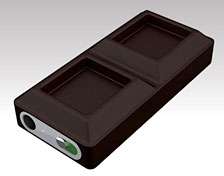 PR: Embrace your iPod shuffle 3G with a delectable
outfit - it's mouthwatering good!
PR: Embrace your iPod shuffle 3G with a delectable
outfit - it's mouthwatering good!
SwitchEasy Limited announces the immediate availability of its latest creation, ChocoShuffle silicon protection solution for iPod shuffle 3G.
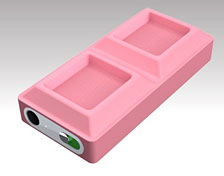
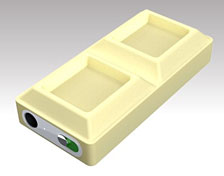
The first thing you'll notice about ChocoShuffle is that it looks exactly like your favorite chocolate. This Unique design feature not only looks great, but is also the perfect shape to protect your iPod shuffle 3G from accidental bumps. ChocoShuffle are designed to be shock proof and fun to use! It's just our playful and delectable way to add some spark to your already cool iPod shuffle 3G.
 Grip with Ease
Your iPod shuffle 3G is a very tiny player and is prone to slip in your hands. With our unique non-slip thumb grip design, your worries are over. Just set your thumbs in one of the grooves and you can securely hold your shuffle.
Flavorful Selection
ChocoShuffle comes in three great luscious flavors. You can pick either our chocolatey Milk Chocolate, our creamy White Chocolate, or our sweet Strawberry Chocolate.
One of them will definitely fulfill your taste.
 Key Features:
- Shock proof silicon design
- Unique non-slip thumb grip design
- Easy access to power button
- Unique delectable "Chocolate" design
The suggested retail price of SwitchEasy ChocoShuffle is $8.99 + $3.00 S&H in US and Canada, and open price for the rest of the world.
Link: SwitchEasy
Join us on Facebook, follow us on Twitter or Google+, or subscribe to our RSS news feed
Links for the Day
- Mac of the Day: Performa 5200, introduced 1995.04. The first PowerPC all-in-one was also one of the worst Macs ever made.
- Support Low End Mac
Recent Content
About LEM Support Usage Privacy Contact
Follow Low End Mac on Twitter
Join Low End Mac on Facebook
Favorite Sites
MacSurfer
Cult of Mac
Shrine of Apple
MacInTouch
MyAppleMenu
InfoMac
The Mac Observer
Accelerate Your Mac
RetroMacCast
The Vintage Mac Museum
Deal Brothers
DealMac
Mac2Sell
Mac Driver Museum
JAG's House
System 6 Heaven
System 7 Today
the pickle's Low-End Mac FAQ
Affiliates
Amazon.com
The iTunes Store
PC Connection Express
Macgo Blu-ray Player
Parallels Desktop for Mac
eBay

