
iNews Review
Use 1G iPhone without a Service Plan, $22.5 Million iPod Nano Scratch Settlement, and More
This Week's iPhone, iPod, and Apple TV News
Compiled by Charles Moore and edited by Dan Knight - 2009.01.30
Mac notebook and other portable computing is covered in The 'Book Review, and general Mac news is in Mac News Review.
All prices are in US dollars unless otherwise noted.
News, Reviews, & Opinion
- Using an Original iPhone without a Service Plan
- Apple Reaches $22.5 Million Settlement in Nano Scratch Suit
- Apple Explores Auto iPhone Audio
- Apple Proposes Audio Sensor to Auto-adjust iPhone Ringtones
- Some Days, Jailbreaking Looks Better and Better
- Copy and Paste on (Some) iPhones
- Does the iPhone Need Help?
- iPhones Will Win the War in Afghanistan
Apps & Services
- Cooliris for the iPhone: Sharing Photos on the Go Is Easy
- Sketches 1.5 Includes Opacity and Customer Suggested Features
- ReaddleDocs 1.3 Adds RTF Support and Works with iPhone Photos Library
- Palringo Adds Location, Distance and Maps to Its Rich-messaging Application for iPhone
- TheSnapper, a New Application for iPhone and iPhone 3G
Accessories
iPod and iPhone Deals
These price trackers are updated regularly.
- Best iPhone deals
- Best classic iPod deals
- Best iPod touch deals
- Best iPod nano deals
- Best iPod shuffle deals
News, Reviews, & Opinion
Using an Original iPhone without a Service Plan
Apple Support says:
"If you upgrade to an iPhone 3G or cancel your wireless service account/tariff for your original iPhone, it is possible to continue using the original iPhone without an active wireless service (using it with Wi-Fi only). To do so, you need to leave the inactive SIM card in the original iPhone to continue using it. You will be able to use the original iPhone as you would an iPod touch (Wi-Fi only, no cellular service) as long as you keep the SIM it was last used with, even if you update or restore the original iPhone...."
Link: Using an Original iPhone without a Wireless Service Plan
Apple Reaches $22.5 Million Settlement in Nano Scratch Suit
CNET's Dawn Kawamoto reports:
"Apple has reached a $22.5 million settlement agreement in the class action iPod Nano scratch lawsuit and potential claimants began receiving settlement notices this week, according to the plaintiffs attorney.
"The lawsuit, filed in October 2005 in a California Superior Court in Los Angeles County, alleges Apple's iPod Nano is prone to scratches and its alleged defects were not disclosed by the company...."
Link: Apple Reaches $22.5 Million Settlement in Nano Scratch Suit
Apple Explores Auto iPhone Audio
The Register's Rik Myslewski says:
"What if your iPhone could set its own volume?
"Today, the US Patent & Tradmark Office published an Apple patent application for an intelligent sound sensor that would adjust a device's audio volume level in relation to the ambient sound in its environment...."
Link: Apple Explores Auto iPhone Audio
Apple Proposes Audio Sensor to Auto-adjust iPhone Ringtones
Appleinsider's Sam Oliver reports:
"Apple is exploring the possibility of adding an ambient sound sensor to the iPhone that would allow the handset to adjust its ringtone volume to its surrounding audio environment, which would ameliorate potentially-disruptive audio outputs."
Link: Apple Proposes Audio Sensor to Auto-adjust iPhone Ringtones
Some Days, Jailbreaking Looks Better and Better
Red Eye Chicago.com blog says:
"Cookie cop is back, but this time I feel a little more like the criminal with bad thoughts than the person helping to fight crime.
"If I went back and linked to all of my blog entries warning of the horrors and injustices of jailbreaking your iPhone, well, it would take all day. Almost as long as it would take to link to all my complaining about fart apps.
"But every once in a while, like a dieter who just needs a candy bar or a vegetarian that's craving bacon, I have moments of weakness where I think about a jailbroken iPhone in my pocket...."
Link: Some Days, Jailbreaking Looks Better and Better
Copy and Paste on (Some) iPhones
Macworld's Christopher Breen reports:
"Invariably, when Apple releases a new version of the iPhone's software, users ask this question: 'Is copy and paste finally implemented?' And, just as invariably, the answer is 'No.'
"As far as Apple is concerned, the answer remains no. But those who've jailbroken their iPhones can now reply, 'Yes, sort of.'"
Link: Copy and Paste on (Some) iPhones
Does the iPhone Need Help?
InternetNews's David Needle says:
"It's not Burning Tires 3D, Crazy Tanks or any of the other silliness that makes the iPhone fun to use. Its may not even have the immediate practicality of say, Soonr, which automatically backs up your Mac or PC files to the cloud for easy access from your iPhone.
"But somewhere, someday, Tony Bove thinks plenty of iPhone users will find his $2.99 program indispensable.
"Released for the App Store earlier this month, Tony's Tips for iPhone Users is an online help system of thousands of iPhone tips...."
Link: Does the iPhone Need Help?
iPhones Will Win the War in Afghanistan
The Register's Lewis Page reports:
"The head of the North Atlantic Treaty Organisation (NATO), Jaap de Hoop Scheffer, has said that progress is being made in the international community's battle against terror in Afghanistan - and that progress is being made by iPhones.
"...the Alliance chief also revealed that he had suffered phone envy during a recent trip to Kabul. He also seemed to suggest that when a suffering people turn away from the dark horror-wracked night of despair and legacy technology, and instead reach out into the bright new Multitouch dawn - well, then peace and prosperity can't be far away.
"According to Mr De Hoop Scheffer:
"Today, half the country is relatively at peace . . . And when I saw an Afghan fellow pull out his Apple iPhone in Kabul, while I was talking on my 5 year old NATO mobile, I saw another symbol of progress...."
Link: iPhones Will Win the War in Afghanistan, Says NATO Chief
Apps & Services
Cooliris for the iPhone: Sharing Photos on the Go Is Easy
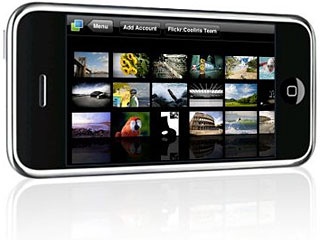 PR: The Cooliris iPhone app has been getting a lot of
attention lately - both MacWorld and Mashable have called it one of the
top productivity tools for the iPhone.
PR: The Cooliris iPhone app has been getting a lot of
attention lately - both MacWorld and Mashable have called it one of the
top productivity tools for the iPhone.
Today, with the release of Cooliris for iPhone version 1.3, added are a number of performance improvements, from graphics to usability, making the browsing experience even better - a number of performance and stability improvements - faster, smoother scrolling and no more crashing.
Version 1.3's biggest new feature is the addition of the "My Photos" tab, where you can search any public account in Flickr and Picasa, add as many accounts as you would like, then view the albums in Cooliris.There are a number of cool ways to enjoy the "My Photos" feature:
- Show off your public Flickr or Picasa photos on the wall
- Use the send function to email your pictures to your friends while you're on the go
- Save pictures from a friend's album to your iPhone
- Set pictures from your Flickr and Picasa albums as your iPhone wallpaper
So whether you're a photo aficionado or just want a smoother, richer Cooliris experience on your iPhone, we hope you enjoy the new version 1.3. To update to this version, just download it here or search for Cooliris in the iTunes App store straight from your iPhone or iPod Touch.
Link: Cooliris for the iPhone (available through the iPhone App Store)
Sketches 1.5 Includes Opacity and Customer Suggested Features
PR: LateNiteSoft has just announced the release of Sketches 1.5 through Apple's App Store. The latest update of the popular drawing app for the iPhone and iPod Touch includes some new features suggested by existing customers, as well as increased reliability. Existing customers can download the update for free, whereas new users can purchase a full license of Sketches for just $4.99/3.99 Euro.
"As we have stated since our initial launch of Sketches in July, we are committed to improving the application and listen to our customers' feedback. Due to our Mac shareware heritage, we don't believe in ephemeral success; instead, we strongly believe in quality apps and regular updates" says Jorge Llubiá, co-founder and COO. The new update brings some new features which have been requested by LateNiteSoft's existing customers. These include the ability to select color opacity, an improved stroke width selection control or a new hosting service to facilitate sharing your work via twitter or email.
"Adding varying degrees of opacity was not a technical issue. The real challenge was to incorporate that feature in a consistent and coherent way with the rest of the interface, without negatively impacting usability. In the few days that Sketches 1.5 has been available, we are amazed to see people already taking advantage of the new feature to create awesome works - we will definitely expand into this area in our upcoming Sketches 2.0 release.", explains Jorge.
The new version of Sketches also brings its own image hosting service, which is used to store pictures that Sketches users are willing to share via twitter or email. "The sharing features have been available since the initial release of Sketches, but they relied on third party image hosting services to operate" explains Pedro Cuenca, CTO. "Starting with Sketches 1.5, shared images are uploaded to our own service, fully developed and operated by us. This way we are in full control of all the aspects of the application, and can avoid unwanted side effects, such as excessive or inappropriate advertisements, downtime or privacy concerns. In addition, operating our own image hosting service will allow us to grow Sketches sharing features easily - we have some ideas we'd like to expand on in Sketches 2.0 and other future releases.".
Other improvements in Sketches 1.5 include bug fixes, and a more responsive stroke width control. "This might seem a silly change, but we did not realize you need to precisely touch on top of the slider knob until some of our customers pointed us to this problem - so used as we were to the default behaviour. After we created our own version of the same control, our customers are no longer finding it difficult to operate it the way they naturally expect the control to behave", explains Jorge. "Likewise, the bug fixes in this version solve scenarios we had not tested ourselves. We are very grateful for all the feedback and encouragement we receive".
Among other distinctions, Sketches has received a 4.5 mouse rating from Macworld, has been favorably reviewed by TUAW, Ars Technica and Gizmodo, and has earned 5-star ratings from iPhoneAlley and 148apps. An Apple "Staff Favorite" in most countries, it is the #9 Entertainment application in the "Best of iTunes 2008" selection posted by Apple in their various sites.
Sketches 1.5 is available through Apple's App Store for only $4.99 / 3.99 Euro. It can be downloaded for free by existing customers.
Link: Sketches (available through the iPhone App Store)
ReaddleDocs 1.3 Adds RTF Support and Works with iPhone Photos Library
PR: Readdle announces the release of ReaddleDocs 1.3, the new version of their popular document and file management solution for the iPhone and iPod Touch. Now ReaddleDocs owners can read RTF and RTFD files, and browse their Photos folder directly from the application.
ReaddleDocs combines a network file server, web storage client, web browser, file manager and powerful document viewer in a one iPhone business application. It allows users to transfer files and documents to their devices over Wi-Fi and 3G networks; view them on the go, email and share files and documents with other iPhone users easily.
ReaddleDocs 1.3 provides access to iPhone Photos folder. Users can sort photos directly on their devices and zip them before sending the photos by email. The access to the Photos folder is "read only" so it's impossible to accidentally delete an image or break the iPhone photos database.
The lack of RTF support on the iPhone was a very common problem for Mac OS X users, because RTF is a default format for TextEdit. ReaddleDocs 1.3 can view RTF documents created with both TextEdit and MS Word; RTFD files, RTF documents with embedded images, are also supported.
"We received a lot of feedback and reviews from our users during the last 6 months and one of the biggest complaints was inability to view RTF and RTFD files on their devices. Now this function is finally available among other iPhone missing features implemented by ReaddleDocs" notes Alexander Tyagulsky, Readdle CMO.
Also, ReaddleDocs 1.3 includes a new and improved Web Browser, that is now compatible with secure HTTPS web sites and can accept untrusted network certificates used by home WebDAV servers.
ReaddleDocs is available at the special price of $9.99 at the App Store. More information about ReaddleDocs could be found at their website.
Link: ReaddleDocs (available through the iPhone App Store)
Palringo Adds Location, Distance and Maps to Its Rich-messaging Application for iPhone
PR: iPhone users looking for their nearest friends need only to glance at their screens, thanks to the addition today of location functionality to Palringo's popular rich-messaging application.
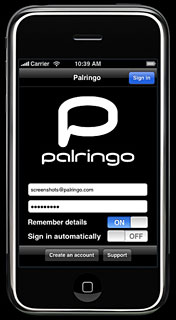 From today, users
looking down their contact lists see not only the location of their
Palringo contacts - typically a town name - but also how far away those
contacts are from them.
From today, users
looking down their contact lists see not only the location of their
Palringo contacts - typically a town name - but also how far away those
contacts are from them.
In the next update (due soon), a further click will bring up a map showing the location of a contact and also the location of any other Palringo contacts within a 10km/6-mile radius.
In the same update, the location function will allow a user to display his own location on a map - highly convenient for a user visiting somewhere for the first time.
Location and proximity information adds an interesting new layer of social network connectivity. A Palringo user can choose to reveal her location to any, all or none of her contacts, changing this selection at any time. Location can be set manually by the user, or Palringo can detect location automatically, keeping it continuously updated.
"Just knowing where people are can be really useful, and knowing how far away they are is even better. The prospect of knowing where someone is before you start adds a whole new dimension to your conversation," said Kerry Ritz, Palringo's CEO. "It can eliminate worry and will probably mean the end of a lot of unnecessary 'Where are you?' calls. And soon you'll pretty much be able to watch your friend, a few minutes late for your rendezvous, approaching on a map," he added.
Location and proximity information complement Palringo's rich messaging service, which already provides the option to send/receive vocal instant messages, picture messages and text-based messages. The Palringo service is designed for use on mobile phones, but versions are also available for Mac OS and other desktop environments.
While the iPhone has its own location service (and Palringo on iPhone takes full advantage of it), Palringo on other platforms calculates location using all available radio signals, including those from mobile network base stations and also from Wi-Fi access points known to Palringo's database. The database is updated with new information constantly, so Palringo's location algorithm becomes more accurate every day. Location can be calculated accurately to within a single street in towns and cities.
Palringo integrates with most popular IM services: AOL Instant Messenger, Google Talk, Yahoo! Messenger, Gadu-Gadu, ICQ, Jabber and Microsoft's Windows Live. People can also use Palringo to contact their friends using iChat, Apple's IM application.
Palringo is free to download from the App Store. There are no subscriptions or other hidden charges.
Link: Palringo (available through the iPhone App Store)
TheSnapper, a New Application for iPhone and iPhone 3G
PR: This week Meme Incorporated launched TheSnapper 1.0 in the Photography section of Apple iTunes App Store. The new 99¢ app "listens" for snaps or claps to operate the iPhone camera. An options page expands the set of features to include auto save of pictures, snap to save, and shouting Cheeeese instead of snapping. Included are default settings for a continuous mode where TheSnapper takes pictures at any noise, then auto saves the pictures to the iPhone camera roll. This new feature adds an auto shutter to the iPhone. TheSnapper was originally designed to make it easier to take pictures of yourself and your friends. Now settings like continuous mode turn the iPhone into a spy camera.
"It is an exciting time to develop new native applications for the iPhone," observed Rama McIntosh, the CEO and co-founder of Meme Incorporated. "Developers complain it's hard to get noticed with over 15,000 applications available. However, we believe the App Store is still new and in its infancy and we have only just begun to realize the iPhone's capabilities. TheSnapper(tm) proves this is true. TheSnapper(tm) made the top 100 paid Photography applications on its first day without press or marketing, then climbed to number 42 on the second day. We can't wait to see where TheSnapper(tm) goes today on the iTunes' charts."
TheSnapper application is available for 99¢ from the Apple iTunes App Store.
Meme Incorporated is a leading developer of iPhone and iPod touch software, Ruby-On-Rails websites, and custom iPhone applications for select clients.
Link: Meme Incorporated (available through the iPhone App Store)
Accessories
GWS Technologies Adds iPhone Solar Chargers to Its Microgeneration Product Line
PR: GWS Technologies, Inc. an alternative energy company developing and marketing solar and wind-powered renewable energy products and solutions, has announced that it has added Solar Arcadia's iPhone Solar Chargers to its line of innovative microgeneration products.
"Solar Arcadia has come up with a tremendous product that lets consumers power their electronic devices with free, clean solar power," said Michael Coskun, Vice President of GWS Technologies. "With over 13 million iPhones sold worldwide, this product has enormous market potential, and we are excited to be able to add the iPhone Solar Charger to our revenue stream."
The iPhone Solar Charger can use natural or artificial light. It is sleek, highly functional, simple to operate and may also be used with an iPod touch. It is available at www.greenwindsolar.com/store and is offered in black and white.
GWS stands for GreenWindSolar. Our products and solutions are part of the new "microgeneration" movement that is transforming the way everyday people provide for their energy needs. Through a growing line of solar and wind-powered products ranging from handheld devices that can recharge an iPod to wind turbines for point-of-use alternative energy generation, GWS is leading the way in the emerging microgeneration marketplace. The company was founded in 2005 and is headquartered in Scottsdale, Arizona.
Join us on Facebook, follow us on Twitter or Google+, or subscribe to our RSS news feed
Links for the Day
- Mac of the Day: Performa 5200, introduced 1995.04. The first PowerPC all-in-one was also one of the worst Macs ever made.
- Support Low End Mac
Recent Content
About LEM Support Usage Privacy Contact
Follow Low End Mac on Twitter
Join Low End Mac on Facebook
Favorite Sites
MacSurfer
Cult of Mac
Shrine of Apple
MacInTouch
MyAppleMenu
InfoMac
The Mac Observer
Accelerate Your Mac
RetroMacCast
The Vintage Mac Museum
Deal Brothers
DealMac
Mac2Sell
Mac Driver Museum
JAG's House
System 6 Heaven
System 7 Today
the pickle's Low-End Mac FAQ
Affiliates
Amazon.com
The iTunes Store
PC Connection Express
Macgo Blu-ray Player
Parallels Desktop for Mac
eBay

