

Unleash the Power of Safari
- 2005.08.10
If browsing is as simple for you as opening Safari, visiting a few Web pages, and then quitting the application until the next time you need it, this tutorial is for you. Even if you won't ever use 100% of its capabilities, there are ways to get more out of the Mac's default browser.
Bookmarks and RSS
The most interesting Safari features revolve around bookmarks. You can customize a chunk of Safari's toolbars to make your most frequently used bookmarks more accessible and use the RSS support (introduced with Tiger) to save time when browsing the Web.
If you never took the time to play around with the bookmarks, it's about time to put your favorite sites in a toolbar located right under the address bar. Pull down the Bookmarks menu and select Show All Bookmarks. In the left column, there will be two key collections: the Bookmark Bar and the Bookmark Menu. All the bookmarks that you put in the the Bookmark Bar will appear in the toolbar under the address bar in the browser's main window. When you save a bookmark, save it there to make it easily accessible there. Should you choose to save a bookmark in the Bookmark Menu, it will be available in the Bookmarks menu instead of the toolbar. Add delete, edit as much as you wish...
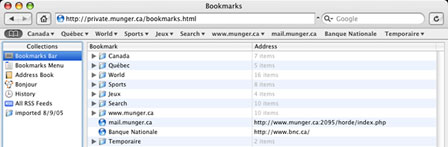
Safari's Bookmark Manager - click image for larger view
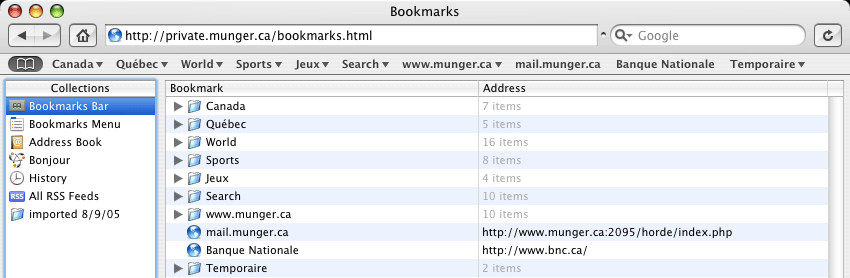
Whenever you are editing the bookmarks bar or menu, click on the plus sign (+) at the bottom of the right column to create a new folder. Drag some bookmarks into the new folder to make things tidier if you keep a lot of pages in your bookmarks.
One of the most frustrating "features" of Safari has been the absence of any way to export bookmarks to HTML files without using third-party software. If you are using Mac OS X 10.4 Tiger, you can now export bookmarks from the File menu, but if you use an earlier version, check out the Safari Bookmarks Exporter (free, link below) to solve this problem.
The newest interesting Safari feature is RSS support. It took Apple long enough to introduce this (it came with Safari 1.3 and Tiger), but let's give the company some credit - the feature is great. When you visit a site, take a look at the address bar. If you see an orange RSS button, the site offers the possibility of looking at its content without actually visiting its main page. If you click on the button, you will get a special page (an RSS feed) with nothing but the latest content. This is a sweet way to look at news sites, for example. No clutter, pure content.
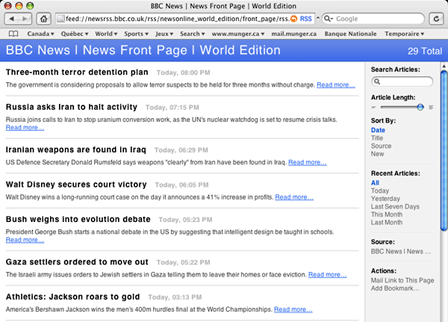
Safari's RSS feature in action - click image for larger view
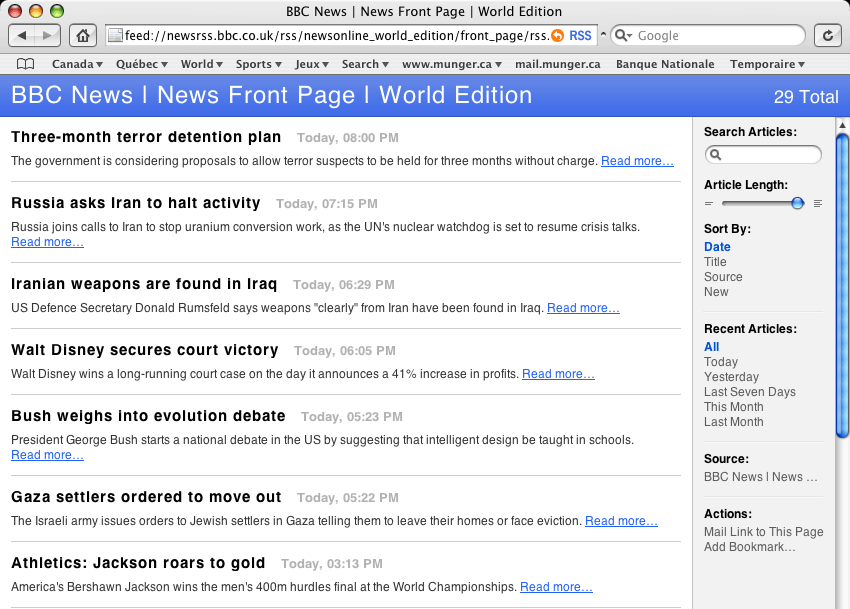
If you want to take things a step further, bookmark the RSS feed itself (after clicking on the RSS button) by pulling down the Bookmarks menu and selecting Add to Bookmarks. Go back to the Bookmarks menu and select Show All Bookmarks. In the left column of the window, you will see an item named All RSS Feeds. Whenever you bookmark an RSS feed, it goes right there.
Double click on any feed and you will see its content page. Once you have set up all your favorite feeds, there's no need to visit a bunch of sites anymore. Just open their feeds to make your browsing simpler and faster. Beautiful, isn't it?
If you want Safari to check for RSS updates automatically, pull down the Safari menu and select Preferences. Then click on the RSS button and tailor the preferences to your liking.
Maintenance
Is Safari slowing down a bit? You can fix that with a few clicks. The first step is to clear the browser history. Think of the History as a useful tool that can become a ball and chain to drag around it it's never cleaned. Hit the History menu and select Clear History.
You can limit Safari's history by downloading Safari Enhancer (free, link below). After installing it, launch it, enter your administrator password, and click on the Function tab. In the box where you can limit the history, type a number. The default is 100. Make it 50 or less for a performance gain.
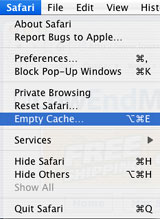 Clearing your cache
also is a good thing to do from time to time. Pull down the Safari
menu and choose Empty Cache. Confirm this in the dialog box. This
will clear the files stored in your cache, keeping it clear and
minimizing the chances of hiccups (or crashes) in the browser.
Clearing your cache
also is a good thing to do from time to time. Pull down the Safari
menu and choose Empty Cache. Confirm this in the dialog box. This
will clear the files stored in your cache, keeping it clear and
minimizing the chances of hiccups (or crashes) in the browser.
Interface Changes and Smarter Browsing
As with most Mac OS X applications, Safari's main toolbar can be customized. If you pull down the View menu and select Customize Address Bar, you can drag and drop buttons around to change their position as well as add or remove them from the bar. You will notice that some buttons are "tied together", such as the address box and the Google search box. There is nothing you can do about that.
By the way, from the View menu you can show and hide the bookmark bar and status bar whenever you want. When they are useful, keep them around. When they get in the way, hide them for a while.
A major disappointment, in my opinion, is the fact that Apple chose to impose the "brushed metal" appearance in Safari. Aqua is Mac OS X's standard theme, yet Apple insists on using an alternate theme in some of its programs.
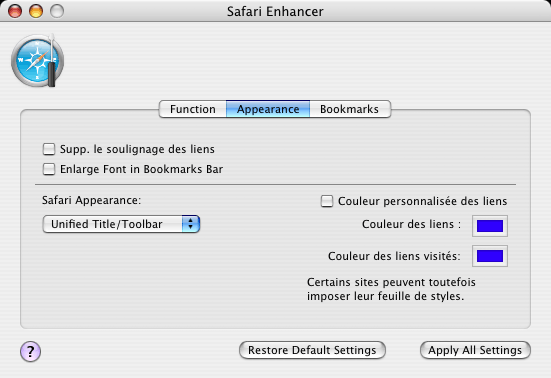 You can fix this by downloading Safari Enhancer.
Launch it, enter your admin password, and click on Appearance. In
the bottom left corner, a popup menu will allow you to choose
between Brushed Metal, Aqua, and also Unified/Toolbar under Tiger.
Choose your favorite and click on Apply All Settings to change
Safari's appearance! The next time you launch it, it will have the
look you want. You will notice that all the screenshots in this
column feature the Unified theme.
You can fix this by downloading Safari Enhancer.
Launch it, enter your admin password, and click on Appearance. In
the bottom left corner, a popup menu will allow you to choose
between Brushed Metal, Aqua, and also Unified/Toolbar under Tiger.
Choose your favorite and click on Apply All Settings to change
Safari's appearance! The next time you launch it, it will have the
look you want. You will notice that all the screenshots in this
column feature the Unified theme.
While you're at it, why don't you play around with Safari Enhancer's other features? They are rather neat.
SnapBack
To be a smarter Web surfer, you can enable tabbed browsing by pulling down the Safari menu and selecting Preferences. Click on tabbed browsing to activate the feature. To create new tabs, use the File menu and select New Tab.

Safari's SnapBack page - click image for larger view

Another smart browsing feature is the SnapBack page. Basically, it is the entry page (home page) for a site. Say that you write www.abcnews.com in the address bar and hit Enter to take a look at the news. Safari will remember the entry page and show an orange arrow in the address bar whenever you click on a link that leads to a page on the same site. Click on the arrow to get back to the first page of the site. It spares you a trip to the Back button or the History menu to go back to the main page.
You can even choose which page is the SnapBack in a site. Click on the History menu and select Mark for SnapBack.
Share a Page
You just stumbled upon a page that might interest a friend? Don't waste your time selecting the address to copy and paste it. Just pull down the File menu and click on Mail Content of this Page (to send the whole thing) or Mail Link to this Page (to send the URL only), and Safari will take you to your favorite email application with a new message that includes the information.
 Privacy
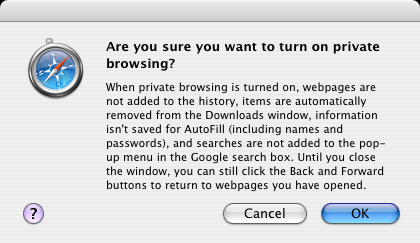
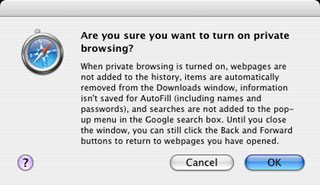
You don't want to leave tracks behind when surfing the Web? Just pull down the Safari menu and choose Private Browsing. This will prevent Safari from recording sites in your history and downloads when you close windows, among other things.
Block Popups
Blocking popup windows (under the Safari menu) is also a great way to prevent sites from opening new windows that invade your desktop.
Finally, don't forget that Safari was developed with the Cocoa programming environment, the preferred development environment under Mac OS X. When you select an address or text in Safari, you can head to the Safari menu and point your mouse to the Services item. From there, you can, for example, make a new note in Stickies or look a word up in the Dictionary. Depending on what software is installed on your Mac, there may be many other things you can do under Services.
Enjoy using Safari. 
- Link: Enhancer
- Link: Safari Bookmarks Exporter
Join us on Facebook, follow us on Twitter or Google+, or subscribe to our RSS news feed
Michel Munger is a journalist who lives in Montréal. He discovered the Mac in 1994, and his work on a PC reminds him every day why he embraced Apple's platform. Munger has also authored some MacDaniel columns.
You can learn more about him on his personal website.
Today's Links
- Mac of the Day: Performa 5200, introduced 1995.04. The first PowerPC all-in-one was also one of the worst Macs ever made.
- June 13 in LEM history: 00: Dark side of cable modems - 01: File transfer - 02: 10 tips for more efficient Mac use - OS X from a Linux perspective - 03: Text browsers - Hard drive upgrade tutorials - Switching to OS X - 03: Apple's first Mac OS on Intel project - 06: Moving files to your vintage Mac - 07: Parallels 3 narrows the gap - 08: Environmentally responsible Mac retirement - Old Mac data retrieval
- Support Low End Mac
About LEM Support Usage Privacy Contact
Follow Low End Mac on Twitter
Join Low End Mac on Facebook
Favorite Sites
MacSurfer
Cult of Mac
Shrine of Apple
MacInTouch
MyAppleMenu
InfoMac
The Mac Observer
Accelerate Your Mac
RetroMacCast
The Vintage Mac Museum
Deal Brothers
DealMac
Mac2Sell
Mac Driver Museum
JAG's House
System 6 Heaven
System 7 Today
the pickle's Low-End Mac FAQ
Affiliates
Amazon.com
The iTunes Store
PC Connection Express
Macgo Blu-ray Player
Parallels Desktop for Mac
eBay

